Overview
Use case classification is an AI-based capability in Microsoft Frontier that identifies and classifies the use cases people commonly work on.
A use case is a type of work you commonly do, such as go-to-market planning, project scheduling, or executive summary writing. Copilot classifies your activity in Microsoft 365, Copilot, Cowork, and other Microsoft AI experiences against pre-defined categories of use cases.
Understanding the use cases you commonly work on helps Copilot and other AI experiences recommend personalized prompts and guidance that fit the work you do. Aggregated insights can also help organizational leaders understand how AI is used across their organization, including which use cases consume the most AI credits.
How use cases are classified
An AI classification engine analyzes signals from your work activity across Microsoft 365, Copilot, Copilot agents, Cowork and other Microsoft AI experiences and maps them to a use case that most closely represents the work you performed from our library of use cases.
Common signals that could be used include:
- Profile information: Your role, job title, and function in Microsoft 365.
- Activity signals: Key phrases from emails, meetings, and documents in Microsoft 365
- AI tool usage data: Usage data from Copilot, Cowork, Copilot agents and other Microsoft AI experiences.
Note
The signals used for use case classification may change over time.
Your individual classifications are not visible to other people. Classifications are directionally accurate and are intended to help understand trends in how you, and others in your organization, are using AI at work. Organization leaders and administrators may see work activity across the organization only as aggregated insights to preserve your privacy.
Microsoft doesn’t see the underlying content used to classify your work or the use cases that AI identifies for you. Information used to classify your use cases isn’t visible to other people.
Manage your use case classification and privacy settings
You can choose whether your use cases are classified. By default, use case classification is on for all users in Frontier who have Copilot licenses.
Note
This capability and setting may not be available to you if your org is not eligible for use case classification, you do not have the right license or if the administrator has turned off use case classification for you. Your administrators can turn off use case classification for specific users or groups in your organization.
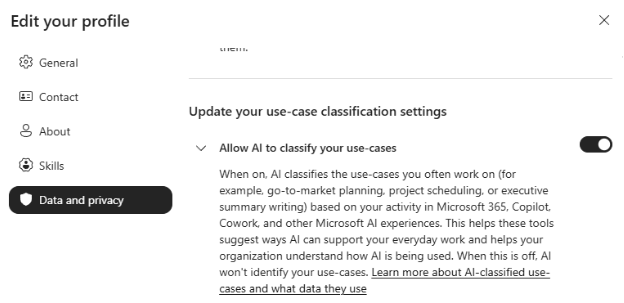
You can manage whether your use cases are classified from the settings in Microsoft Profile editor. You can access your profile from Teams, Outlook on the web, new Outlook for Windows, Office.com, Microsoft 365 Copilot, SharePoint, or People Companion.
To manage use case classification settings:
- Open a Microsoft 365 app, such as Outlook or Teams. To see your own profile card, select your own profile picture.
- Select Update your profile at the top of your card.
- Select the Data and privacy tab.
- Update your use case classification settings. Allow AI to identify your use cases: When this setting is on, AI can identify use cases you frequently work on based on your activity in Microsoft 365, Copilot, Cowork, and other Microsoft AI experiences. When this setting is off, AI won’t classify your use cases.
- Select Save changes.