-
On the Insert tab, select
-
From the Lines gallery, select a line and drag your cursor to make the line appear.

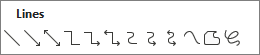
Note: To draw a perfectly horizontal or vertical line, press and hold the Shift key while you draw. To add an automatic line across the width of the page, see Create a horizontal line.
-
On the Insert tab, select
-
Choose a line style and drag your cursor to make the line appear.
Note: To add a line across the width of the page, see Create a horizontal line.
-
On the Insert menu, select
-
In the Preview window that appears, select
-
When you're done, select Save and Close.