If an Office application such as Word or Excel isn’t working correctly, sometimes restarting it will fix the problem. If that doesn’t work, you can try repairing it. When you’re done, you might need to restart your computer.
Repair Office from the Control Panel
The steps to access the repair tool vary depending on your operating system. Choose your operating system from the tabs below:
Right-click the Start button
 and in Windows 11 select Installed apps, or in Windows 10 select Apps and Features on the pop-up menu.
Select the Microsoft Office product you want to repair and select Modify. If you don't have any options, select the three dots on the side.
Note
This will repair the entire Office suite even if it's just one application you want to repair such as Word or Excel. If you have a standalone app installed, then search for that application by name.
In the How would you like to repair your Office Programs window, select Online Repair > Repair to make sure everything gets fixed. (The faster Quick Repair option is also available, but it only detects and then replaces corrupted files.)
Follow the instructions on the screen to complete the repair.


Running Repair didn't help. Now what?
Use the uninstall troubleshooter to uninstall Microsoft 365, Office 2021, Office 2019, or Office 2016 from your Windows PC.
Select the button below to start the uninstall troubleshooter.
Click Open if you get a pop-up window indicating This site is trying to open Get Help.
Follow the prompts on the remaining screens and when prompted, restart your computer.
Select the steps for the version of Office you want to install or reinstall.
Microsoft 365 | Office 2024 | Office 2021 | Office 2019 | Office 2016
Important
- The uninstall troubleshooter currently can't uninstall Office 2024.
- Run the troubleshooter on the same Windows PC with the Microsoft 365 or Office product you want to uninstall.
- You need to be on Windows 10 or higher to run the troubleshooter.
Tip
If the Microsoft 365 uninstall troubleshooter doesn't completely uninstall Microsoft 365 or Office from your PC, you can try to manually uninstall Office.
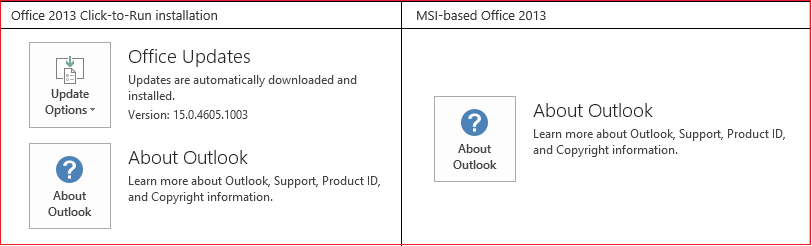
Is my Office installation Click-to-Run or MSI-based?
Open an Office application, such as Outlook or Word.
Go to File > Account or Office Account.
If you see an "Update Options" item, you have a Click-to-Run installation. If you don't see the "Update Options" item, you have an MSI-based install.