
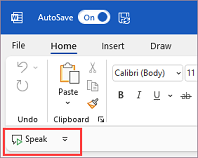
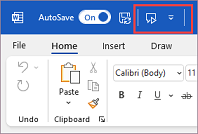
The Quick Access Toolbar (QAT) is a customizable toolbar containing commands that are independent of the ribbon tab that is currently displayed. It can be located in one of two places, as illustrated by the red outlines in the images below:
Below the ribbon (default location):
Above the ribbon:
To move the Quick Access Toolbar
If you don't want the QAT in its current location, you can move it to the other location:
- Select
 Customize Quick Access Toolbar at the right end of the toolbar.
 - Near the bottom of the menu, select Show Below the Ribbon or Show above the ribbon.
If you find that the default location above the ribbon is too far from your work area, you may want to move it closer to your work area. However, the location below the ribbon can encroach on the work area. Keeping the Quick Access Toolbar in its default location helps to maximize your workspace.
To show or hide the Quick Access Toolbar
Click Ribbon Display Options, located in the lower-right below the ribbon.

In the list, choose either Show Quick Access Toolbar or Hide Quick Access Toolbar as appropriate.


