
To remind yourself to follow up on a message, you can add a follow-up flag. A flag gives you a visual cue that you want to return to that message later. In the message list, flagged items display the
 symbol.
Pinning a message moves it to the top of your inbox so it's easy to find later. A pinned message is indicated by a
 symbol.
Flag a message
- In the message list, hover over the message to see the flag option.
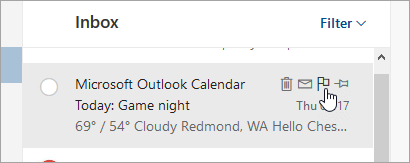
- Select
 to flag the message.
 - Select
to unflag the message.
To see all of your flagged messages, select
 at the bottom left corner of the page.
Pin a message
Note
To pin a message or see pinned messages, your inbox must be sorted by date. Select Filter at the top of the message list to change how your inbox is sorted.
- In the message list, hover over the message to see the pin option.

- Select
 to keep the message at the top of your inbox.
 - Select
to unpin the message.
Still need help?

|
To get support in Outlook.com, tap or click here or select Help on the menu bar and enter your query. If the self-help doesn't solve your problem, scroll down to Still need help? and select Yes. If the above steps don't work or if you can't sign in, tap or click here. |
|---|---|

|
For other help with your Microsoft account and subscriptions, visit Account & Billing Help. |

|
To get help and troubleshoot other Microsoft products and services, enter your problem here. |

|
Post questions, follow discussions and share your knowledge in the Outlook.com Community. |