
When you receive a meeting invitation for a time that conflicts with another appointment on your calendar, you can propose a new meeting time — from your email inbox or from your calendar.
Propose a new meeting time from your email inbox
In your email inbox, double-click the meeting request to open it.
Click Propose New Time, and choose one of the following:
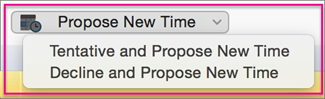
Tentative and Propose New Time
Tip
By selecting this option, if the meeting organizer doesn't accept your proposed new time, you'll appear as a 'tentative' attendee in the calendar.
Decline and Propose New Time
Tip
By selecting this option, if the meeting organizer doesn't accept your proposed new time, the calendar will show you as not attending the meeting.
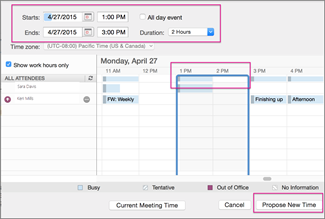
Enter the date and time of your new meeting proposal, and click Propose New Time.
Tip
You can also click either side of the blue, time line border (shown below) and move it left or right to a different meeting date and time.
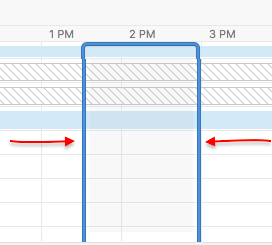
In the lower, right corner, click Propose New Time.
Add a note in the body of the message, and click Send.
Propose a new meeting time from your calendar
If you've already accepted a meeting request and decide later you want to propose a new time, you can do this from the calendar.
In the calendar, right-click the meeting you want to propose a new time for, click Propose New Time, and choose one of the following:
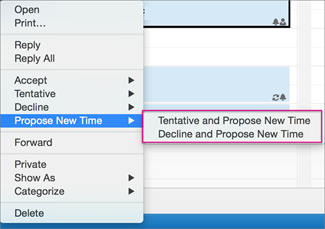
Tentative and Propose New Time
Tip
By selecting this option, if the meeting organizer doesn't accept your proposed new time, you'll appear as a 'tentative' attendee in the calendar.
Decline and Propose New Time
Tip
By selecting this option, if the meeting organizer doesn't accept your proposed new time, the calendar will show you as not attending the meeting.
Enter the date and time of your new meeting proposal, and click Propose New Time.
Tip
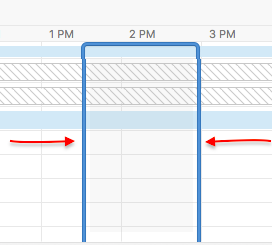
You can also click either side of the blue, time line border (shown below) and move it left or right to a different meeting date and time.
In the lower, right corner, click Propose New Time.
Add a note in the body of the message, and click Send.