
You can choose the days of the week that are a part of your work week, the time when your work day starts and ends, and the day of the week that you want to be the start of your week.
By default, the work week is defined as Monday through Friday with a work day of 9 A.M. to 5 P.M. The first day of the week is Sunday.
To change your work days and times, do the following:
Click the File tab.
Click Options.
Click Calendar.
Under Work time, do one or more of the following:
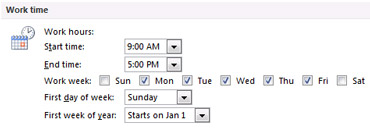
- To change your work hours In the Start time and End time lists, click the start time and end time of your work day. This is primarily used for your free/busy time availability for meeting requests from other people.
- To set your work week Select the check boxes for the days that are a part of your work week. Clear the check boxes for the days that are not a part of the work week.
- To set the first day of the week In the First day of week list, click a day.
- To set the first week of the year In the First week of year list, click an entry.
