

When you type a web address, classic Outlook creates a hyperlink for you. You can press CTRL+Z right away to remove the link, but you can stop classic Outlook from making automatic links.
To turn automatic links off:
Select File > Options > Mail.
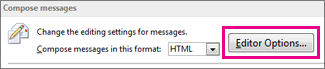
Under Compose messages, select Editor Options.
Select AutoCorrect Options.
Select the AutoFormat As You Type tab.
Uncheck the Internet and network paths with hyperlinks check box.
