

Many of the animation effects available in the PowerPoint desktop application are also available in PowerPoint for the web. Also, PowerPoint for the web can play animation effects that were applied in the PowerPoint desktop application.
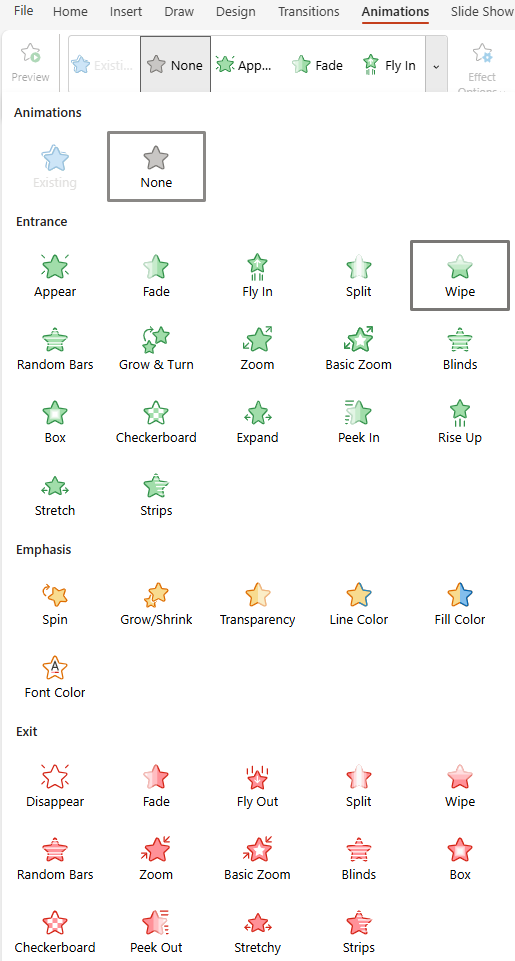
The following animation effects are currently available in PowerPoint for the web, and most can be applied to pictures, shapes, and text:
| Animation effect | What it does |
|---|---|
| Appear entrance | Text or object rapidly appears |
| Fade In entrance | Text or object gradually comes into view |
| Fly In entrance | Text or object flies in from the bottom, top, left, or right sides |
| Split entrance | Text or object becomes whole as its halves unite from a specified direction |
| Wipe entrance | Text or object is wiped into place from a specified direction |
| Random Bars entrance | Text or object comes into view from behind bars that turn and disappear |
| Grown & Turn entrance | Text or object spins forward into view from a distance |
| Zoom entrance | Text or object zooms into view from a distance |
| Basic Zoom entrance | Text or object zooms into view from a distance less subtly than with the Zoom entrance |
| Blinds entrance | Text or object comes into view from behind vertical or horizontal window blinds |
| Box entrance | Text or object takes shape as a box, growing either from the edges or the center |
| Checkerbox | Text or object appears in checkerboard fashion |
| Expand | Text or object grows from the middle outward |
| Peek In | Text or object slides into view from a specified direction |
| Rise Up | Text or object flies in from the bottom, then settles into place |
| Stretch | Text or object stretches into place from a specified direction |
| Strips entrance | Text or object peels into place from a specified direction |
| Spin emphasis | Text or object spins clockwise or counterclockwise |
| Grow/Shrink emphasis | Text or object first grows, then shrinks to specified size |
| Transparency emphasis | Text or object appears at a specified level of transparency |
| Line Color emphasis | Text or object border color changes toa specified color |
| Fill Color emphasis | Text or object is visible as a specified block of color appears |
| Font Color emphasis | Text becomes a specified color |
| Disappear exit | Text or object disappears rapidly |
| Fade exit | Text or object fades from view |
| Fly Out exit | Text or object flies away in a specified direction |
| Split exit | Text or object splits in half from a specified direction and disappears |
| Wipe exit | Text or object is wiped away from a specified direction and disappears |
| Random Bars exit | Text or object disappears behind bars that also then disappear |
| Zoom exit | Text or object zooms into the distance and disappears |
| Basic Zoom exit | Text or object zooms into the distance (less subtly than the Zoom exit does) and disappears |
| Blinds exit | Text or object comes disappears from view from behind vertical or horizontal window blinds |
| Box exit | Text or object exits in a box shape, receding either from the edges or the center |
| Checkerbox exit | Text or object disappears in checkerboard fashion. |
| Peek Out exit | Text or object recedes from view in a specified direction |
| Stretchy exit | Text or object stretches horizontally as it disappears |
| Strips exit | Text or object peels off in a specified direction |
Note
The Existing option plays an animation effect that was applied to the picture, shape, or text in the PowerPoint desktop application.
More information about using animation effects in your presentation:
We regularly update the Microsoft 365 apps for the web to include new and improved features, so check our Microsoft 365 Blog for announcements.