

You change or remove a theme by making a selection from the gallery on the Design tab in PowerPoint.

Select a heading below to open it and see the detailed instructions.
Change the current theme
On the Design tab, in the Themes group, select the Themes button to open the entire gallery of themes:
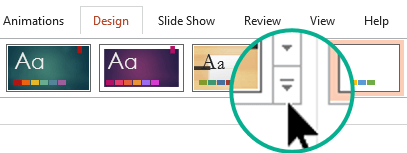
Do one of the following:
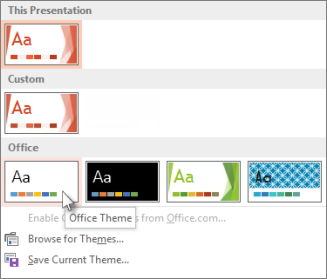
- To apply a built-in theme, under Office, select the theme that you want.
- To apply a custom theme or a themed document stored in a different location, select Browse for Themes, and then locate and select the theme you want.
Remove a colorful theme
To remove a colorful theme, apply the Office Theme for a simple design with a plain white background.
On the Design tab, in the Themes group, select the Themes button to open the entire gallery of themes:
Under Office, locate and select the Office Theme, which has a white background.
Edit a theme
Go to Create your own theme in PowerPoint.
Apply a theme to all slides
Let's say you have a bunch of slides borrowed from different sources and they don't match visually. You can unify the look of the slides in a few clicks:
In the slide thumbnail pane on the left, select a slide.
On the Design tab, in the Themes group, select the Themes button to open the entire gallery of themes:
Point the mouse at the theme you want to apply. Right-click it, and then select Apply to All Slides.

If you change your mind, you can undo immediately by pressing Alt+Backspace, or you can repeat step 3 with a different theme.
Apply a theme only to selected slides
- In the slide thumbnail pane on the left, select the slide or slides that you want to apply a theme to.
(To select multiple slides, press and hold the Ctrl key while you click the individual slides.) - On the Design tab, in the Themes group, select the Themes button to open the entire gallery of themes:
- Point the mouse at the theme you want to apply. Right-click it, and then select Apply to Selected Slides.
If you change your mind, you can undo immediately by pressing Alt+Backspace, or you can repeat step 3 with a different theme.
Start a new presentation without a theme
- Select File > New.
- Select Blank Presentation.
A presentation with a white background opens.