
Philips SpeechMike Premium (SMP) 3700 is compatible with PowerScribe 360 v4.0.x and above, PowerScribe One Core (2019), and PowerScribe One 2023.1 Service Pack 3 and above.
Default button settings in PowerScribe One
Note
The SpeechMike 3700 should be configured in the PowerScribe Preferences. Configuring the SpeechMike 3700 in the Philips Control Center is not recommended.
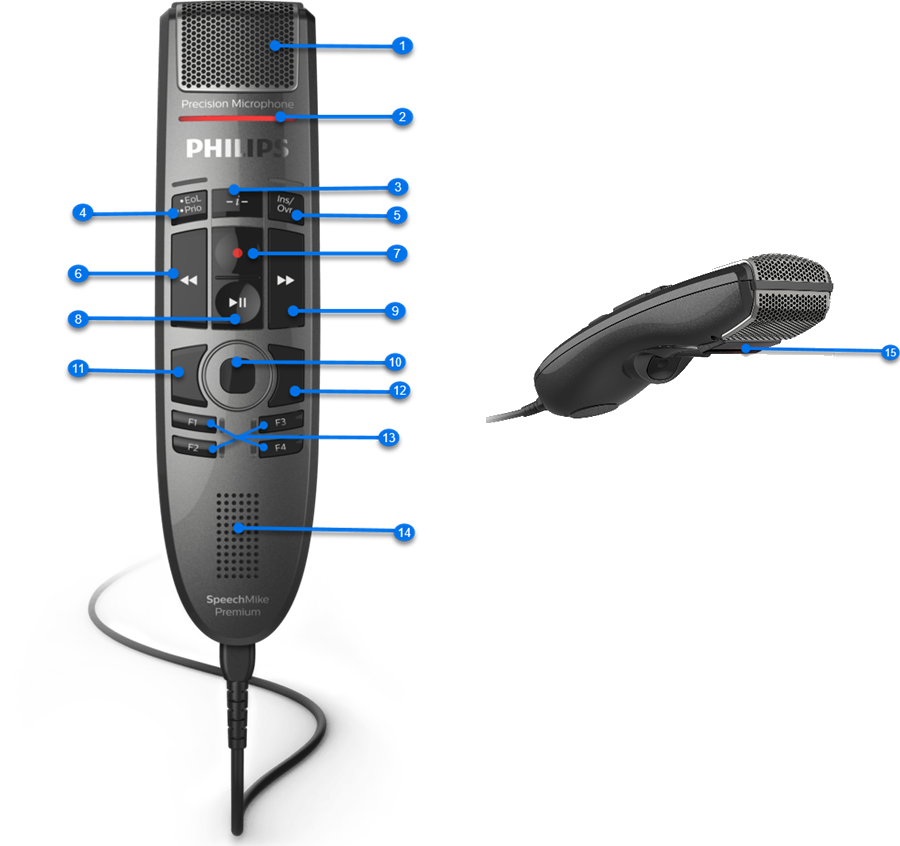
| Button | Default setting |
|---|---|
| 1 | Microphone: speak directly into the microphone when dictating. |
| 2 | Record indicator light: The light turns on when you activate recording (for example, by pressing the Record button) and turns off when you stop recording. |
| 3 | Instruction: Nonfunctional button when using PowerScribe. |
| 4 | EOL PRIO: Previous field (Selects the previous field in the report.) |
| 5 | INS/OVR: Previous field (PS 360) Sign report (PS Core) |
| 6 | Rewind: Previous field (Selects the previous field in the report.) |
| 7 | Record: Use deadman switch (Toggle dictation on/off may be preferred for Cloud.) |
| 8 | Play/Stop:
|
| 9 | Forward: Next field. |
| 10 | Touch navigation/left mouse button |
| 11 | Mouse Left: Left mouse click |
| 12 | Mouse Right: Right mouse click |
| 13 | F1: Previous field (PS 360) and New paragraph (PSO Core) F2: Next field (PS 360) and Sign as Preliminary (PSO Core) F3: Nothing. (There is no default setting, however the button can be customized) F4: Toggle visibility field (PS 360) and Save as draft (PSO Core) |
| 14 | Speaker: Audio output |
| 15 | Located on the back of microphone.
|
To modify your SpeechMike 3700 buttons settings, select Preferences > Devices > Philips SpeechMike.
The following table shows the account-level programmable buttons on Philips SpeechMike and all possible actions you can assign to each button.
Note
The default setting for each button appears in bold in the following table.
| Button | Action/Setting | Action/Setting |
|---|---|---|
| SpeechMike Record | Toggle dictation on off | Use deadman switch |
| SpeechMike Play/Pause | Nothing Delete Key Delete last word |
Delete last utterance Toggle play audio on off Deadman play audio |
| SpeechMike Rewind | Toggle rewind on off Previous field Use deadman switch |
Select Backward Previous field or table cell |
| SpeechMike Forward | Toggle fast forward on off Use deadman switch Next field |
Select forward Previous field or table cell |
| SpeechMike EOL | Nothing Previous field Sign report New line New paragraph Delete key Delete last word Delete last utterance Toggle play audio on off Select backward Save as draft Deadman play audio |
Enter key Backspace Correct report STAT Sign as preliminary Previous field or table cell Overread report Overread and prelim End of line End of report Exit report |
| SpeechMike INS/OVWR | Nothing Next field Sign report New line New paragraph Delete key Delete last word Delete last utterance Toggle play audio on off Select forward Save as draft Deadman play audio |
Enter key Backspace Correct report STAT Sign as preliminary Next field or table cell Overread report Overread and prelim End of line End of report Exit field |
| SpeechMike Command | Nothing Sign report New line New paragraph Delete key Delete last word Delete last utterance Toggle play audio on off Toggle visibility Save as draft Deadman play audio |
Enter key Backspace Correct report STAT Sign as preliminary Overread report Overread and prelim End of line End of report Exit field |
| SpeechMike F1 | Nothing Previous field Sign report New line New paragraph Delete key Delete last word Delete last utterance Toggle play audio on off Select backward Save as draft Deadman play audio |
Enter key Backspace Correct report STAT Sign as preliminary Previous field or table cell Overread report Overread and prelim End of line End of report Exit report |
| SpeechMike F2 | Nothing Previous field Sign report New line New paragraph Delete key Delete last word Delete last utterance Toggle play audio on off Select backward Save as draft Deadman play audio |
Enter key Backspace Correct report STAT Sign as preliminary Previous field or table cell Overread report Overread and prelim End of line End of report Exit report |
| SpeechMike F3 | Nothing Next field Sign report New line New paragraph Delete key Delete last word Delete last utterance Toggle play audio on off Select forward Save as draft Deadman play audio |
Enter key Backspace Correct report STAT Sign as preliminary Previous field or table cell Overread report Overread and prelim End of line End of report Exit report |
| SpeechMike F4 | Nothing Next field Sign report New line New paragraph Delete key Delete last word Delete last utterance Toggle play audio on off Select forward Save as draft Deadman play audio |
Enter key Backspace Correct report STAT Sign as preliminary Previous field or table cell Overread report Overread and prelim End of line End of report Exit report |