
PowerMic 4 is compatible with PowerScribe 360 v4.0 Service Pack 9 and above, PowerScribe One Core (2019) Service Pack 7 and above, and PowerScribe One 2022.2 and above.
Default button settings in PowerScribe One
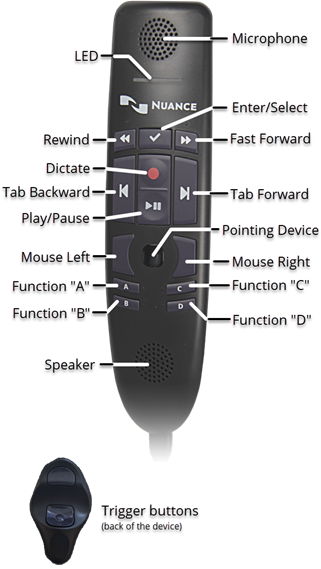
| Button | Default setting |
|---|---|
| LED | The LED turns on when you activate recording (for example, by pressing the Record button) and turns off when you stop recording. |
| Record | Use deadman switch. (Toggle dictation on/off may be preferred for Cloud.) |
| Play/Pause | Deadman play audio. |
| Rewind | Use deadman switch. (Press and hold to move backward in the audio playback.) |
| Enter/Select | Enter key (same as pressing the Enter key on a keyboard). Note: The bottom Trigger button on the back also functions as Enter/Select. |
| Trigger | (Located on back of microphone.)
|
| Fast Forward | Use deadman switch. (Press and hold to move forward in the audio playback.) |
| Tab Backward | Previous field. (Selects the previous field in the report.) |
| Tab Forward | Next field. (Selects the next AutoText field in the report.) |
| Pointing device | N/A. (Use to position the mouse insertion point and select objects.) |
| Function "A" | Nothing. |
| Function "B" | Nothing. |
| Function "C" | Nothing. |
| Function "D" | Nothing. |
| Mouse Left | Left mouse click. |
| Mouse Right | Right mouse click. |
Note
There are no default settings configured for Functions A, B, C, and D. These buttons can be mapped to the user's preference.
To customize your PowerMic 4 settings, select Preferences > Devices > PowerMic 4.
The following table shows the account-level programmable buttons on PowerMic 4 and all possible actions you can assign to each button.
Note
The default setting for each button appears in bold in the following table.
| Button | Action/Setting | Action/Setting |
|---|---|---|
| PowerMic 4 Dictate | Toggle dictation on off | Use deadman switch |
| PowerMic 4 Play/Pause | Nothing Delete Key Delete last word |
Delete Last Utterance Toggle play audio on off Deadman play audio |
| PowerMic 4 Rewind | Toggle fast forward on off Next field |
Use deadman switch Select backward |
| PowerMic 4 Forward | Toggle fast forward on off Next field |
Use deadman switch Select forward |
| PowerMic 4 Tab Backward | Nothing Previous field Sign report New line New paragraph Delete key Delete last word Delete last utterance Toggle play audio on off Select backward Save as draft |
Deadman play audio Enter key Backspace Correct report STAT Sign as preliminary Overread report Overread and prelim End of line End of report Exit field |
| PowerMic 4 Tab Forward | Nothing Next field Sign report New line New paragraph Delete key Delete last word Delete last utterance Toggle play audio on off Select forward Save as draft |
Deadman play audio Enter key Backspace Correct report STAT Sign as preliminary Overread report Overread and prelim End of line End of report Exit field |
| PowerMic 4 Enter/Select | Nothing Sign report New line New paragraph Delete key Delete last word Delete last utterance Toggle play audio on off Toggle visibility Save as draft Deadman play audio |
Enter key Backspace Correct report STAT Sign as preliminary Overread report Overread and prelim End of line End of report Exit field |
| PowerMic 4 Function A | Nothing Previous field Sign report New line New paragraph Delete key Delete last word Delete last utterance Toggle play audio on off Select backward Save as draft |
Deadman play audio Enter key Backspace Correct report STAT Sign as preliminary Overread report Overread and prelim End of line End of report Exit field |
| PowerMic 4 Function B | Nothing Previous field Sign report New line New paragraph Delete key Delete last word Delete last utterance Toggle play audio on off Select backward Save as draft |
Deadman play audio Enter key Backspace Correct report STAT Sign as preliminary Overread report Overread and prelim End of line End of report Exit field |
| PowerMic 4 Function C | Nothing Next field Sign report New line New paragraph Delete key Delete last word Delete last utterance Toggle play audio on off Select forward Save as draft |
Deadman play audio Enter key Backspace Correct report STAT Sign as preliminary Overread report Overread and prelim End of line End of report Exit field |
| PowerMic 4 Function D | Nothing Next field Sign report New line New paragraph Delete key Delete last word Delete last utterance play audio on off Select forward Save as draft |
Deadman play audio Enter key Backspace Correct report STAT Sign as preliminary Overread report Overread and prelim End of line End of report Exit field |