
In Project, the default task duration unit is days, but you can change it to be minutes, hours, weeks, or months:
- Choose File > Options.
- In the Project Options dialog box, choose Schedule.
- Under Scheduling options for this project, in the Duration is entered in list, select a duration unit.
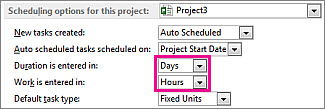
- To use the same setting automatically in all future projects, select All New Projects in the Scheduling options for this project list.