

Project Home gives you a birds-eye view of the projects and roadmaps that matter the most. It helps you keep track of important projects by letting you mark them favorites so that you'll see them at the top of the Project Home page.
Go to your Project Home
Sign in to Microsoft 365, select All apps, and then select the Project icon. Alternatively, go to project.microsoft.com.
On the Project Home page, you'll see all of the projects and roadmaps you've viewed recently, or you can create a new one.
Tip
- You can do more from the Project Home page. Select More options
 for each project or roadmap listed on the page to see a list of choices.
 - To use Roadmap to expand your view from Project Home, see Welcome to Roadmap.
Note
- Projects created in Production Dataverse environments show the name of the environment where they were created in parentheses next to the project type.
- To create a project in a Production Dataverse environment, use the Project Power App.
- You can do more from the Project Home page. Select More options
Manage your view of Recent and Favorites lists
You can add and remove projects from your Recent list and Favorites list in Project Home.
Note
- A project must be in your Recent list before it can be added to your Favorites list.
- If you can't find the project you're looking for, you can search for it by typing the name of the project into the search box filter on Project Home.
Add a project to the Recent list
- Open a project or roadmap you want to add to Project Home. The project will automatically be added to the Recent list in Project Home.
Remove a project from the Recent list
In Project Home, go to the Recent list, right-click the project, and select Delete file.
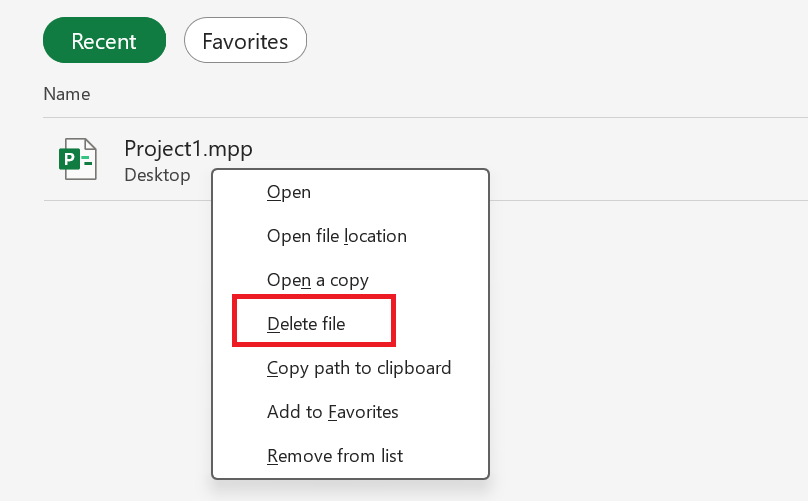 .
.The project will no longer display in the Recent list.
Add a project to the Favorites list
In Project Home, go to the Recent list, right-click the project you want to move to the Favorites list, and select Add to Favorites.
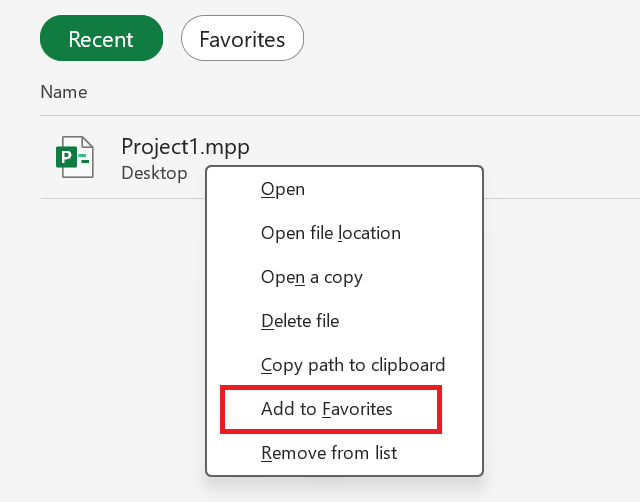 .
.The project will move to the Favorites list.
Remove a project from the Favorites list
In Project Home, select the Favorites tab.
In the Favorites list, right-click the poject you want to remove from Favorites and select Remove from Favorites.
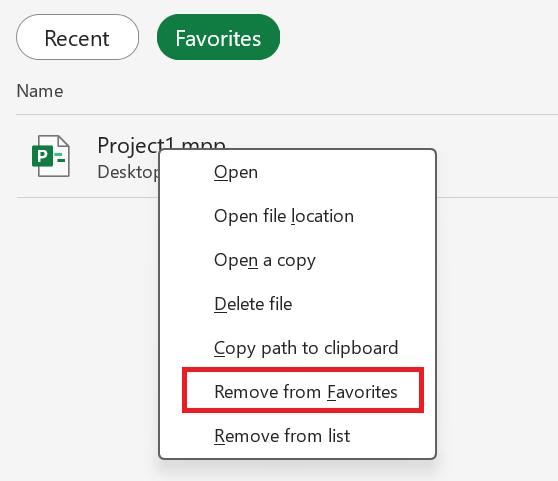
The project will no longer display in the favorites list.
See also
Move your .mpp project file from Project desktop to Project for the web