
Important
After October 2026, Microsoft Publisher will no longer be supported. Microsoft 365 subscribers will no longer have access. Learn more about Publisher retirement.
Copy one object
- Right-click the object you want to copy, and then click Copy.
- Right-click where you want to copy the object, and under Paste Options, click Paste.
Copy just the attributes of an object
You can copy formatting attributes, such as color or fill, from one object to another.
- Click the object whose attributes you want to copy.
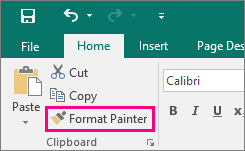
- On the Home tab, click Format Painter.
- Click the object you want to copy the attributes to.
Copy multiple objects
- Hold down SHIFT and click the objects you want to copy.
- Right-click the objects and click Copy.
- Right-click where you want to copy the objects, and under Paste Options, click Paste.
Copy a whole page
- Go to the page in your publication where you want to insert the page.
- On the Insert tab, click the arrow under Page, and then click Insert Duplicate Page.

Note
To copy and paste items from other Microsoft Office programs, use the Office Clipboard.