
Overview
This is an update to the functionality regarding the Immediate Information Supply in the Spanish version of Dynamics NAV/365 Business Central. Specifically changes have been made to recreate missing entries in the SII history that for some reasons were not created. This feature provides two overall functionalities: To present the user with an option to generate the lost SII entries, and to enable a job that runs periodically and checks for missing entries and displays the statistics about these in a tile in the role center.
Reference Information
| Reference No. | 270487 |
|---|---|
| Product Area | Financial Management |
| Discovered in | Microsoft Dynamics NAV 2015, 2016, 2017, 2018 and Dynamics 365 Business Central |
| Title | [ES] – Recreate missing SII entries |
| Released on | August 2018 |
Important Notice to Customers
We recommend that you contact your Microsoft Dynamics Partner before installing service packs or hotfixes. It is important to verify that your environment is compatible with the service pack(s), hotfix(es), or download(s) being installed. A service pack, hotfix, or download may cause interoperability issues with customizations, and third-party products that work with your Microsoft Dynamics solutions.
Important Notice to Partners
As per the SPA, it is non-compliant for partners to redistribute tax and regulatory updates to ERP customers not enrolled in the Business Ready Enhancement Plan. Partners can verify their customer’s status in VOICE. If they're not enrolled, Partners will need to get them current before they can distribute.
Installation
Before this update can be installed, the following prerequisites are required:
- Microsoft Dynamics 365 Business Central 2018 Spain
- Microsoft Dynamics NAV 2018 Spain
- Microsoft Dynamics NAV 2017 Spain
- Microsoft Dynamics NAV 2016 Spain
- Microsoft Dynamics NAV 2015 Spain
This update is available through:
- Microsoft Dynamics ® NAV 2018 Spain, Cumulative Update CU 8
- Microsoft Dynamics ® NAV 2017 Spain, Cumulative Update CU 21
- Microsoft Dynamics ® NAV 2016 Spain, Cumulative Update CU 34
- Microsoft Dynamics ® NAV 2015 Spain, Cumulative Update CU 46
Installation Steps:
For more information about how to install an update rollup, click the following article number to view the article in the Microsoft Knowledge Base:
- 3021418 - How to Install a Microsoft Dynamics NAV 2015 Cumulative Update
- 3109325 - How to install a Microsoft Dynamics NAV 2016 Cumulative Update
- 3204818 - How to install a Microsoft Dynamics NAV 2017 Cumulative Update
- 4072484 - How to install a Microsoft Dynamics NAV 2018 Cumulative Update
Note:
- Existing customizations in objects that are included in this update file may break when you import the regulatory feature.
- No data upgrade is required before you can use this feature.
Licensing
Refresh your license to access the new objects that are added with this release.
Objects
The following object have been added / modified through this release:
Dynamics NAV 2015
| Type | No. | Name | Added/Modified |
|---|---|---|---|
| Codeunit | 10751 | SII Job Management | Modified |
| Codeunit | 10753 | SII Job Upload Pending Docs. | Modified |
| Codeunit | 10755 | SII Initial Doc. Upload | Modified |
| Codeunit | 10757 | SII Recreate Missing Entries | Added |
| Page | 10751 | SII Setup | Modified |
| Page | 10752 | SII History | Modified |
| Page | 10753 | Recreate Missing SII Entries | Added |
| Page | 9030 | Account Manager Activities | Modified |
| Page | 9032 | Acc. Payables Activities | Modified |
| Page | 9034 | Acc. Receivable Activities | Modified |
| Page | 9036 | Bookkeeper Activities | Modified |
| Page | 9060 | SO Processor Activities | Added |
| Page | 9063 | Purchase Agent Activities | Added |
| Table | 10751 | SII Setup | Modified |
| Table | 10754 | SII Missing Entries State | Added |
| Table | 9053 | Sales Cue | Added |
| Table | 9054 | Finance Cue | Modified |
| Table | 9055 | Purchase Cue | Added |
Dynamics NAV 2016
| Type | No. | Name | Added/Modified |
|---|---|---|---|
| Codeunit | 10751 | SII Job Management | Modified |
| Codeunit | 10753 | SII Job Upload Pending Docs. | Modified |
| Codeunit | 10755 | SII Initial Doc. Upload | Modified |
| Codeunit | 10757 | SII Recreate Missing Entries | Added |
| Page | 10751 | SII Setup | Modified |
| Page | 10752 | SII History | Modified |
| Page | 10753 | Recreate Missing SII Entries | Added |
| Page | 9030 | Account Manager Activities | Modified |
| Page | 9032 | Acc. Payables Activities | Modified |
| Page | 9034 | Acc. Receivable Activities | Modified |
| Page | 9036 | Bookkeeper Activities | Modified |
| Page | 9060 | SO Processor Activities | Added |
| Table | 10751 | SII Setup | Modified |
| Table | 10754 | SII Missing Entries State | Added |
| Table | 9053 | Sales Cue | Added |
| Table | 9054 | Finance Cue | Modified |
| Table | 9055 | Purchase Cue | Added |
Dynamics NAV 2017
| Type | No. | Name | Added/Modified |
|---|---|---|---|
| Codeunit | 10751 | SII Job Management | Modified |
| Codeunit | 10753 | SII Job Upload Pending Docs. | Modified |
| Codeunit | 10755 | SII Initial Doc. Upload | Modified |
| Codeunit | 10757 | SII Recreate Missing Entries | Added |
| Page | 10751 | SII Setup | Modified |
| Page | 10752 | SII History | Modified |
| Page | 10753 | Recreate Missing SII Entries | Added |
| Page | 1310 | O365 Activities | Added |
| Page | 9030 | Account Manager Activities | Modified |
| Page | 9032 | Acc. Payables Activities | Modified |
| Page | 9034 | Acc. Receivable Activities | Modified |
| Page | 9036 | Bookkeeper Activities | Modified |
| Page | 9037 | Accountant Activities | Added |
| Page | 9060 | SO Processor Activities | Added |
| Table | 10751 | SII Setup | Modified |
| Table | 10754 | SII Missing Entries State | Added |
| Table | 1313 | Activities Cue | Added |
| Table | 9053 | Sales Cue | Added |
| Table | 9054 | Finance Cue | Modified |
| Table | 9055 | Purchase Cue | Added |
Dynamics NAV 2018
| Type | No. | Name | Added/Modified |
|---|---|---|---|
| Codeunit | 10751 | SII Job Management | Modified |
| Codeunit | 10753 | SII Job Upload Pending Docs. | Modified |
| Codeunit | 10755 | SII Initial Doc. Upload | Modified |
| Codeunit | 10757 | SII Recreate Missing Entries | Added |
| Page | 10751 | SII Setup | Modified |
| Page | 10752 | SII History | Modified |
| Page | 10753 | Recreate Missing SII Entries | Added |
| Page | 1310 | O365 Activities | Added |
| Page | 1314 | AccountantPortal Activity Cues | Added |
| Page | 9030 | Account Manager Activities | Modified |
| Page | 9032 | Acc. Payables Activities | Modified |
| Page | 9034 | Acc. Receivable Activities | Modified |
| Page | 9036 | Bookkeeper Activities | Modified |
| Page | 9037 | Accountant Activities | Added |
| Page | 9060 | SO Processor Activities | Added |
| Table | 10751 | SII Setup | Modified |
| Table | 10754 | SII Missing Entries State | Added |
| Table | 1313 | Activities Cue | Added |
| Table | 9053 | Sales Cue | Added |
| Table | 9054 | Finance Cue | Modified |
| Table | 9055 | Purchase Cue | Added |
Setup and functionality
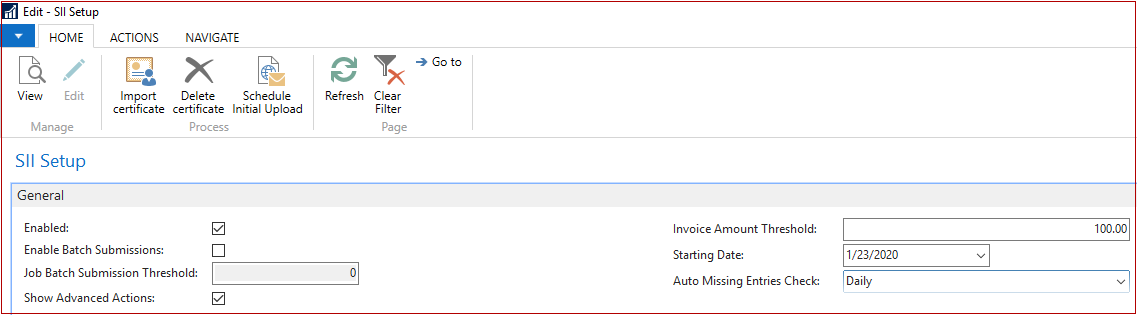
Enable functionality to re-create missing SII Entries
- Go to SII Setup.
- Enable the Show Advanced Actions option to see the Recreate Lost Entries action from the SII History page.
- Specify Starting Date from which the entries will transfer to the SII system. The lost entries detection will handle only entries from that date.
- Specify Automatic Missing Entries Check to either not schedule, schedule Daily or Weekly Job Queue Entry to automatically detect lost entries.
Setup tiles for Role Center
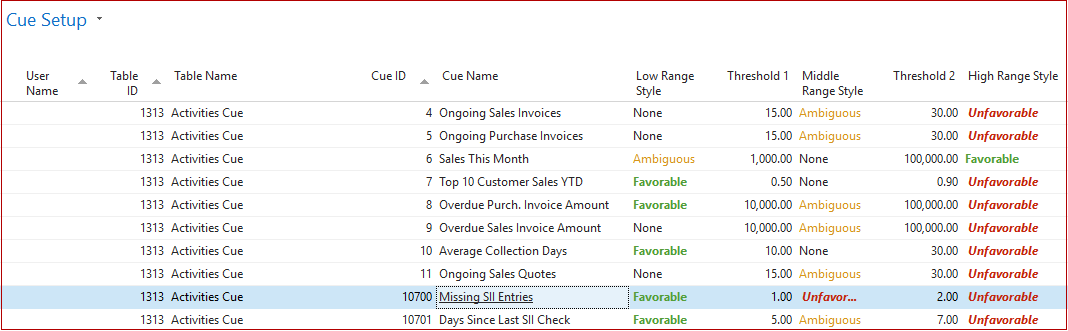
Open the Cue Setup page and add the setup for Missing SII Entries and Days Since Last SII Check for the following cues:
- Sales Cue
- Purchase Cue
- Finance Cue
- Activities Cue
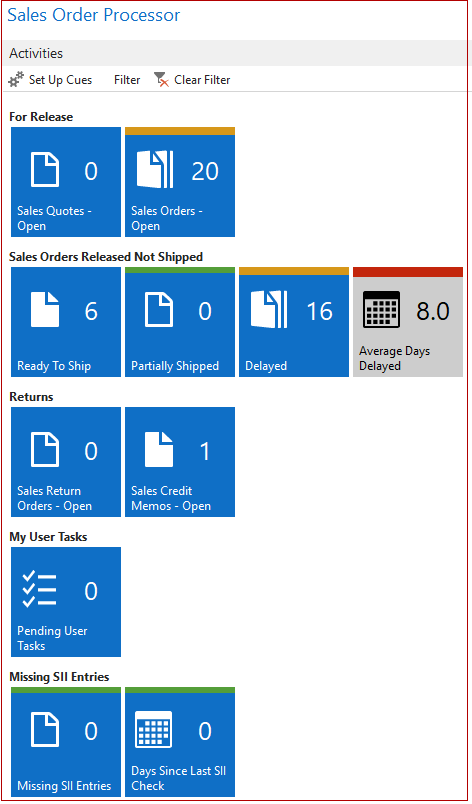
Missing SII Entries statistics in your Role Center
You can see both the count of missing SII entries and days since last check (either manual or automatic by Job Queue).
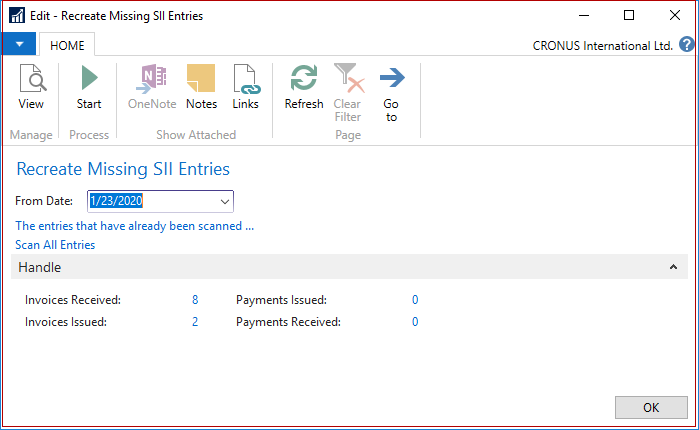
You can click the Missing Entries tile and the following page will be opened:
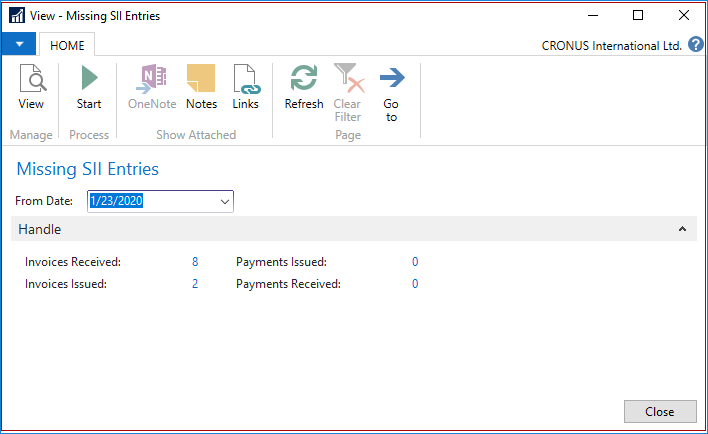
- Here you can drill-down to each type of entry (received or issued) and document (invoice or payment) and see how many entries to be recreated.
- Change “From Date” to range only entries posted after this date.
- If you already recreated some missing entries, system reminds the last entry nos. of such entries so that the next scan will be performed quickly, excluding already scanned entries. If you still want to scan all entries regardless of last entry nos. remaindered, click Scan All Entries.
Re-create missing SII entries
Disable the SII Setup option by unchecking the Enabled option on the SII Setup page.
Post any document that should go through the SII system.
Open the SII History page, make sure that no entry has been transferred.
Get back to the SII Setup page and enable it.

Open the SII History page. At this moment, a Queue Entry Job has been created. Go to the Job Queue Entries page and find an Job Queue Entry appropriate.
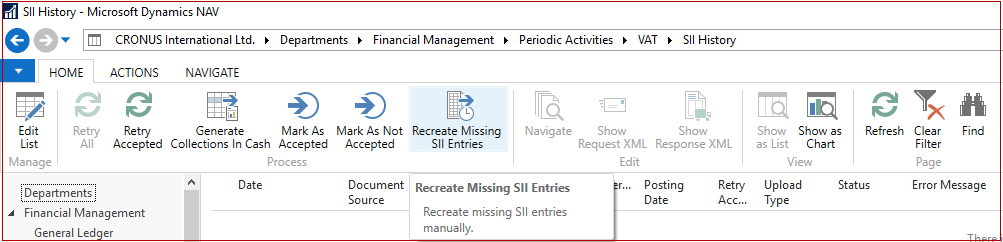
The other option is to open the SII History page and choose the Recreate Missing Entries action.
Investigate entries to handle by drill-down values for each entry type and once you’re ready to recreate entries, choose the Start action.
Support Information
If you are experiencing issues downloading the install file or documentation, please contact ITMBSSUP@microsoft.com.
For technical support questions, contact your partner or, if enrolled in a support plan directly with Microsoft, you can enter a new support request to Microsoft Dynamics® Technical Support from Customer Source or Partner Source under Support >> New Support Request.
You can also contact Microsoft Dynamics® Technical Support by phone using these links for country specific phone numbers.
- Partners - Global Support Contacts (requires Partner Source login)
- Customers - Global Support Contacts (requires Customer Source login)
Linguistic Quality Feedback
Thank you for taking the time to give us your feedback. It will be used to evaluate the linguistic quality of the translated Dynamics NAV user interface and make improvements if needed.
Please use this feedback link to provide your feedback to the below questions.
Q1: Which language and version of the product are you working on?
Q2: What is your role in your organization/company?
Q3: Is the used terminology correct for your market/locale?
Q4: Please include any other feedback you may have on the linguistic quality of the product.
Privacy Statement: Microsoft is committed to protecting your privacy, while delivering software that brings you the performance, power, and convenience you desire in your personal computing. This privacy statement explains the data collection and use practices. It does not apply to other online or offline Microsoft sites, products, or services.
If you choose to provide feedback about the linguistic quality of this regulatory feature, then your email address and any additional information that you choose to provide will be included. We will only use your feedback data to help improve the linguistic quality. Microsoft will not contact you to further investigate your feedback or to ask you for more information. Your email address will be removed from our systems after 90 days.