
Introduction
The Brazilian states RS, SP and SC have defined and implemented a new process to calculate and report compensation and restitution of ICMS-ST tax amounts in internal operations to final consumers when goods are acquired under the Tax substitution regime (ICMS-ST). This process is applicable for retailers and non-retailers companies
As a general rule, the taxpayer should determine on monthly base the difference between the ICMS-ST amount calculated in incoming fiscal documents and the ICMS-ST amount calculated in outgoing fiscal documents to the final consumer. Other exceptions and specific rules may applies depending on the state definition
This difference is named**: ICMS-ST adjustment**, because this correction could be positive (+) or negative (-) and it must be reported in SPED Fiscal or other related tax statements.
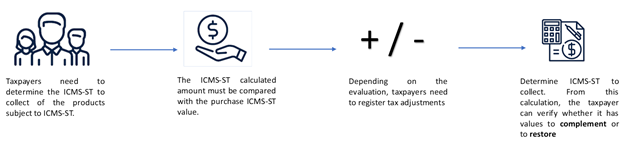
High level example
Purchase - Incoming fiscal document BC ICMS ST = 80,00
ICMS-ST calculated => 80,00 * 18% = R$ 14,00
Sales - Outgoing fiscal document Base amount = 90,00
ICMS-ST effective = 90,00 * 18% = R$ 16,20
ICMS ST amount to complement = R$ 16,20 (ICMS ST effective) - R$ 14,00 (ICMS ST from purchase) = R$ 2,20 (> 0.00)
Or
Purchase - Incoming fiscal document BC ST = 80,00
ICMS-ST calculated => 80,00 * 18% = R$ 14,00
Sales - Outgoing fiscal document Base amount = 70,00
ICMS-ST effective = 70,00 * 18% = R$ 12,60
ICMS ST amount for restitution = R$ 12,60 (ICMS ST effective) - R$ 14,00 (ICMS ST from purchase) = R$ -1,40 (< 0.00)
Overview
Sao Paulo state implementation
New tax statement named CAT 1219 was introduced by SP state where the companies must submit ICMS-ST tax declaration on a monthly base for tax complement and restitution of ICMS-ST amounts.
The statement file is generated based on version 1.1.0 of guidance layout document.
Scope
The CAT 1218 statement includes the generation of following records:
Record 0000 –Statement opening andTaxpayer Identification and Participant Identification
| Number | Field | Description |
|---|---|---|
| 01 | REG | Fixed text containing "0000" |
| 02 | PERIODO | Reporting period |
| 03 | NOME | Entity business name |
| 04 | CNPJ | Registration number of the entity in the CNPJ |
| 05 | IE | State Registration of the entity |
| 06 | COD_NUM | IBGE code |
| 07 | COD_VER | Version code of the layout. Filled in manually at the reports run. |
| 08 | COD_FIN | Code of the purpose of the file, filled in manually at the report run:CodeDescription00Regular file Delivery01File delivery required by specific intimation02File delivery for replacement of previously uploaded file |
Record 0150 - PARTICIPANT TABLE
Only participants with transactions in period; one record per participant
| Number | Field | Description |
|---|---|---|
| 01 | REG | Fixed text containing "0150" |
| 02 | COD_PART | Identification code of the participant |
| 03 | NOME | Personal or business name of the participant. |
| 04 | COD_PAIS | Country code of the participant |
| 05 | CNPJ | Participant CNPJ |
| 06 | CPF | Participant CPF |
| 07 | IE | Participant State Registration |
| 08 | COD_MUN | IBGE code |
Record 0200 - ITEM IDENTIFICATION TABLE
Only items with operations in record 1100. One line per item.
| Number | Field | Description |
|---|---|---|
| 01 | REG | Fixed text containing "0200" |
| 02 | COD_ITEM | Item Code |
| 03 | DESCR_ITEM | Description item |
| 04 | COD_BARRA | Product bar code |
| 05 | UNID_INV | Inventory Unit of measurement |
| 06 | COD_NCM | Fiscal classification code |
| 07 | ALIQ_ICMS | ICMS rate applicable to the item in internal operations |
| 08 | CEST | Tax Substitution Specifier Code |
Record 1050 – BALANCE RECORD
Total amount (initial inventory position and final inventory position) of records 1100
One line for each item of the file.
Information is fetched from the Presumed taxed balances.
| Number | Field | Description |
|---|---|---|
| 01 | REG | Fixed text containing "1050" |
| 02 | COD_ITEM | Item code according Record 0200 |
| 03 | QTD_INI | Initial item quantity at the beginning of the period |
| 04 | ICMS_TOT_INI | Accumulated initial value of the total of the ICMS supported by the taxpayer, calculated for the item at the beginning of the period |
| 05 | QTD_FIM | Final item quantity at the end the period |
| 06 | ICSM_TOT_FIM | Accumulated final value of the total of the ICMS supported by the taxpayer, calculated for the item at the end of the period |
Record 1100 – BALANCE DELAILS RECORD
Details of electronic Fiscal documents.
Information is fetched from the Outgoing and Incoming tabs of the Presumed taxes form
| Number | Field | Description |
|---|---|---|
| 01 | REG | Fixed text containing "1100" |
| 02 | CHV_DOC | Electronic Fiscal Document ACCESSKEY |
| 03 | DATA | Fiscal document date |
| 04 | NUM_ITEM | Sequential number of item in the Electronic Fiscal Document |
| 05 | IND_OPER | Indicator of operation type: 0- Input; 1- Output |
| 06 | COD_ITEM | Item code according Record 0200 |
| 07 | CFOP | Fiscal Code of Operation and Provision |
| 08 | QTD. | Item Quantity - no negative values for returns; always positive |
| 09 | ICMS_TOT | Total value of ICMS supported by taxpayer in incoming fiscal documents |
| 10 | VL_CONFR | ICMS and ICMS ST value for outgoing fiscal documents |
| 11 | COD_LEGAL | Code of Legal Framework of the hypothesis of Refund or Complement of ICMS ST Described below in the table. |
| Code | Hypothesis of Restitution or Complement of ICMS ST | Observation | |
|---|---|---|---|
| 1 | Operation where the Restitution or Complement of ICMS ST is applicable in the hypothesis of Item I of Article 269 of the RICMS | Outgoing Fiscal Document to final consumer - ICMS ST [60] | |
| 2 | Operation where the Restitution of ICMS ST is applicable in the hypothesis of Item II of Article 269 of the RICMS | Outgoing Fiscal Document for inventory decrease CFOP 5.927/others - ICMS CST [90] (Generating fact did not occur) | |
| 3 | Operation where the Restitution of ICMS ST is applicable in the hypothesis of Item III of Article 269 of the RICMS | Outgoing Fiscal Document - ICMS CST [30] (Exempt or not taxed) | |
| 4 | Operation whre the Restitution of ICMS ST is applicable in the hypothesis of Item IV of Article 269 of the RICMS | Outgoing Fiscal Document to other state - ICMS ST [60] (Interstate) | |
| 0 | Operation where the Restitution or Complement of ICMS ST is not applicable | Other Outgoing Fiscal Documents ICMST <> [60] (not classifying for codes 1 to 4) |
Rio Grande do Sul (RS) state implementation
Through Decree 54308/2018 of RS this state establishes the procedure to calculate and report the complement or restitution of ICMS-ST tax amount for those contributors (retailers and non-retailers) who perform activities with goods subject to the tax substitution regime (ICMS-ST)
The state has defined two process, one for retail companies and another on for non-retail companies.
Scope
The ICMS-ST amount calculated for complement and restitution are reported in SPED Fiscal ICMS-ST under the record 1900 and related adjustment records 1921, 1923 and other ones since the state consider this process as an sub assessment of ICMS-ST
Non-Retail companies
| Records | Level | Description | Comment | Parameters from RS state |
|---|---|---|---|---|
| 1001 | 1 | Opening Block 1 | When enable Block 1900 | |
| 1900 | 2 | Indicator of ICMS-ST sub tax assessment | Sub tax assessment indicator and description | |
| 1910 | 3 | Booking period | ||
| 1920 | 4 | TOTALS amounts | Summarization from records 1921 | |
| 1921 | 5 | RS001920 | The Adjustment transaction that summarizes all ICMS effective amount from:
|
Adjustment code of Debit for outgoing fiscal documents |
| 1923 | 6 | 1:N records | Details of outgoing fiscal documents by item or consolidated by fiscal document | Consolidate record 1923 |
| 1921 | 5 | RS021922 | The Adjustment transaction that summarizes the ICMS-ST amount OR ICMS presumed amount (when ICMS-ST does not exit) from Incoming fiscal documents with ICMS-ST = 60 and related to the above outgoing fiscal document Note: Incoming fiscal documents of items reported in record 1921-RS001920 only. |
Adjustment code of Credit for outgoing fiscal documents |
| 1923 | 6 | 1:N records | Details of incoming fiscal documents by item or consolidated by fiscal document | Consolidate record 1923 |
| 1921 | 4 | RS041921 or RS011921 | The adjustment transaction of complement or restitution | Adjustment code Complement reverse or Restitution reverse |
| E220 | RS101921 | The adjustment transaction created to report in E220 | Adjustment code of Complement E220 | |
| E111 | RS011021 | The adjustment transaction created to report in E111 | Adjustment code of Restitution E111 |
Retail companies
| Records | Level | Description | Comments | Parameters from RS state |
|---|---|---|---|---|
| 1001 | 1 | Opening Block 1 | When enable Block 1900 | |
| 1900 | 2 | Indicator of ICMS-ST sub tax assessment | Sub tax assessment indicator and description | |
| 1910 | 3 | Booking period | ||
| 1920 | 4 | TOTALS amounts | Summarization from records 1921 | |
| 1921 | 5 | RS021921 | CREDIT: Adjustment transaction that summarizes the ICMS-ST amount or ICMS amount presumed tax (when doesn't exist ICMS-ST) from all incoming fiscal documents received in the period (include those that are not used in outgoing and taxation code = 60 (CST) Received and Approved in the booking period |
Adjustment code of credit for incoming fiscal documents |
| 1923 | 6 | 1:N records | Details of incoming fiscal documents by item or consolidated by fiscal document | Consolidate record 1923 |
| 1921 | 5 | RS021920 | **Credit from Inventory .The adjustment transaction to register the inventory credit . This amount is calculated Presumed tax balance form under ICMS-ST tax assessment in relation of inventory opening balance. Since this adjustment must be reported 3 installments, the field DESCR_COMPL_AJ in record 1921, includes the following text: "Valor adjudicado nos termos do RICMS, Livro III, art. 25-A, I, nota 05, 1/3" |
Adjustment code of credit of inventory |
| 1921 | 5 | RS011920 | Credit reversa l. The adjustment transaction that summarizes the ICMS tax from outgoing fiscal document to non final consumer and taxation code = 60 and/or to final consumer with ICMS = exempt or non taxable taxation code <> 60 | Adjustment code of credit reversal |
| 1921 | 5 | RS001920 | **Debit : The adjustment transaction that summarizes the outgoing fiscal documents of ICMS effective (CFOP 5*) to final consumer, taxation code = 60 | Adjustment code for debit from outgoing fiscal documents |
| 1923 | 6 | 1:N records | Details of outgoing fiscal documents by item or consolidated by fiscal document | Consolidate record 1923 |
| 1921 | 5 | RS041921 | The adjustment transaction of complement or restitution | Adjustment code Complement reverse or Restitution reverse |
| 1926 | 5 | Payment ICMS-ST | Equal to E250. This record is generated when there is amount to collect and payment exist in ICMS-ST tax assessment (compensation) | |
| E220 | RS101921 | The adjustment transaction created to report in E220 | Adjustment code of Complement E220 | |
| E111 | RS011021 | The adjustment transaction created to report in E111 | Adjustment code of Restitution E111 |
Santa Catarina (SC) state implementation
Through THE SEF Portaria No. 396/2018 this state establishes the procedure to calculate and report the complement or restitution of ICMS-ST tax amount for those contributors (retailers and non-retailers) who perform activities with goods subject to the tax substitution regime (ICMS-ST)
Scope
| Block | Description |
|---|---|
| 0 | Opening, Identification and References |
| H | Inventory position |
| 2 | Other information Structure: 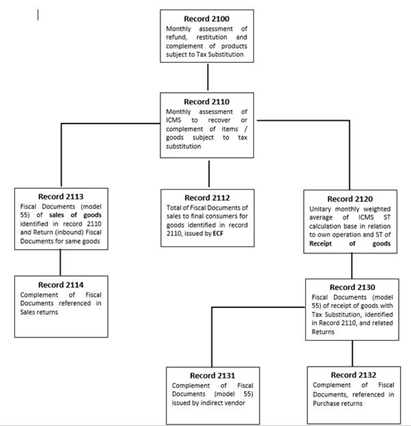
|
| 9 | Control and Closing file |
The following records are out of scope: 2112 (outgoing fiscal documents generated by ECF) and 2131
More Information
Setup
Navigate to Fiscal books > Setup > Fiscal books parameters per state, then select the appropriated state (SP. SC or RS)
Presumed tax
Presumed tax calculation algorithm: Select the appropriated method to calculate the presumed ICMS-ST tax when outgoing fiscal documents to final and non-final consumer are generated and posted in Dynamics AX. This parameter is used to fulfill the related tags when NFe fiscal document model
Last purchase: Use information from latest incoming fiscal documents posted in the period
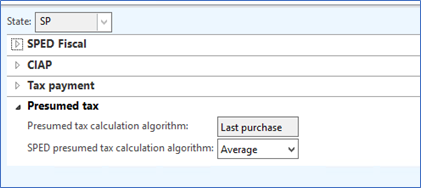
SPED Presumed tax calculation algorithm: Select the appropriated method to calculate the presumed ICMS-ST from ICMS-ST tax assessment created in Fiscal Books module.
- Average : Calculate the average amount from incoming fiscal documents. This method must be selected for SP or SC state
- Last purchase : Use information from latest incoming fiscal documents posted in the period. This method must be selected for RS state
ICMS-ST sub tax assessment in RS state
In case of RS state since the amounts and details about the calculation of ICMS-ST compensations and restitution are reported in SPED fiscal under the records 1900 and related. Additional setup configuration is necessary to automatically create the adjustments transactions established by the Decree 54308/2018.
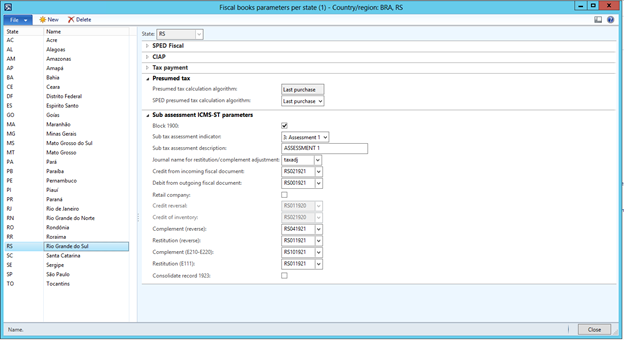
- Block 1900: Enables the generation of records of ICMS-ST sub tax assessment detailed in the scope session
- Sub tax assessment indicator: Select the available type of indicators to identify the sub tax assessment
- Sub tax assessment description: Introduce a complementary description of sub tax assessment reported in record 1900 in field (03) DESCR_COMPL_OUT_APUR
- Journal name: Select the journal used to create and post the compensation and restitution tax assessment.
- Credit from incoming fiscal documents: Select the related adjustment code the legislation establishes for this type of adjustment.
- Debit from outgoing fiscal documents: Select the related adjustment code the legislation establishes for this type of adjustment
- Retail company: Enable this checkbox if the main business activity on this state is Retail. Otherwise disable the checkbox.
- Credit reversal: Select the related adjustment code the legislation establishes for this type of adjustment
- Credit of inventory: Select the related adjustment code the legislation establishes for this type of adjustment
- Complement (reverse): Select the related adjustment code the legislation establishes for this type of adjustment
- Restitution (reverse): Select the related adjustment code the legislation establishes for this type of adjustment
- Complement (E210-E220): Select the related adjustment code the legislation establishes for this type of adjustment. When this adjustment being created the ICMS-ST tax assessment will be updated as well
- Restitution (E111): Select the related adjustment code the legislation establishes for this type of adjustment. When this adjustment being created the ICMS tax assessment will be updated as well, since credit are only allowed in ICMS tax assessment.
- Consolidate record 1923. Enable this checkbox if you want to consolidate or report on record 1923 per fiscal document (no items detailed). The field 08 COD_ITEM will be leaved in blank.
Repro steps
ICMS-ST tax assessment
Before to proceed with the generation of statement for each state, you need to create a fiscal booking period for the month , the ICMS-ST tax assessment for the related state and then calculate balances if applicable in the state.
Open Fiscal books >Common >Tax assessment >ICMS-ST and click Presumed taxes balance.
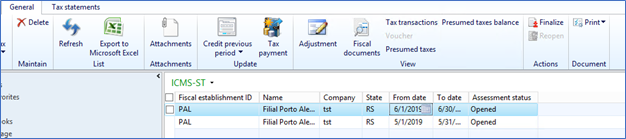
The form includes fields that are needed for the reporting purposes: Item code, product description, inventory unit measure, quantities, ICMS and ICMS ST taxes and base amounts per inventory unit and their totals.
In the Presumed taxes balance form, click Calculate inventory balances. System will calculate the initial Opening balance and the Closing balance and show the figures per Item number.
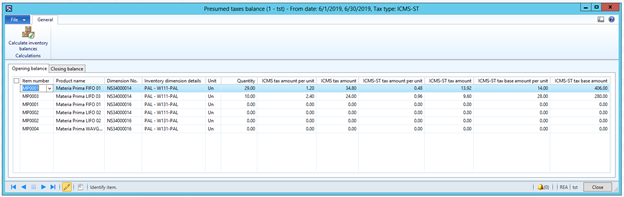
Opening balance calculation function works as following:
- Validates whether the presumed taxes balance for previous period exist. If no such balances observed, then starts the calculation; otherwise the procedure considers the figures from the previous period.
- Selects all items in on-hand inventory which have any transactions before the period.
- Calculates quantity for every selected item on the first day of the period.
- Finds last purchase for every item with the ICMS-ST tax transaction.
- Using the tax amounts from the last purchase and converting the purchase unit to the inventory one, calculates ICMS and ICMS-ST amount for the on-hand inventory quantity.
Closing balance calculation . Only applicable for SP state
- Deletes old presumed taxes balances for the period except the records which are used for the next period (these amounts will be updated; all other amounts will be recalculated).
- Selects all items in on-hand inventory which have any transactions in the period.
- For every item search for the presumed taxes balance in the previous periods to get quantity for the opening balance, otherwise it would be zero.
- Selects all incoming fiscal documents in the period, summarizes ICMS/ICMS-ST tax amounts and summarizes items quantities.
- Calculates average amount per unit by summarizing the totals of ICMS/ICMS-ST amounts of all incoming documents and dividing them by the summarized quantity in these documents.
- Selects all outgoing fiscal documents and summarizes their quantities. Calculates ICMS/ICMS-ST tax amounts using the average amount which was calculated in step 5.
- Calculates closing balance amounts and quantities using the values from the previous periods and the sums of incoming and outgoing documents from current period. These sums were calculated in step 4 and 6, respectively.
Presumed tax calculation
Once the Balances are calculated (for the first time), open the Presumed taxes form and click Calculate presumed tax.
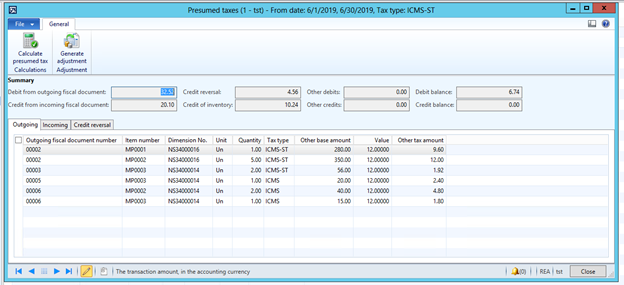
The form includes fields that are needed for the reporting purposes and each tab includes the related fiscal documents that are applicable for compensation and restitution in accordance with the criteria’s established by state law.
- Outgoing tab: Fiscal document number, item code, inventory unit measure, quantities, ICMS and ICMS ST tax rates, ICMS and ICMS ST tax and base amounts and calculated presumed taxes.
- Incoming tab: Fiscal document number and date, item code, inventory unit measure, quantities, and ICMS and ICMS ST tax and base amounts.
- Credit reversal. Only applicable for RS state. Outgoing Fiscal documentsto non-final consumer and taxation code = 60 and/or to final consumer with ICMS = exempt or non-taxable taxation code <> 60
Presumed tax calculation - Average algorithm works a following:
- Selects all lines of all outgoing fiscal documents in the current period.
- For every item from these lines selects all lines of all incoming fiscal documents with the same item code in the current period. And then calculates average ICMS/ICMS-ST tax amount.
- In case of no incoming document in the period, then the corresponding record in the presumed taxes balances is taken into consideration.
Note for SP. For Sales complementary fiscal documents and Purchase order returns the average values are not calculated, the values from the original fiscal documents are considered only.
Generate adjustments
Use this button for RS state to generate the related tax adjustment to be reported in SPED Fiscal.
Depending on type of company business (Retail or Non retail), Dynamics AX will generate the related adjustments:
- Debit for outgoing fiscal documents
- Credit for incoming fiscal documents
- Credit from Inventory position (opening balance). This tax adjustment will be created once and split in 3 installments.
- Credit Reversal.
- Compensation and restitution (reversal)
- Compensation in record E220
- Restitution in record E111
Note: Once you pressed Generate Adjustment button, there is no way to go back to the initial state. You must reverse manually the adjustment transaction created during the execution of this option to report record E220 or E111. The other adjustments related to debit, credit, credit for inventory and credit reversal are only created for SPED fiscal purposes. You will not able to see these transactions since are saved in a temporary table.
Statement generation
SP state
Navigate to Fiscal books>Common>Booking period and on the Tax statements tab click CAT 4218 SP. This statement is also available in ICMS-ST tax assessment for SP state.
- File name – enter the path where the file should be saved and the name of the text file.
- Layout version – select the version.
- File type – select one of the available options for the type of the file:
-
- Regular
- Specific intimation
- Substitute
The generated text file should be validated first by using tax authority application and once the file was successfully approved you will be able to send tax authorities.
RS state
Navigate to Fiscal books>Common>Booking period and on the Tax statements tab click SPED fiscal. This statement is also available in ICMS-ST tax assessment for RS state.
Introduce the regular parameters that are usually introduced to generate the statement SPED Fiscal. In order to generate the records 1900 and related you must reproduce the following steps:
- Create and Sync the related booking period
- Sync Inventory if applicable the criteria to take the credit from opening balance of inventory.
- Create or Update the ICMS-ST tax assessment for RS state
- Calculate Presumed tax balances (if applicable)
- Calculate Presumed tax
- Generate adjustments. Click on Generate Adjustment button under Presumed tax form
- Complete the remainder activities or steps related to ICMS-ST tax assessment
- Then generate SPED Fiscal statement as usual.
SC state
Navigate to Fiscal books>Common>Booking period and on the Tax statements tab click SPED DRCST. This statement is also available in ICMS-ST tax assessment for SC state
- File name – enter the path where the file should be saved and the name of the text file.
- File type – select one of the available options for the type of the file:
-
- Regular
- Substitute
This file is submitted by using webservices and require certificate. Once the return message is received with the result of government validation, the response is saved in the same location where the file was generated.
Hotfix information
How to obtain the Microsoft Dynamics AX updates files
This update is available for manual download and installation from the Microsoft Download Center.
SPED Fiscal ICMS IPI - Decree 54.308/18 – RS in Microsoft Dynamics AX2012 R3
Download update for Microsoft Dynamics AX 2012 R3
ICMS-ST complement and Reimbursement declaration for SP state - CAT 42/18 in Microsoft Dynamics AX2012 R3:
Download update for Microsoft Dynamics AX 2012 R3
ICMS-ST complement and Reimbursement declaration for SC state - DRCST declaration in Microsoft Dynamics AX2012 R3:
Download update for Microsoft Dynamics AX 2012 R3
The following additional hotfixes are required for DRCST declaration:
Prerequisites
You must have one of the following products installed to apply this hotfix:
Microsoft Dynamics AX 2012 R3
Restart requirement
You must restart the Application Object Server (AOS) service after you apply the hotfix.