
Symptoms
When a workflow status link is selected, WrkStat.aspx displays the following error message: "The WorkflowInstanceID parameter is invalid." This occurs because the WorkflowInstanceID value in the URL is over-encoded, causing each % to be encoded as %25 (and, in some cases, as %2525).
| Status | WorkflowInstanceID Value |
|---|---|
| Correct | ...&WorkflowInstanceID=%7b5C3B04B5%2d7099%2d42A9%2d8073%2dEBB154B9EAC9%7d |
| Broken (Double-encoded) | ...&WorkflowInstanceID=%257b5C3B04B5%252d7099%252d42A9%252d8073%252dEBB154B9EAC9%257d |
| Broken (Triple-encoded) | ...&WorkflowInstanceID=%25257b...%25252d...%25257d |
A permanent fix for this error will be included in an upcoming Microsoft SharePoint update. Until then, you can use the IIS URL Rewrite rule that's provided in this article as a workaround to restore workflow status links without modifying any stored data. The rule corrects the URL while the request is processed. Therefore, no changes are made to the data that's stored in your lists.
The links themselves are not corrupted in storage. The WorkflowInstanceID value is over-encoded only when the page is rendered. Therefore, this workaround is safe to use, and it automatically becomes non-operational after the official fix is installed because correctly encoded links are left unchanged.
Workaround
Prerequisites
Administrator access to each Web Front End (WFE) server in the farm.
IIS URL Rewrite 2.1 installed on every WFE. If the module isn't already installed, download it from the IIS website. (If the module isn't installed, adding the rewrite rule will cause an "HTTP 500.19" error.)
To work around this problem, perform the following steps on every WFE server that serves the affected sites.
Option 1 - Open the Workflow Status page by using the menu
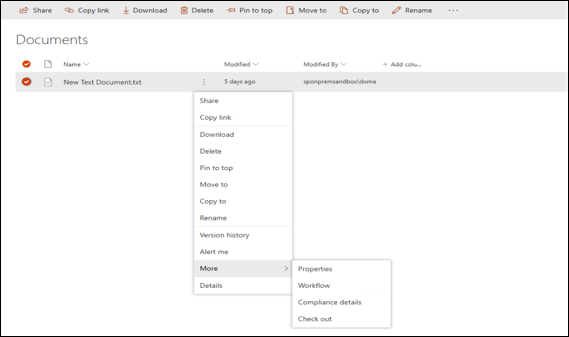
Open the Workflow Status page from the document's menu instead of using the workflow status link:
- Select the Menu next to the document.
- Select More > Workflow.
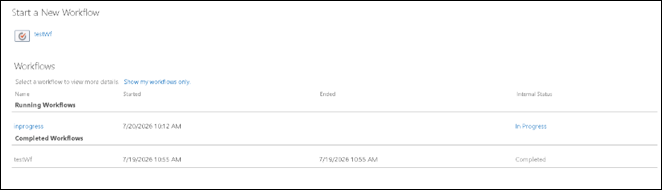
- Select Internal Status.
The workflow status page is displayed. Refer to the screenshots below.
Option 2 - Add the rule directly to web.config
If you prefer to edit the file manually (or if you're scripting the change across servers):
Locate the content web application's
web.configfile. The file is typically stored at the following location::C:\inetpub\wwwroot\wss\VirtualDirectories\<port>\web.config (<port> is the port of the affected web application, e.g. 80 or 443.)Back up the file by copying it to a safe location.
Open
web.configin a text editor and locate the<system.webServer>section.Add the
<rewrite>block that's shown in the following code to the<system.webServer>section. If a<rewrite>section already exists, add only the<rule>element to its<rules>section.
<rewrite>
  <rules>
    <rule name="Fix over-encoded WrkStat WorkflowInstanceID" stopProcessing="true">
      <match url="^(.*)(_layouts/15/WrkStat\.aspx)$" ignoreCase="true" />
      <conditions logicalGrouping="MatchAll" trackAllCaptures="false">
        <add input="{QUERY_STRING}"
             pattern="^(.*)(List|WorkflowInstanceID)=%(?:25)+7b([0-9A-Fa-f]{8})%(?:25)+2d([0-9A-Fa-f]{4})%(?:25)+2d([0-9A-Fa-f]{4})%(?:25)+2d([0-9A-Fa-f]{4})%(?:25)+2d([0-9A-Fa-f]{12})%(?:25)+7d(.*)$" />
      </conditions>
      <action type="Rewrite"
              url="{R:0}?{C:1}{C:2}=%7b{C:3}%2d{C:4}%2d{C:5}%2d{C:6}%2d{C:7}%7d{C:8}"
              appendQueryString="false" />
    </rule>
  </rules>
</rewrite>
- Save the file. SharePoint automatically recycles the application. Therefore, an IIS reset is not required.
Verify the workaround
- Open a list that contains a Workflow Status column.
- Select a workflow status link that previously displayed the "WorkflowInstanceID parameter is invalid" error message.
- Verify that the Workflow Status page opens successfully.
- Verify that the workflow status links that were already working continue to function correctly. The rewrite rule corrects only over-encoded links and leaves correctly encoded links unchanged.
If you have multiple over-encoded links, verify that both double-encoded (%257b...) and triple-encoded (%25257b...) links now open successfully.
Frequently asked questions (FAQ)
Does this change or corrupt my list data?
No. The over-encoding occurs only when the link is generated during page rendering. The underlying data is stored correctly. Therefore, there is nothing to repair or convert. The rewrite rule simply corrects the URL while the request is processed.
Do I have to update the URLs that are stored in my lists?
No. Do not manually modify the stored URLs. The value is generated each time the page is rendered. After the permanent fix is installed, the links will be generated correctly without any additional changes.
Do I have to apply this workaround on every server?
Yes. Apply the workaround on every Web Front End (WFE) server that serves the affected sites. Alternatively, if you use a reverse proxy or load balancer that supports URL rewriting, you can apply an equivalent rule there, instead.
Is an IIS reset required?
No. After you edit web.config or apply the rule through the GUI, SharePoint automatically recycles the application.