
This article describes update KB3191933for Microsoft Office 2016, which was released on June 6, 2017. This update has a prerequisite.
Be aware that the update on the Microsoft Download Center applies to the Microsoft Installer (.msi)-based edition of Office 2016. It doesn't apply to the Office 2016 Click-to-Run editions, such as Microsoft Office 365 Home. (How to determine?)
Improvements and fixes
Improves the announce event of MenuOpened to state that there is a new IM message when a new instant message (IM) arrives in Microsoft Skype for Business 2016.
This update fixes the following issue:
- Email messages may not be displayed if the computer has low memory. The email messages may be displayed when you resize the window.
How to download and install the update
Microsoft Update
Use Microsoft Update to automatically download and install the update.
Download Center
This update is also available for manual download and installation from the Microsoft Download Center.
-
 Download update KB3191933 for 32-bit version of Office 2016
 -
Download update KB3191933 for 64-bit version of Office 2016
If you're not sure what platform (32-bit or 64-bit) you're running, see Am I running 32-bit or 64-bit Office? Additionally, see more information about how to download Microsoft support files.
Virus-scan claim
Microsoft scanned this file for viruses by using the most current virus-detection software that was available on the date that the file was posted. The file is stored on security-enhanced servers that help prevent any unauthorized changes to it.
Update information
Prerequisite
To apply this update, you must have Microsoft Office 2016 installed.
Restart information
You may have to restart the computer after you install this update.
More information
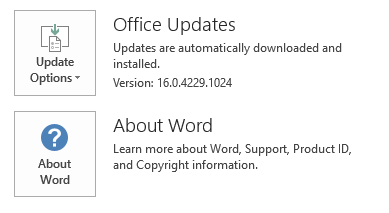
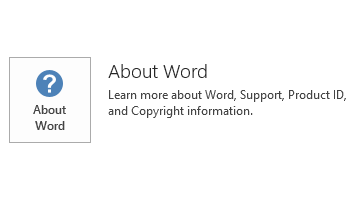
To determine whether your Office installation is Click-to-Run or MSI-based, follow these steps:
- Start an Office 2016 application.
- On the File menu, select Account.
- For Office 2016 Click-to-Run installations, an Update Options item is displayed. For MSI-based installations, the Update Options item isn't displayed.
| Office 2016 Click-to-Run installation | MSI-based Office 2016 |
|---|---|
|
|
How to uninstall this update
Windows 10
- Go to Start, enter View Installed Updates in the Search Windows box, and then press Enter.
- In the list of updates, locate and select KB3191933, and then select Uninstall.
Windows 8 and Windows 8.1
- Swipe in from the right edge of the screen, and then select Search. If you're using a mouse, point to the lower-right corner of the screen, and then select Search.
- Enter windows update, select Windows Update, and then select Installed Updates.
- In the list of updates, locate and select KB3191933, and then select Uninstall.
Windows 7
- Go to Start, enter Run, and then select Run.
- Enter Appwiz.cpl, and then select OK.
- Select View installed updates.
- In the list of updates, locate and select KB3191933, and then select Uninstall.
References
Learn about the standard terminology that's used to describe Microsoft software updates. The Office System TechCenter contains the latest administrative updates and strategic deployment resources for all versions of Office.
File informationThe global version of this update has the file attributes (or later file attributes) that are listed in the following table.
x64
x86
msodll40ui-x-none.msp file information
| File identifier | File name | File version | File size | Date | Time |
|---|---|---|---|---|---|
| Mso40uires.dll | Mso40uires.dll | 16.0.4297.1000 | 3,194,560 | 16-May-2017 | 03:36 |
| Mso40uiwin32client.dll.x64 | Mso40uiwin32client.dll | 16.0.4549.1000 | 9,345,280 | 17-May-2017 | 00:19 |
| Mso40uiwin32client.dll.x86 | Mso40uiwin32client.dll | 16.0.4549.1000 | 7,424,768 | 17-May-2017 | 00:29 |
msodll40ui-x-none.msp file information
| File identifier | File name | File version | File size | Date | Time |
|---|---|---|---|---|---|
| Mso40uires.dll | Mso40uires.dll | 16.0.4297.1000 | 3,194,560 | 16-May-2017 | 03:33 |
| Mso40uiwin32client.dll.x64 | Mso40uiwin32client.dll | 16.0.4549.1000 | 9,345,280 | 17-May-2017 | 00:52 |
| Mso40uiwin32client.dll.x86 | Mso40uiwin32client.dll | 16.0.4549.1000 | 7,424,768 | 17-May-2017 | 00:19 |