
This article describes update KB3141511 for Microsoft Outlook 2016, which was released on February 7, 2017. This update has a prerequisite.
Be aware that the update on the Microsoft Download Center applies to the Microsoft Installer (.msi)-based edition of Office 2016. It doesn't apply to the Office 2016 Click-to-Run editions, such as Microsoft Office 365 Home. (How to determine?)
Improvements and fixes
This update adds the In-Client Store feature that enables you to install and disable web extensions (add-ins) in the Microsoft Installer (.msi)-based edition of Outlook 2016.
This update fixes the following issues:
- Fonts are changed unexpectedly in Out-of-Office messages.
- You may see three unexpected attachments in meeting requests that contain images in Outlook 2016. The attachments are copies of the resized images.
- Outlook 2016 crashes repeatedly when Outlook 2016 reconnects attachments in MAPI.
- Assume that Outlook 2016 is subscribed to an Internet calendar that requires your credential. Then, you select the Remember my credentials option in the credential prompt. In this situation, if the password expires, you can't authenticate to the Internet calendar, and you're not prompted to enter the new password.
- When you send a meeting request or cancellation that has an HTML body and HTML images, the recipient does not see the images as expected.
- Rules that move email messages inside a date range don't work as expected in Outlook 2016 because they always use UTC time instead of the local time zone. In this situation, email messages received outsidethe date range (local time zone) may also be moved.
- After a delegate leaves the company, you can't update the delegates information in Outlook 2016. Meanwhile, you receive the following error message: The Delegates settings were not saved correctly. Cannot activate free/busy information.
- You can't open a document in a SharePoint site mailbox document folder, and you receive the following error message: Outlook blocked access to the following potentially unsafe attachments: filename.docx
- Modern attachments aren't displayed in recipients' mailboxes in Outlook 2016.
- When you reply a meeting request in Outlook 2016, the font isn't displayed as expected in some cases.
- You may experience Outlook 2016 crash that's associated with email toast notifications.
- When you try to add an attachment to a MAPI message that has a picture in Outlook 2016, you may receive the following error message: Cannot create attachments. The property does not exist. The field you want to modify is not valid for this type of item.
- When you try to open a Wunderbar shortcut (the shortcut of the navigation pane) that is created by using object model solutions in Outlook 2016, you receive the following error message: An OLE registration error occurred. The program is not correctly installed. Run Setup again for the program. Therefore, you cannot delete the Wunderbar shortcut.
- You can't load other users' calendars in Outlook 2016. The load status remains Retrieving and the CPU usage stays at 100%.
- When you preview an email attachment and then copy the attachment to your computer, a duplicate of the attachment appears.
How to download and install the update
Microsoft Update
Use Microsoft Update to automatically download and install the update.
Download Center
This update is also available for manual download and installation from the Microsoft Download Center.
-
 Download update KB3141511 for 32-bit version of Outlook 2016
 -
Download update KB3141511 for 64-bit version of Outlook 2016
If you're not sure what platform (32-bit or 64-bit) you're running, see Am I running 32-bit or 64-bit Office? Additionally, see more information about how to download Microsoft support files.
Virus-scan claim
Microsoft scanned this file for viruses by using the most current virus-detection software that was available on the date that the file was posted. The file is stored on security-enhanced servers that help prevent any unauthorized changes to it.
Update information
Prerequisites To apply this update, you must have Microsoft Outlook 2016 installed.
Restart information You may have to restart the computer after you install this update.
More information
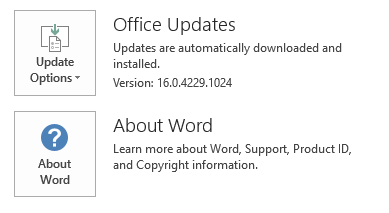
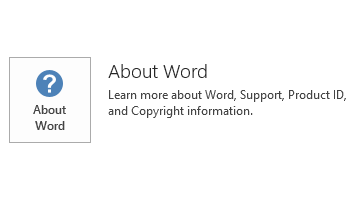
To determine whether your Office installation is Click-to-Run or MSI-based, follow these steps:
- Start an Office 2016 application.
- On the File menu, select Account.
- For Office 2016 Click-to-Run installations, an Update Options item is displayed. For MSI-based installations, the Update Options item isn't displayed.
| Office 2016 Click-to-Run installation | MSI-based Office 2016 |
|---|---|
|
|
How to uninstall this update Windows 10
- Go to Start, enter View Installed Updates in the Search Windows box, and then press Enter.
- In the list of updates, locate and select KB3141511, and then select Uninstall.
Windows 8 and Windows 8.1
- Swipe in from the right edge of the screen, and then select Search. If you're using a mouse, point to the lower-right corner of the screen, and then select Search.
- Enter windows update, select Windows Update, and then select Installed Updates.
- In the list of updates, locate and select KB3141511, and then select Uninstall.
Windows 7
- Go to Start, enter Run, and then select Run.
- Enter Appwiz.cpl, and then select OK.
- Select View installed updates.
- In the list of updates, locate and select KB3141511, and then select Uninstall.
References
Learn about the standard terminology that's used to describe Microsoft software updates.
The Office System TechCenter contains the latest administrative updates and strategic deployment resources for all versions of Office.
File informationThe global version of this update has the file attributes (or later file attributes) that are listed in the following table.
x86
outlook-x-none.msp file information
| File identifier | File name | File version | File size | Date | Time |
|---|---|---|---|---|---|
| Contab32.dll | Contab32.dll | 16.0.4483.1000 | 152,824 | 31-Jan-2017 | 18:28 |
| Dlgsetp.dll | Dlgsetp.dll | 16.0.4483.1000 | 109,800 | 31-Jan-2017 | 18:28 |
| Envelope.dll | Envelope.dll | 16.0.4483.1000 | 189,200 | 31-Jan-2017 | 18:28 |
| Mapiph.dll | Mapiph.dll | 16.0.4498.1000 | 332,616 | 31-Jan-2017 | 18:28 |
| Mapir.dll_1033 | Mapir.dll | 16.0.4444.1000 | 1,280,736 | 31-Jan-2017 | 18:27 |
| Mimedir.dll | Mimedir.dll | 16.0.4498.1000 | 446,144 | 31-Jan-2017 | 18:28 |
| Olmapi32.dll | Olmapi32.dll | 16.0.4498.1000 | 4,774,656 | 31-Jan-2017 | 18:28 |
| Omsmain.dll | Omsmain.dll | 16.0.4471.1000 | 753,408 | 31-Jan-2017 | 18:28 |
| Omsxp32.dll | Omsxp32.dll | 16.0.4471.1000 | 261,416 | 31-Jan-2017 | 18:28 |
| Outllibr.dll_1033 | Outllibr.dll | 16.0.4468.1000 | 7,491,816 | 31-Jan-2017 | 18:27 |
| Outlmime.dll | Outlmime.dll | 16.0.4498.1000 | 611,608 | 31-Jan-2017 | 18:28 |
| Outlook.exe | Outlook.exe | 16.0.4498.1000 | 23,173,320 | 31-Jan-2017 | 18:28 |
| Outlook.hol_1033 | Outlook.hol | Not applicable | 1,334,168 | 31-Jan-2017 | 18:27 |
| Outlph.dll | Outlph.dll | 16.0.4375.1000 | 358,192 | 31-Jan-2017 | 18:28 |
| Outlvba.dll | Outlvba.dll | 16.0.4498.1000 | 76,536 | 31-Jan-2017 | 18:28 |
| Pstprx32.dll | Pstprx32.dll | 16.0.4498.1000 | 1,386,192 | 31-Jan-2017 | 18:28 |
| Rm.dll | Rm.dll | 16.0.4312.1000 | 81,584 | 31-Jan-2017 | 18:28 |
| Scnpst32.dll | Scnpst32.dll | 16.0.4498.1000 | 460,640 | 31-Jan-2017 | 18:28 |
| Scnpst64.dll | Scnpst64.dll | 16.0.4498.1000 | 472,424 | 31-Jan-2017 | 18:28 |
| Scnpst64c.dll | Scnpst64c.dll | 16.0.4498.1000 | 673,656 | 31-Jan-2017 | 18:28 |
x64
outlook-x-none.msp file information
| File identifier | File name | File version | File size | Date | Time |
|---|---|---|---|---|---|
| Contab32.dll | Contab32.dll | 16.0.4483.1000 | 199,920 | 31-Jan-2017 | 18:34 |
| Dlgsetp.dll | Dlgsetp.dll | 16.0.4483.1000 | 138,472 | 31-Jan-2017 | 18:34 |
| Envelope.dll | Envelope.dll | 16.0.4498.1000 | 248,584 | 31-Jan-2017 | 18:34 |
| Mapiph.dll | Mapiph.dll | 16.0.4498.1000 | 481,088 | 31-Jan-2017 | 18:34 |
| Mapir.dll_1033 | Mapir.dll | 16.0.4444.1000 | 1,280,736 | 31-Jan-2017 | 18:33 |
| Mimedir.dll | Mimedir.dll | 16.0.4498.1000 | 601,280 | 31-Jan-2017 | 18:34 |
| Olappt.fae | Olappt.fae | 16.0.4366.1000 | 134,480 | 31-Jan-2017 | 18:34 |
| Olmapi32.dll | Olmapi32.dll | 16.0.4498.1000 | 6,603,520 | 31-Jan-2017 | 18:34 |
| Omsmain.dll | Omsmain.dll | 16.0.4471.1000 | 1,004,288 | 31-Jan-2017 | 18:34 |
| Omsxp32.dll | Omsxp32.dll | 16.0.4471.1000 | 352,040 | 31-Jan-2017 | 18:34 |
| Outllibr.dll_1033 | Outllibr.dll | 16.0.4468.1000 | 7,491,816 | 31-Jan-2017 | 18:33 |
| Outlmime.dll | Outlmime.dll | 16.0.4498.1000 | 783,128 | 31-Jan-2017 | 18:34 |
| Outlook.exe | Outlook.exe | 16.0.4498.1000 | 34,962,120 | 31-Jan-2017 | 18:34 |
| Outlook.hol_1033 | Outlook.hol | Not applicable | 1,334,168 | 31-Jan-2017 | 18:33 |
| Outlph.dll | Outlph.dll | 16.0.4375.1000 | 429,360 | 31-Jan-2017 | 18:34 |
| Outlvba.dll | Outlvba.dll | 16.0.4498.1000 | 97,016 | 31-Jan-2017 | 18:34 |
| Pstprx32.dll | Pstprx32.dll | 16.0.4498.1000 | 2,569,936 | 31-Jan-2017 | 18:34 |
| Rm.dll | Rm.dll | 16.0.4444.1000 | 110,800 | 31-Jan-2017 | 18:34 |
| Scnpst32.dll | Scnpst32.dll | 16.0.4498.1000 | 611,168 | 31-Jan-2017 | 18:34 |
| Scnpst64.dll | Scnpst64.dll | 16.0.4498.1000 | 614,248 | 31-Jan-2017 | 18:34 |
| Scnpst64c.dll | Scnpst64c.dll | 16.0.4498.1000 | 814,456 | 31-Jan-2017 | 18:34 |