
Important This article contains information that shows you how to help lower security settings or how to turn off security features on a computer. You can make these changes to work around a specific problem. Before you make these changes, we recommend that you evaluate the risks that are associated with implementing this workaround in your particular environment. If you implement this workaround, take any appropriate additional steps to help protect the computer.
Summary
This security update resolves multiple vulnerabilities in Microsoft Windows. The vulnerabilities could allow elevation of privilege if an attacker runs a specially crafted application on a domain-joined system.
To learn more about the vulnerability, see Microsoft Security Bulletin MS16-101.
More Information
Important
- All future security and non-security updates for Windows 8.1 and Windows Server 2012 R2 require update 2919355 to be installed. We recommend that you install update 2919355 on your Windows 8.1-based or Windows Server 2012 R2-based computer so that you receive future updates.
- If you install a language pack after you install this update, you must reinstall this update. Therefore, we recommend that you install any language packs that you need before you install this update. For more information, see Add language packs to Windows.
Non-security-related fixes that are included in this security update
This security update also fixes the following non-security-related issues:
In a Domain-joined Scale Out File Server (SoFS) on a domainless cluster, when an SMB client that is running either Windows 8.1 or Windows Server 2012 R2 connects to a node that is down, authentication fails. When this occurs, you may receive an error message that resembles the following message:
Note
STATUS_NO_TGT_REPLY
Known issues in this security update
Known issue 1
The security updates that are provided in MS16-101 and newer updates disable the ability of the Negotiate process to fall back to NTLM when Kerberos authentication fails for password change operations with the STATUS_NO_LOGON_SERVERS (0xc000005e) error code. In this situation, you may receive one of the following error codes.
Hexadecimal Decimal Symbolic Friendly 0xc0000388 1073740920 STATUS_DOWNGRADE_DETECTED The system detected a possible attempt to compromise security. Please make sure that you can contact the server that authenticated you. 0x4f1 1265 ERROR_DOWNGRADE_DETECTED The system detected a possible attempt to compromise security. Please make sure that you can contact the server that authenticated you. Workaround
If password changes that previously succeeded fail after the installation of MS16-101, it's likely that password changes were previously relying on NTLM fallback because Kerberos was failing. In order to change passwords successfully by using Kerberos protocols, follow these steps:
Configure open communication on TCP port 464 between clients that have MS16-101 installed and the domain controller that is servicing password resets.
Read-only domain controllers (RODCs) can service self-service password resets if the user is allowed by the RODCs password replication policy. Users who are not allowed by the RODC password policy require network connectivity to a read/write domain controller (RWDC) in the user account domain.
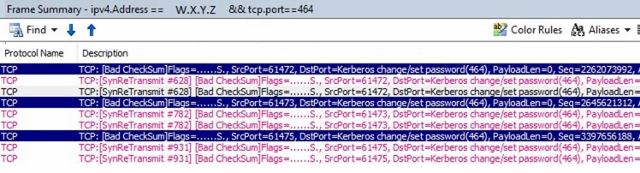
Note To check whether TCP port 464 is open, follow these steps:
Create an equivalent display filter for your network monitor parser. For example:
ipv4.address== <ip address of client> && tcp.port==464
In the results, look for the "TCP:[SynReTransmit" frame.
Make sure that the target Kerberos names are valid. (IP addresses are not valid for the Kerberos protocol. Kerberos supports short names and fully qualified domain names.)
Make sure that service principal names (SPNs) are registered correctly.
For more information, see Kerberos and Self-Service Password Reset.
Known issue 2
We know about an issue in which programmatic password resets of domain user accounts fail and return the STATUS_DOWNGRADE_DETECTED (0x800704F1) error code if the expected failure is one of the following:
- ERROR_INVALID_PASSWORD
- ERROR_PWD_TOO_SHORT (rarely returned)
- STATUS_WRONG_PASSWORD
- STATUS_PASSWORD_RESTRICTION
The following table shows the full error mapping.
Hexadecimal Decimal Symbolic Friendly 0x56 86 ERROR_INVALID_PASSWORD The specified network password is not correct. 0x267 615 ERROR_PWD_TOO_SHORT The password that was provided is too short to meet the policy of your user account. Please provide a longer password. 0xc000006a -1073741718 STATUS_WRONG_PASSWORD When you try to update a password, this return status indicates that the value that was provided as the current password is incorrect. 0xc000006c -1073741716 STATUS_PASSWORD_RESTRICTION When you try to update a password, this return status indicates that some password update rule was violated. For example, the password may not meet the length criteria. 0x800704F1 1265 STATUS_DOWNGRADE_DETECTED The system cannot contact a domain controller to service the authentication request. Please try again later. 0xc0000388 -1073740920 STATUS_DOWNGRADE_DETECTED The system cannot contact a domain controller to service the authentication request. Please try again later. Resolution
MS16-101 has been re-released to address this issue. Install the latest version of the updates for this bulletin to resolve this issue.
Known issue 3
We know about an issue in which programmatic resets of local user account password changes may fail and return the STATUS_DOWNGRADE_DETECTED (0x800704F1) error code.
The following table shows the full error mapping.
Hexadecimal Decimal Symbolic Friendly 0x4f1 1265 ERROR_DOWNGRADE_DETECTED The system cannot contact a domain controller to service the authentication request. Please try again later. Resolution
MS16-101 has been re-released to address this issue. Install the latest version of the updates for this bulletin to resolve this issue.
Known issue 4
Passwords for disabled and locked-out user accounts cannot be changed using the negotiate package.
Password changes for disabled and locked-out accounts will still work when using other methods such as when using an LDAP modify operation directly. For example, the PowerShell cmdlet Set-ADAccountPassword uses an "LDAP Modify" operation to change the password and remains unaffected.
Workaround
These accounts require an administrator to make password resets. This behavior is by design after you install MS16-101 and later fixes.
Known issue 5
Applications that use the NetUserChangePassword API and that pass a servername in the domainname parameter will no longer work after MS16-101 and later updates are installed.
Microsoft documentation states that providing a remote server name in the domainname parameter of the NetUserChangePassword function is supported. For example, the NetUserChangePassword function MSDN topic states the following:
domainname [in]
A pointer to a constant string that specifies the DNS or NetBIOS name of a remote server or domain on which the function is to execute. If this parameter is NULL, the logon domain of the caller is used. However, this guidance has been superseded by MS16-101, unless the password reset is for a local account on the local computer. Post MS16-101, in order for domain user password changes to work, you must pass a valid DNS Domain Name to the NetUserChangePassword API.
Known issue 6
After you install the security updates that are described in MS16-101, remote, programmatic changes of a local user account password, and password changes across untrusted forest fail.
This operation fails because the operation relies on NTLM fall-back which is no longer supported for nonlocal accounts after MS16-101 is installed.
A registry entry is provided that you can use to disable this change.
Warning This workaround may make a computer or a network more vulnerable to attack by malicious users or by malicious software such as viruses. We do not recommend this workaround but are providing this information so that you can implement this workaround at your own discretion. Use this workaround at your own risk.
ImportantThis section, method, or task contains steps that tell you how to modify the registry. However, serious problems might occur if you modify the registry incorrectly. Therefore, make sure that you follow these steps carefully. For added protection, back up the registry before you modify it. Then, you can restore the registry if a problem occurs. For more information about how to back up and restore the registry, click the following article number to view the article in the Microsoft Knowledge Base:
322756 How to back up and restore the registry in WindowsTo disable this change, set the NegoAllowNtlmPwdChangeFallback DWORD entry to use a value of 1 (one).
Important Setting the NegoAllowNtlmPwdChangeFallback registry entry to a value of 1 will disable this security fix:
Registry value Description 0 Default value. Fallback is prevented. 1 Fallback is always allowed. The security fix is turned off. Customers that are having issues with remote local accounts or untrusted forest scenarios can set the registry to this value. To add these registry values, follow these steps:
Click Start, click Run, type regedit in the Open box, and then click OK.
Locate and then click the following subkey in the registry:
HKEY_LOCAL_MACHINE\System\CurrentControlSet\Control\Lsa
On the Edit menu, point to New, and then click DWORD Value.
Type NegoAllowNtlmPwdChangeFallback for the name of the DWORD, and then press ENTER.
Right-click NegoAllowNtlmPwdChangeFallback, and then click Modify.
In the Value data box, type 1 to disable this change, and then click OK.
Note To restore the default value, type 0 (zero), and then click OK.
Status
The root cause of this issue is understood. This article will be updated with additional details as they become available.
How to obtain and install the update
Method 1: Windows Update
This update is available through Windows Update. When you turn on automatic updating, this update will be downloaded and installed automatically. For more information about how to turn on automatic updating, see
Get security updates automatically.
Method 2: Microsoft Update Catalog
To get the stand-alone package for this update, go to the Microsoft Update Catalog website.
Method 3: Microsoft Download Center
You can obtain the stand-alone update package through the Microsoft Download Center. Follow the installation instructions on the download page to install the update.
Click the download link in Microsoft Security Bulletin MS16-101 that corresponds to the version of Windows that you are running.
More Information
How to obtain help and support for this security update
Help for installing updates: Support for Microsoft Update
Security solutions for IT professionals: TechNet Security Troubleshooting and Support
Help for protecting your Windows-based computer from viruses and malware: Virus Solution and Security Center
Local support according to your country/region: International Support
File Information
File hash information
| File name | SHA1 hash | SHA256 hash |
|---|---|---|
| Windows8.1-KB3177108-x86.msu | 56DD46107F56F6EE47481B48E79A47074775B64B | C08D2F31ED85EB93BD1D021AE63197227C879D6565CD1E81E872A317C34C91E8 |
| Windows8.1-KB3177108-x64.msu | 3D7C85C7A6C5C0F4630F6E7950C60BFE09B002B3 | C4104862D4FBC7DA6ECD4A9C609F1E1F910D9EF4895C140554DAD35FEC84DE93 |
| Windows8-RT-KB3177108-x64.msu | A65945511227612F442BA9B2D858AB13B8F56297 | F75D17F4F1680532A2B951F10BA88E7025C4C48C6C7EAE507EA0F1C53EBD04C5 |
File information
The English (United States) version of this software update installs files that have the attributes that are listed in the following tables.
Windows 8.1 and Windows Server 2012 R2 file information
Notes
The files that apply to a specific product, milestone (RTM, SPn), and service branch (LDR, GDR) can be identified by examining the file version numbers as shown in the following table:
Version Product Milestone Service branch 6.3.960 0.16xxx Windows RT 8.1, Windows 8.1, and Windows Server 2012 R2 RTM GDR 6.3.960 0.17xxx Windows RT 8.1, Windows 8.1, and Windows Server 2012 R2 RTM GDR 6.3.960 0.18xxx Windows RT 8.1, Windows 8.1, and Windows Server 2012 R2 RTM GDR GDR service branches contain only those fixes that are widely released to address widespread, critical issues. LDR service branches contain hotfixes in addition to widely released fixes.
The MANIFEST files (.manifest) and MUM files (.mum) that are installed are not listed.
For all supported x86-based versions
| File name | File version | File size | Date | Time | Platform |
|---|---|---|---|---|---|
| Bcryptprimitives.dll | 6.3.9600.18340 | 340,872 | 16-May-2016 | 21:13 | x86 |
| Cng.sys | 6.3.9600.18340 | 479,312 | 16-May-2016 | 21:16 | x86 |
| Ksecpkg.sys | 6.3.9600.18340 | 148,824 | 16-May-2016 | 21:16 | x86 |
| Lsasrv.dll | 6.3.9600.18405 | 1,118,208 | 08-Jul-2016 | 14:18 | x86 |
| Adtschema.dll | 6.3.9600.17415 | 736,768 | 29-Oct-2014 | 02:06 | x86 |
| Msaudite.dll | 6.3.9600.17415 | 154,112 | 29-Oct-2014 | 02:06 | x86 |
| Msobjs.dll | 6.3.9600.16384 | 61,952 | 22-Aug-2013 | 04:17 | x86 |
| Netlogon.dll | 6.3.9600.18405 | 696,832 | 08-Jul-2016 | 14:17 | x86 |
| Msv1_0.dll | 6.3.9600.18405 | 332,632 | 09-Jul-2016 | 00:08 | x86 |
| Mrxsmb10.sys | 6.3.9600.18298 | 229,376 | 06-Apr-2016 | 16:48 | x86 |
| Mrxsmb20.sys | 6.3.9600.18404 | 153,088 | 07-Jul-2016 | 20:35 | x86 |
| Mrxsmb.sys | 6.3.9600.18298 | 328,704 | 06-Apr-2016 | 16:48 | x86 |
For all supported x64-based versions
| File name | File version | File size | Date | Time | Platform | SP requirement | Service branch |
|---|---|---|---|---|---|---|---|
| Bcryptprimitives.dll | 6.3.9600.18344 | 397,232 | 18-May-2016 | 23:18 | x64 | None | Not applicable |
| Certcli.dll | 6.3.9600.18404 | 445,440 | 07-Jul-2016 | 21:53 | x64 | None | Not applicable |
| Cng.sys | 6.3.9600.18344 | 563,024 | 18-May-2016 | 23:18 | x64 | None | Not applicable |
| Ksecpkg.sys | 6.3.9600.18344 | 178,016 | 18-May-2016 | 23:16 | x64 | None | Not applicable |
| Lsasrv.dll | 6.3.9600.18405 | 1,445,376 | 08-Jul-2016 | 14:22 | x64 | None | Not applicable |
| Adtschema.dll | 6.3.9600.17415 | 736,768 | 29-Oct-2014 | 02:50 | x64 | None | Not applicable |
| Msaudite.dll | 6.3.9600.17415 | 154,112 | 29-Oct-2014 | 02:51 | x64 | None | Not applicable |
| Msobjs.dll | 6.3.9600.16384 | 61,952 | 22-Aug-2013 | 11:46 | x64 | None | Not applicable |
| Ocspisapi.dll | 6.3.9600.17415 | 293,376 | 29-Oct-2014 | 01:43 | x64 | SPS | AMD64_MICROSOFT-WINDOWS-OCSP |
| Ocspisapictrs.h | Not applicable | 1,421 | 18-Jun-2013 | 15:06 | Not applicable | SPS | AMD64_MICROSOFT-WINDOWS-OCSP |
| Ocspisapictrs.ini | Not applicable | 2,636 | 18-Jun-2013 | 15:06 | Not applicable | SPS | AMD64_MICROSOFT-WINDOWS-OCSP |
| Ocspsvcctrs.ini | Not applicable | 2,960 | 22-Aug-2013 | 19:26 | Not applicable | SPS | AMD64_MICROSOFT-WINDOWS-OCSP |
| Ocspsvcctrs.ini | Not applicable | 3,134 | 22-Aug-2013 | 19:44 | Not applicable | SPS | AMD64_MICROSOFT-WINDOWS-OCSP |
| Ocspsvcctrs.ini | Not applicable | 2,918 | 22-Aug-2013 | 12:30 | Not applicable | SPS | AMD64_MICROSOFT-WINDOWS-OCSP |
| Ocspsvcctrs.ini | Not applicable | 3,210 | 22-Aug-2013 | 19:43 | Not applicable | SPS | AMD64_MICROSOFT-WINDOWS-OCSP |
| Ocspsvcctrs.ini | Not applicable | 3,098 | 22-Aug-2013 | 19:30 | Not applicable | SPS | AMD64_MICROSOFT-WINDOWS-OCSP |
| Ocspsvcctrs.ini | Not applicable | 3,028 | 22-Aug-2013 | 19:46 | Not applicable | SPS | AMD64_MICROSOFT-WINDOWS-OCSP |
| Ocspsvcctrs.ini | Not applicable | 3,140 | 22-Aug-2013 | 19:31 | Not applicable | SPS | AMD64_MICROSOFT-WINDOWS-OCSP |
| Ocspsvcctrs.ini | Not applicable | 2,642 | 22-Aug-2013 | 19:30 | Not applicable | SPS | AMD64_MICROSOFT-WINDOWS-OCSP |
| Ocspsvcctrs.ini | Not applicable | 2,576 | 22-Aug-2013 | 19:31 | Not applicable | SPS | AMD64_MICROSOFT-WINDOWS-OCSP |
| Ocspsvcctrs.ini | Not applicable | 3,026 | 22-Aug-2013 | 19:23 | Not applicable | SPS | AMD64_MICROSOFT-WINDOWS-OCSP |
| Ocspsvcctrs.ini | Not applicable | 3,028 | 22-Aug-2013 | 19:23 | Not applicable | SPS | AMD64_MICROSOFT-WINDOWS-OCSP |
| Ocspsvcctrs.ini | Not applicable | 3,188 | 22-Aug-2013 | 19:23 | Not applicable | SPS | AMD64_MICROSOFT-WINDOWS-OCSP |
| Ocspsvcctrs.ini | Not applicable | 3,126 | 22-Aug-2013 | 19:33 | Not applicable | SPS | AMD64_MICROSOFT-WINDOWS-OCSP |
| Ocspsvcctrs.ini | Not applicable | 3,064 | 22-Aug-2013 | 19:36 | Not applicable | SPS | AMD64_MICROSOFT-WINDOWS-OCSP |
| Ocspsvcctrs.ini | Not applicable | 3,092 | 22-Aug-2013 | 19:36 | Not applicable | SPS | AMD64_MICROSOFT-WINDOWS-OCSP |
| Ocspsvcctrs.ini | Not applicable | 2,828 | 22-Aug-2013 | 19:32 | Not applicable | SPS | AMD64_MICROSOFT-WINDOWS-OCSP |
| Ocspsvcctrs.ini | Not applicable | 2,464 | 22-Aug-2013 | 19:20 | Not applicable | SPS | AMD64_MICROSOFT-WINDOWS-OCSP |
| Ocspsvcctrs.ini | Not applicable | 2,480 | 22-Aug-2013 | 19:20 | Not applicable | SPS | AMD64_MICROSOFT-WINDOWS-OCSP |
| Ocspsvcctrs.ini | Not applicable | 2,460 | 22-Aug-2013 | 19:21 | Not applicable | SPS | AMD64_MICROSOFT-WINDOWS-OCSP |
| Ocspsvc.exe | 6.3.9600.17415 | 219,136 | 29-Oct-2014 | 02:19 | x64 | SPS | AMD64_MICROSOFT-WINDOWS-OCSP |
| Ocspsvcctrs.h | Not applicable | 1,569 | 18-Jun-2013 | 15:06 | Not applicable | SPS | AMD64_MICROSOFT-WINDOWS-OCSP |
| Ocspsvcctrs.ini | Not applicable | 2,918 | 18-Jun-2013 | 15:06 | Not applicable | SPS | AMD64_MICROSOFT-WINDOWS-OCSP |
| Netlogon.dll | 6.3.9600.18405 | 840,704 | 08-Jul-2016 | 14:19 | x64 | None | Not applicable |
| Msv1_0.dll | 6.3.9600.18405 | 442,712 | 09-Jul-2016 | 00:09 | x64 | None | Not applicable |
| Mrxsmb10.sys | 6.3.9600.18298 | 284,672 | 06-Apr-2016 | 18:19 | x64 | None | Not applicable |
| Mrxsmb20.sys | 6.3.9600.18404 | 201,728 | 07-Jul-2016 | 22:33 | x64 | None | Not applicable |
| Mrxsmb.sys | 6.3.9600.18298 | 401,920 | 06-Apr-2016 | 18:19 | x64 | None | Not applicable |
| Netlogon.dll | 6.3.9600.18405 | 696,832 | 08-Jul-2016 | 14:17 | x86 | None | Not applicable |
| Msv1_0.dll | 6.3.9600.18405 | 332,632 | 09-Jul-2016 | 00:08 | x86 | None | Not applicable |
| Bcryptprimitives.dll | 6.3.9600.18344 | 340,880 | 18-May-2016 | 22:28 | x86 | None | Not applicable |
| Certcli.dll | 6.3.9600.18404 | 324,096 | 07-Jul-2016 | 20:06 | x86 | None | Not applicable |
| Adtschema.dll | 6.3.9600.17415 | 736,768 | 29-Oct-2014 | 02:06 | x86 | None | Not applicable |
| Msaudite.dll | 6.3.9600.17415 | 154,112 | 29-Oct-2014 | 02:06 | x86 | None | Not applicable |
| Msobjs.dll | 6.3.9600.16384 | 61,952 | 22-Aug-2013 | 04:17 | x86 | None | Not applicable |
Windows Server 2012 file information
Notes
The files that apply to a specific product, milestone (RTM, SPn), and service branch (LDR, GDR) can be identified by examining the file version numbers as shown in the following table:
Version Product Milestone Service branch 6.2.920 0.17xxx Windows 8, Windows RT, or Windows Server 2012 RTM GDR 6.2.920 0.21xxx Windows 8, Windows RT, or Windows Server 2012 RTM LDR GDR service branches contain only those fixes that are widely released to address widespread, critical issues. LDR service branches contain hotfixes in addition to widely released fixes.
The MANIFEST files (.manifest) and MUM files (.mum) that are installed are not listed.
For all supported x64-based versions
| File name | File version | File size | Date | Time | Platform | SP requirement | Service branch |
|---|---|---|---|---|---|---|---|
| Ksecdd.sys | 6.2.9200.21473 | 100,184 | 02-May-2015 | 06:23 | x64 | None | Not applicable |
| Lsass.exe | 6.2.9200.20521 | 35,840 | 20-Sep-2012 | 06:33 | x64 | None | Not applicable |
| Sspicli.dll | 6.2.9200.21703 | 164,352 | 17-Nov-2015 | 08:00 | x64 | None | Not applicable |
| Sspisrv.dll | 6.2.9200.20521 | 27,648 | 20-Sep-2012 | 06:32 | x64 | None | Not applicable |
| Cng.sys | 6.2.9200.21637 | 566,072 | 22-Sep-2015 | 13:43 | x64 | None | Not applicable |
| Ksecpkg.sys | 6.2.9200.21858 | 171,360 | 10-May-2016 | 19:18 | x64 | None | Not applicable |
| Lsasrv.dll | 6.2.9200.21941 | 1,281,536 | 23-Jul-2016 | 18:10 | x64 | None | Not applicable |
| Adtschema.dll | 6.2.9200.21289 | 719,360 | 10-Nov-2014 | 04:43 | x64 | None | Not applicable |
| Msaudite.dll | 6.2.9200.21269 | 146,944 | 11-Oct-2014 | 05:38 | x64 | None | Not applicable |
| Msobjs.dll | 6.2.9200.16384 | 61,952 | 26-Jul-2012 | 02:36 | x64 | None | Not applicable |
| Ocspsvcctrs.ini | Not applicable | 2,960 | 26-Jul-2012 | 05:07 | Not applicable | SPS | AMD64_MICROSOFT-WINDOWS-OCSP |
| Ocspsvcctrs.ini | Not applicable | 3,134 | 26-Jul-2012 | 08:00 | Not applicable | SPS | AMD64_MICROSOFT-WINDOWS-OCSP |
| Ocspsvcctrs.ini | Not applicable | 2,918 | 26-Jul-2012 | 04:43 | Not applicable | SPS | AMD64_MICROSOFT-WINDOWS-OCSP |
| Ocspsvcctrs.ini | Not applicable | 3,210 | 26-Jul-2012 | 07:59 | Not applicable | SPS | AMD64_MICROSOFT-WINDOWS-OCSP |
| Ocspsvcctrs.ini | Not applicable | 3,098 | 26-Jul-2012 | 08:00 | Not applicable | SPS | AMD64_MICROSOFT-WINDOWS-OCSP |
| Ocspsvcctrs.ini | Not applicable | 3,028 | 26-Jul-2012 | 07:59 | Not applicable | SPS | AMD64_MICROSOFT-WINDOWS-OCSP |
| Ocspsvcctrs.ini | Not applicable | 3,140 | 26-Jul-2012 | 05:21 | Not applicable | SPS | AMD64_MICROSOFT-WINDOWS-OCSP |
| Ocspsvcctrs.ini | Not applicable | 2,642 | 26-Jul-2012 | 08:11 | Not applicable | SPS | AMD64_MICROSOFT-WINDOWS-OCSP |
| Ocspsvcctrs.ini | Not applicable | 2,576 | 26-Jul-2012 | 05:20 | Not applicable | SPS | AMD64_MICROSOFT-WINDOWS-OCSP |
| Ocspsvcctrs.ini | Not applicable | 3,026 | 26-Jul-2012 | 07:36 | Not applicable | SPS | AMD64_MICROSOFT-WINDOWS-OCSP |
| Ocspsvcctrs.ini | Not applicable | 3,028 | 26-Jul-2012 | 07:48 | Not applicable | SPS | AMD64_MICROSOFT-WINDOWS-OCSP |
| Ocspsvcctrs.ini | Not applicable | 3,188 | 26-Jul-2012 | 05:30 | Not applicable | SPS | AMD64_MICROSOFT-WINDOWS-OCSP |
| Ocspsvcctrs.ini | Not applicable | 3,126 | 26-Jul-2012 | 05:08 | Not applicable | SPS | AMD64_MICROSOFT-WINDOWS-OCSP |
| Ocspsvcctrs.ini | Not applicable | 3,064 | 26-Jul-2012 | 07:49 | Not applicable | SPS | AMD64_MICROSOFT-WINDOWS-OCSP |
| Ocspsvcctrs.ini | Not applicable | 3,092 | 26-Jul-2012 | 07:52 | Not applicable | SPS | AMD64_MICROSOFT-WINDOWS-OCSP |
| Ocspsvcctrs.ini | Not applicable | 2,828 | 26-Jul-2012 | 05:12 | Not applicable | SPS | AMD64_MICROSOFT-WINDOWS-OCSP |
| Ocspsvcctrs.ini | Not applicable | 2,464 | 26-Jul-2012 | 08:05 | Not applicable | SPS | AMD64_MICROSOFT-WINDOWS-OCSP |
| Ocspsvcctrs.ini | Not applicable | 2,480 | 26-Jul-2012 | 05:13 | Not applicable | SPS | AMD64_MICROSOFT-WINDOWS-OCSP |
| Ocspsvcctrs.ini | Not applicable | 2,460 | 26-Jul-2012 | 08:11 | Not applicable | SPS | AMD64_MICROSOFT-WINDOWS-OCSP |
| Ocspsvc.exe | 6.2.9200.21345 | 272,384 | 15-Jan-2015 | 05:27 | x64 | SPS | AMD64_MICROSOFT-WINDOWS-OCSP |
| Ocspsvcctrs.h | Not applicable | 1,569 | 02-Jun-2012 | 14:34 | Not applicable | SPS | AMD64_MICROSOFT-WINDOWS-OCSP |
| Ocspsvcctrs.ini | Not applicable | 2,918 | 02-Jun-2012 | 14:34 | Not applicable | SPS | AMD64_MICROSOFT-WINDOWS-OCSP |
| Credssp.dll | 6.2.9200.21703 | 20,480 | 17-Nov-2015 | 07:59 | x64 | SP_ | AMD64_MICROSOFT-WINDOWS-SECURITY-CREDSSP |
| Tspkg.dll | 6.2.9200.21703 | 94,720 | 17-Nov-2015 | 08:01 | x64 | SP_ | AMD64_MICROSOFT-WINDOWS-SECURITY-CREDSSP |
| Tspkg.mof | Not applicable | 964 | 02-Jun-2012 | 14:33 | Not applicable | SP_ | AMD64_MICROSOFT-WINDOWS-SECURITY-CREDSSP |
| Wdigest.dll | 6.2.9200.21858 | 208,896 | 10-May-2016 | 17:07 | x64 | None | Not applicable |
| Kerberos.dll | 6.2.9200.21830 | 829,952 | 09-Apr-2016 | 16:01 | x64 | None | Not applicable |
| Netlogon.dll | 6.2.9200.21941 | 746,496 | 23-Jul-2016 | 18:10 | x64 | None | Not applicable |
| Msv1_0.dll | 6.2.9200.21941 | 317,440 | 23-Jul-2016 | 18:10 | x64 | None | Not applicable |
| Shcore.dll | 6.2.9200.21703 | 590,848 | 17-Nov-2015 | 08:00 | x64 | None | Not applicable |
| Mrxsmb10.sys | 6.2.9200.21529 | 281,600 | 25-Jun-2015 | 18:52 | x64 | None | Not applicable |
| Mrxsmb20.sys | 6.2.9200.21548 | 205,312 | 11-Jul-2015 | 17:07 | x64 | None | Not applicable |
| Mrxsmb.sys | 6.2.9200.21342 | 396,800 | 06-Jan-2015 | 23:17 | x64 | None | Not applicable |
| Lsm.dll | 6.2.9200.21703 | 439,808 | 17-Nov-2015 | 08:00 | x64 | None | Not applicable |
| Workerdd.dll | 6.2.9200.21012 | 14,848 | 12-Apr-2014 | 06:58 | x64 | None | Not applicable |
| Usercpl.dll | 6.2.9200.21703 | 1,043,968 | 17-Nov-2015 | 08:01 | x64 | None | Not applicable |
| Usercpl.ptxml | Not applicable | 789 | 11-Oct-2012 | 00:40 | Not applicable | None | Not applicable |
| Winlogon.exe | 6.2.9200.21703 | 578,048 | 17-Nov-2015 | 08:01 | x64 | None | Not applicable |
| Sspicli.dll | 6.2.9200.20984 | 99,840 | 10-Mar-2014 | 01:34 | x86 | None | Not applicable |
| Wdigest.dll | 6.2.9200.21858 | 176,640 | 10-May-2016 | 17:55 | x86 | None | Not applicable |
| Kerberos.dll | 6.2.9200.21830 | 666,112 | 09-Apr-2016 | 16:48 | x86 | None | Not applicable |
| Netlogon.dll | 6.2.9200.21941 | 636,416 | 23-Jul-2016 | 18:51 | x86 | None | Not applicable |
| Msv1_0.dll | 6.2.9200.21941 | 274,944 | 23-Jul-2016 | 18:51 | x86 | None | Not applicable |
| Adtschema.dll | 6.2.9200.21289 | 719,360 | 10-Nov-2014 | 03:40 | x86 | None | Not applicable |
| Msaudite.dll | 6.2.9200.21269 | 146,944 | 11-Oct-2014 | 04:35 | x86 | None | Not applicable |
| Msobjs.dll | 6.2.9200.16384 | 61,952 | 26-Jul-2012 | 02:47 | x86 | None | Not applicable |
| Credssp.dll | 6.2.9200.21703 | 17,408 | 17-Nov-2015 | 08:08 | x86 | SP_ | X86_MICROSOFT-WINDOWS-SECURITY-CREDSSP |
| Tspkg.dll | 6.2.9200.21703 | 76,800 | 17-Nov-2015 | 08:09 | x86 | SP_ | X86_MICROSOFT-WINDOWS-SECURITY-CREDSSP |
| Tspkg.mof | Not applicable | 964 | 02-Jun-2012 | 14:33 | Not applicable | SP_ | X86_MICROSOFT-WINDOWS-SECURITY-CREDSSP |
| Shcore.dll | 6.2.9200.21703 | 460,800 | 17-Nov-2015 | 08:09 | x86 | None | Not applicable |
| Usercpl.dll | 6.2.9200.21703 | 961,536 | 17-Nov-2015 | 08:09 | x86 | None | Not applicable |
| Usercpl.ptxml | Not applicable | 789 | 11-Oct-2012 | 00:42 | Not applicable | None | Not applicable |