
Summary
This security update resolves vulnerabilities in Windows. The most severe of the vulnerabilities could allow remote code execution if an attacker convinces a user to open a specially crafted document or to go to an untrusted webpage that contains embedded fonts.
To learn more about the vulnerability, see Microsoft Security Bulletin MS15-115.
More Information
Important
- All future security and nonsecurity updates for Windows RT 8.1, Windows 8.1, and Windows Server 2012 R2 require update 2919355 to be installed. We recommend that you install update 2919355 on your Windows RT 8.1-based, Windows 8.1-based, or Windows Server 2012 R2-based computer so that you receive future updates.
- If you install a language pack after you install this update, you must reinstall this update. Therefore, we recommend that you install any language packs that you need before you install this update. For more information, see Add language packs to Windows.
This security update was rereleased on November 11, 2015, for Windows 7 and Windows Server 2008 R2 to resolve the following issues:
- Resolves crashing that occurred in all supported versions of Microsoft Outlook when users were reading certain emails.
- Resolves crashing that occurred in supported versions of Microsoft PowerPoint when opening PowerPoint Presentations.
- Resolves crashing that occurred in supported versions of Internet Explorer when browsing certain web pages such as groupware web pages in Internet Explorer.
- Resolves problems that occurred while users were logging on to the system. For example, after a user restarted the computer and then pressed Ctrl+Alt+Delete at the logon screen, the screen flashed and then went black. The user was then unable to continue. There may be other, similar logon issues that are related to this issue.
Resolution for customers who are unable to log on to their Windows 7 computers:
If you cannot log on to your Windows 7-based computer because of the known issue mentioned earlier, we recommend that you uninstall security update 3097877 and then install all the latest updates from Windows Update.
The following section provides ways to uninstall the update:
Option 1: Disconnect any digitizer devices
If you have a digitizer device connected to your Windows 7 computer (such as a Wacom device), unplug that device and then continue with logon. After you are logged on, install all the latest updates from Windows Update.
Option 2: Recover the last Restore Point by using System Restore
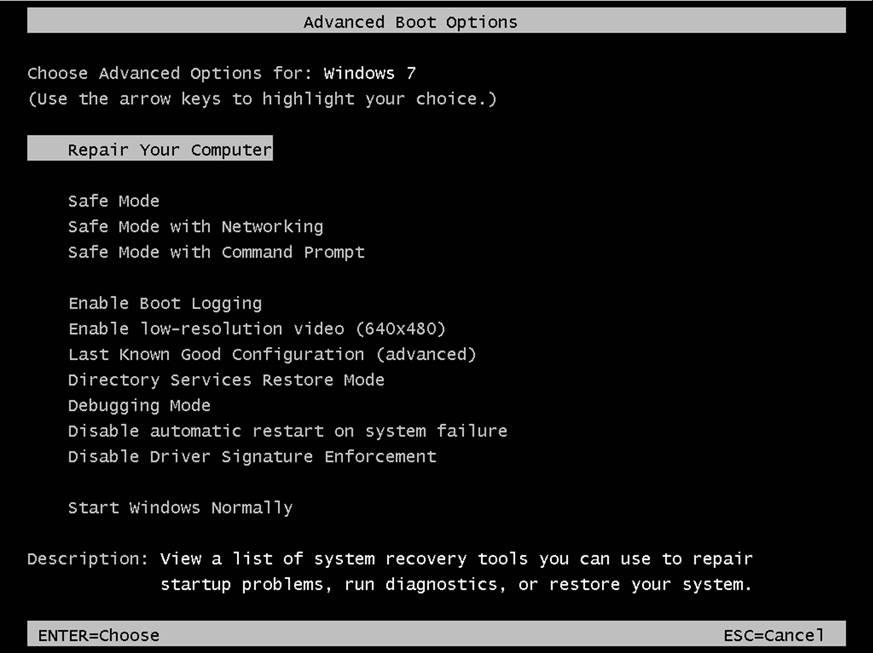
Access the System Recovery Options. To do this, restart the computer and repeatedly tap the F8 key before the Windows logo appears. If the Windows logo appears, try again. Wait until the Windows logon prompt appears, and then shut down and then restart your computer. You must remove any floppy disks, CDs, and DVDs from your computer before you restart.
Select Repair your Computer.
Select the language, and then log on to the computer.
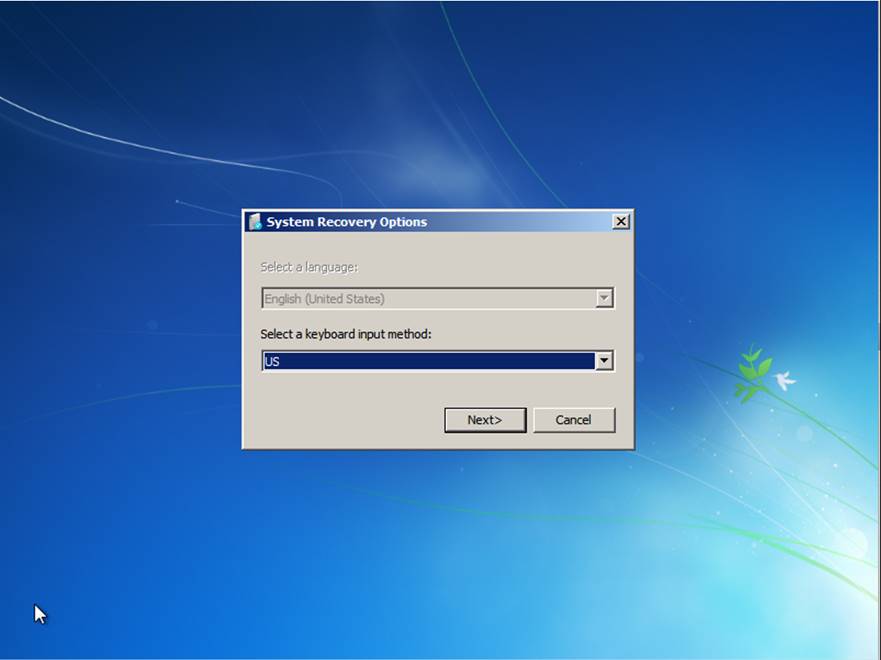
Note If you do not know the local password, you must start by using a Windows 7 DVD or USB bootable media. Then, access System Recovery Options. For more information about how to obtain Windows 7 DVD or USB bootable media, visit the following Microsoft webpage:
Select System Restore from the menu:
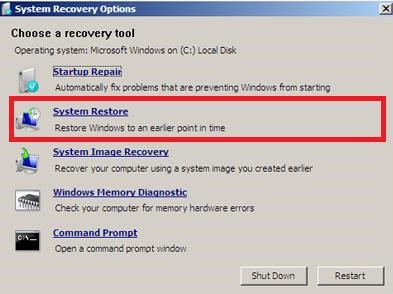
Restore the last restore point. This uninstalls security update 3097877.
Restart the computer into normal mode.
Option 3: Uninstall security update 3097877 at a command prompt
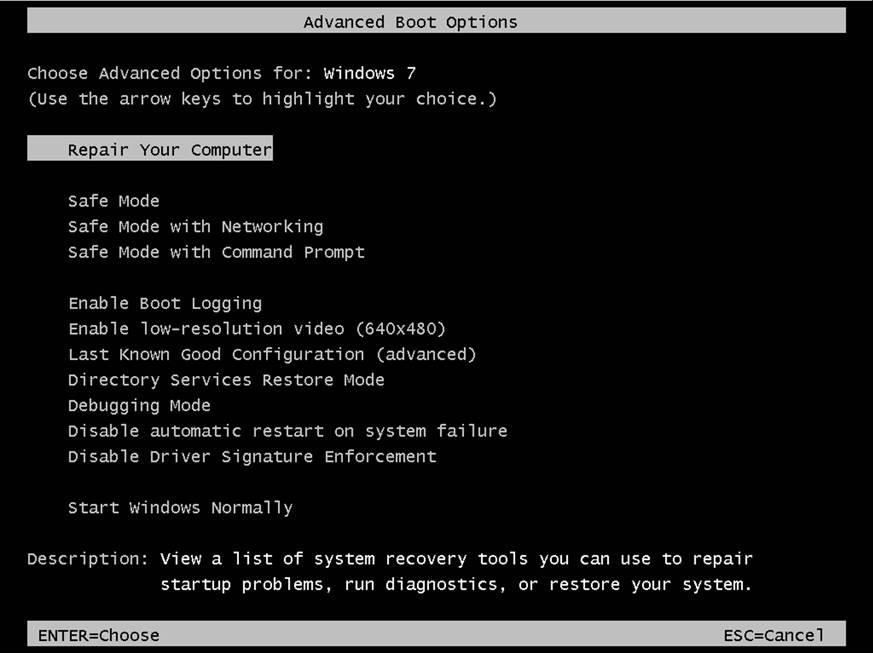
Access the System Recovery Options. To do this, restart the computer and repeatedly tap the F8 key before the Windows logo appears. If the Windows logo appears, try again. Wait until the Windows logon prompt appears, and then shut down and then restart your computer. You must remove any floppy disks, CDs, and DVDs from your computer before you restart.
Select Repair your Computer.
Select the language, and then log on to the computer.
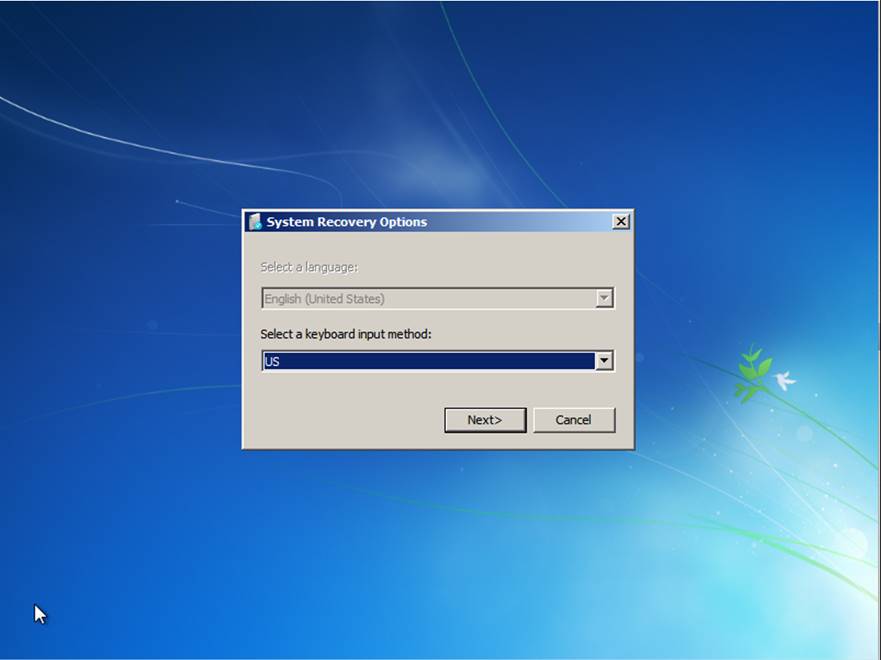
Note If you do not know the local password, you must start by using a Windows 7 DVD or USB bootable media. Then, access System Recovery Options. For more information about how to obtain Windows 7 DVD or USB bootable media, visit the following Microsoft webpage:
Select Command Prompt from the menu:
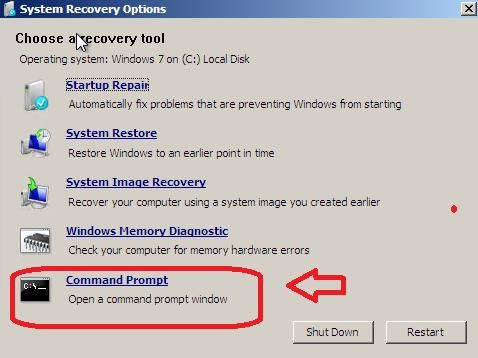
At the command prompt, run the following command:
dism /image:C:\ /get-packages
Search the results for security update 3097877.
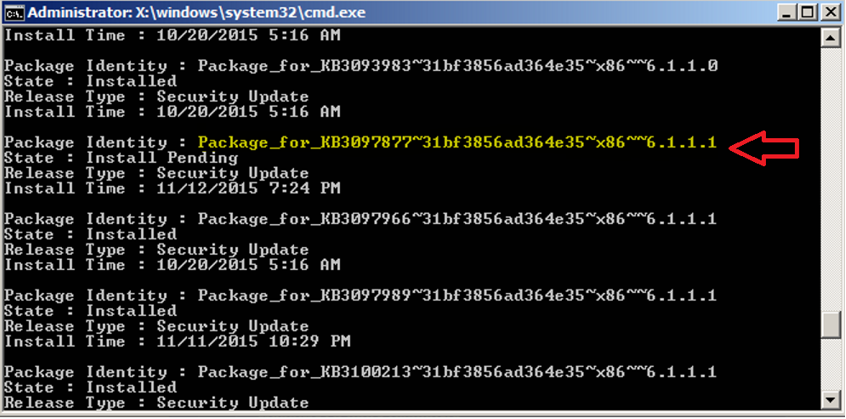
Note The package name in your computer might differ from above because it depends on your computer’s architecture. For example, instead of "x86", you may see "amd64".
For more information about how to determine whether you are running a 32-bit or 64-bit edition of Windows, click the following article number to view the article in the Microsoft Knowledge Base:
827218 How to determine whether a computer is running a 32-bit version or a 64-bit version of the Windows operating system
Copy the package name, and paste it as shown:
dism /image:C:\ /remove-package /PackageName:Package_for_KB3097877~31bf3856ad364e35~x86~~6.1.1.1
You receive a message that states that the uninstallation was successful.
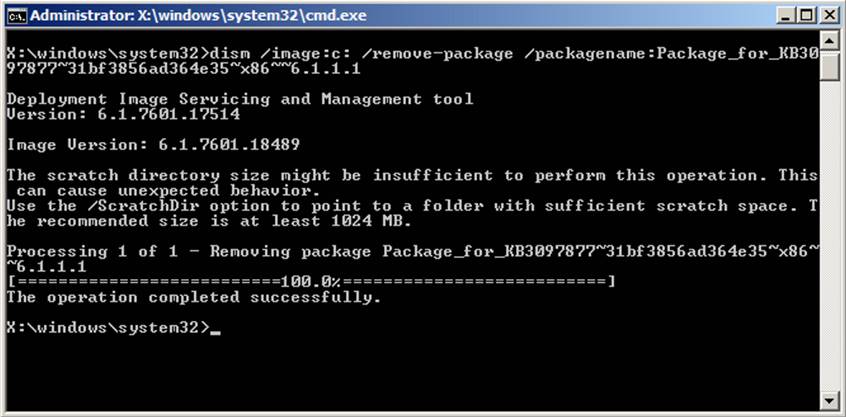
Restart the computer into normal mode.
How to get and install the update
Method 1: Windows Update
This update is available through Windows Update. When you turn on automatic updating, this update will be downloaded and installed automatically. For more information about how to turn on automatic updating, see
Get security updates automatically.
Note For Windows RT and Windows RT 8.1, this update is available through Windows Update only.
Method 2: Microsoft Download Center
You can get the stand-alone update package through the Microsoft Download Center. Follow the installation instructions on the download page to install the update.
Click the download link in Microsoft Security Bulletin MS15-115 that corresponds to the version of Windows that you are running.
More Information
File information
The English (United States) version of this software update installs files that have the attributes that are listed in the following tables. The dates and times for these files are listed in Coordinated Universal Time (UTC). The dates and times for these files on your local computer are displayed in your local time and with your current daylight saving time (DST) bias. Additionally, the dates and times may change when you perform certain operations on the files.
Windows Vista and Windows Server 2008 file information
The files that apply to a specific product, milestone (SPn), and service branch (LDR, GDR) can be identified by examining the file version numbers as shown in the following table:
Version Product Milestone Service branch 6.0.6002.19xxx Windows Vista SP2 or Windows Server 2008 SP2 SP2 GDR 6.0.6002.23xxx Windows Vista SP2 or Windows Server 2008 SP2 SP2 LDR GDR service branches contain only those fixes that are widely released to address widespread, critical issues. LDR service branches contain hotfixes in addition to widely released fixes.
Note The MANIFEST files (.manifest) and MUM files (.mum) that are installed are not listed.
For all supported x86-based versions of Windows Vista and Windows Server 2008
| File name | File version | File size | Date | Time | Platform |
|---|---|---|---|---|---|
| Win32k.sys | 6.0.6002.19525 | 2,068,480 | 17-Oct-2015 | 14:24 | x86 |
| Win32k.sys | 6.0.6002.23835 | 2,076,160 | 17-Oct-2015 | 14:18 | x86 |
| Gdiplus.dll | 5.2.6002.19525 | 1,748,992 | 17-Oct-2015 | 16:00 | x86 |
| Gdiplus.dll | 5.2.6002.23835 | 1,748,992 | 17-Oct-2015 | 15:29 | x86 |
| Gdiplus.dll | 6.0.6002.19525 | 1,839,616 | 17-Oct-2015 | 16:00 | x86 |
| Gdiplus.dll | 6.0.6002.23835 | 1,839,616 | 17-Oct-2015 | 15:29 | x86 |
For all supported x64-based versions of Windows Vista and Windows Server 2008
| File name | File version | File size | Date | Time | Platform |
|---|---|---|---|---|---|
| Win32k.sys | 6.0.6002.19525 | 2,798,592 | 17-Oct-2015 | 14:35 | x64 |
| Win32k.sys | 6.0.6002.23835 | 2,801,152 | 17-Oct-2015 | 14:47 | x64 |
| Gdiplus.dll | 5.2.6002.19525 | 2,193,920 | 17-Oct-2015 | 15:41 | x64 |
| Gdiplus.dll | 5.2.6002.23835 | 2,194,432 | 17-Oct-2015 | 15:34 | x64 |
| Gdiplus.dll | 6.0.6002.19525 | 2,425,344 | 17-Oct-2015 | 15:41 | x64 |
| Gdiplus.dll | 6.0.6002.23835 | 2,425,856 | 17-Oct-2015 | 15:34 | x64 |
| Gdiplus.dll | 5.2.6002.19525 | 1,748,992 | 17-Oct-2015 | 16:00 | x86 |
| Gdiplus.dll | 5.2.6002.23835 | 1,748,992 | 17-Oct-2015 | 15:29 | x86 |
| Gdiplus.dll | 6.0.6002.19525 | 1,839,616 | 17-Oct-2015 | 16:00 | x86 |
| Gdiplus.dll | 6.0.6002.23835 | 1,839,616 | 17-Oct-2015 | 15:29 | x86 |
For all supported IA-64-based versions of Windows Server 2008
| File name | File version | File size | Date | Time | Platform |
|---|---|---|---|---|---|
| Win32k.sys | 6.0.6002.19525 | 6,699,008 | 17-Oct-2015 | 14:25 | IA-64 |
| Win32k.sys | 6.0.6002.23835 | 6,708,736 | 17-Oct-2015 | 14:23 | IA-64 |
| Gdiplus.dll | 5.2.6002.19525 | 4,913,152 | 17-Oct-2015 | 15:23 | IA-64 |
| Gdiplus.dll | 5.2.6002.23835 | 4,913,664 | 17-Oct-2015 | 14:59 | IA-64 |
| Gdiplus.dll | 6.0.6002.19525 | 5,268,992 | 17-Oct-2015 | 15:23 | IA-64 |
| Gdiplus.dll | 6.0.6002.23835 | 5,268,992 | 17-Oct-2015 | 14:59 | IA-64 |
| Gdiplus.dll | 5.2.6002.19525 | 1,748,992 | 17-Oct-2015 | 16:00 | x86 |
| Gdiplus.dll | 5.2.6002.23835 | 1,748,992 | 17-Oct-2015 | 15:29 | x86 |
| Gdiplus.dll | 6.0.6002.19525 | 1,839,616 | 17-Oct-2015 | 16:00 | x86 |
| Gdiplus.dll | 6.0.6002.23835 | 1,839,616 | 17-Oct-2015 | 15:29 | x86 |
Windows 7 and Windows Server 2008 R2 file information
The files that apply to a specific product, milestone (RTM, SPn), and service branch (LDR, GDR) can be identified by examining the file version numbers as shown in the following table:
Version Product Milestone Service branch 6.1.7601.18xxx Windows 7 or Windows Server 2008 R2 SP1 GDR 6.1.7601.23xxx Windows 7 or Windows Server 2008 R2 SP1 LDR GDR service branches contain only those fixes that are widely released to address widespread, critical issues. LDR service branches contain hotfixes in addition to widely released fixes.
Note The MANIFEST files (.manifest) and MUM files (.mum) that are installed are not listed.
For all supported x86-based versions of Windows 7
| File name | File version | File size | Date | Time | Platform |
|---|---|---|---|---|---|
| Win32k.sys | 6.1.7601.19054 | 2,386,944 | 03-Nov-2015 | 17:46 | x86 |
| Win32k.sys | 6.1.7601.23259 | 2,395,648 | 03-Nov-2015 | 17:50 | x86 |
| Gdiplus.dll | 5.2.7601.19054 | 1,723,904 | 03-Nov-2015 | 18:45 | x86 |
| Gdiplus.dll | 5.2.7601.23259 | 1,723,904 | 03-Nov-2015 | 18:44 | x86 |
| Gdiplus.dll | 6.1.7601.19054 | 1,625,600 | 03-Nov-2015 | 18:45 | x86 |
| Gdiplus.dll | 6.1.7601.23259 | 1,627,136 | 03-Nov-2015 | 18:44 | x86 |
For all supported x64-based versions of Windows 7 and Windows Server 2008 R2
| File name | File version | File size | Date | Time | Platform |
|---|---|---|---|---|---|
| Win32k.sys | 6.1.7601.19054 | 3,211,264 | 03-Nov-2015 | 17:55 | x64 |
| Win32k.sys | 6.1.7601.23259 | 3,214,848 | 03-Nov-2015 | 18:01 | x64 |
| Gdiplus.dll | 5.2.7601.19054 | 2,294,272 | 03-Nov-2015 | 18:56 | x64 |
| Gdiplus.dll | 5.2.7601.23259 | 2,294,272 | 03-Nov-2015 | 19:03 | x64 |
| Gdiplus.dll | 6.1.7601.19054 | 2,166,784 | 03-Nov-2015 | 18:56 | x64 |
| Gdiplus.dll | 6.1.7601.23259 | 2,167,296 | 03-Nov-2015 | 19:03 | x64 |
| Gdiplus.dll | 5.2.7601.19054 | 1,723,904 | 03-Nov-2015 | 18:45 | x86 |
| Gdiplus.dll | 5.2.7601.23259 | 1,723,904 | 03-Nov-2015 | 18:44 | x86 |
| Gdiplus.dll | 6.1.7601.19054 | 1,625,600 | 03-Nov-2015 | 18:45 | x86 |
| Gdiplus.dll | 6.1.7601.23259 | 1,627,136 | 03-Nov-2015 | 18:44 | x86 |
For all supported IA-64-based versions of Windows Server 2008 R2
| File name | File version | File size | Date | Time | Platform |
|---|---|---|---|---|---|
| Win32k.sys | 6.1.7601.19054 | 7,505,408 | 03-Nov-2015 | 17:18 | IA-64 |
| Win32k.sys | 6.1.7601.23259 | 7,513,600 | 03-Nov-2015 | 17:21 | IA-64 |
| Gdiplus.dll | 5.2.7601.19054 | 4,924,928 | 03-Nov-2015 | 18:02 | IA-64 |
| Gdiplus.dll | 5.2.7601.23259 | 4,924,928 | 03-Nov-2015 | 19:12 | IA-64 |
| Gdiplus.dll | 6.1.7601.19054 | 4,603,904 | 03-Nov-2015 | 18:02 | IA-64 |
| Gdiplus.dll | 6.1.7601.23259 | 4,605,440 | 03-Nov-2015 | 19:12 | IA-64 |
| Gdiplus.dll | 5.2.7601.19054 | 1,723,904 | 03-Nov-2015 | 18:45 | x86 |
| Gdiplus.dll | 5.2.7601.23259 | 1,723,904 | 03-Nov-2015 | 18:44 | x86 |
| Gdiplus.dll | 6.1.7601.19054 | 1,625,600 | 03-Nov-2015 | 18:45 | x86 |
| Gdiplus.dll | 6.1.7601.23259 | 1,627,136 | 03-Nov-2015 | 18:44 | x86 |
Windows 8 and Windows Server 2012 file information
The files that apply to a specific product, milestone (RTM,SPn), and service branch (LDR, GDR) can be identified by examining the file version numbers as shown in the following table:
Version Product Milestone Service branch 6.2.920 0.17xxx Windows 8, Windows RT, or Windows Server 2012 RTM GDR 6.2.920 0.21xxx Windows 8, Windows RT, or Windows Server 2012 RTM LDR GDR service branches contain only those fixes that are widely released to address widespread, critical issues. LDR service branches contain hotfixes in addition to widely released fixes.
Note The MANIFEST files (.manifest) and MUM files (.mum) that are installed are not listed.
For all supported x86-based versions of Windows 8
| File name | File version | File size | Date | Time | Platform |
|---|---|---|---|---|---|
| Win32k.ptxml | Not applicable | 4,172 | 11-Oct-2012 | 00:38 | Not applicable |
| Win32k.sys | 6.2.9200.17554 | 3,387,904 | 17-Oct-2015 | 13:29 | x86 |
| Win32k.ptxml | Not applicable | 4,172 | 25-Jul-2012 | 20:33 | Not applicable |
| Win32k.sys | 6.2.9200.21671 | 3,375,104 | 17-Oct-2015 | 13:22 | x86 |
For all supported x64-based versions of Windows 8 and Windows Server 2012
| File name | File version | File size | Date | Time | Platform |
|---|---|---|---|---|---|
| Win32k.ptxml | Not applicable | 4,172 | 11-Oct-2012 | 00:37 | Not applicable |
| Win32k.sys | 6.2.9200.17554 | 4,063,744 | 17-Oct-2015 | 13:28 | x64 |
| Win32k.ptxml | Not applicable | 4,172 | 25-Jul-2012 | 20:29 | Not applicable |
| Win32k.sys | 6.2.9200.21671 | 4,061,696 | 17-Oct-2015 | 13:20 | x64 |
| Wow64_win32k.ptxml | Not applicable | 4,172 | 12-Feb-2013 | 00:14 | Not applicable |
| Wow64_win32k.ptxml | Not applicable | 4,172 | 12-Feb-2013 | 00:09 | Not applicable |
Windows 8.1 and Windows Server 2012 R2 file information
The files that apply to a specific product, milestone (RTM,SPn), and service branch (LDR, GDR) can be identified by examining the file version numbers as shown in the following table:
Version Product Milestone Service branch 6.3.920 0.17xxx Windows RT 8.1, Windows 8.1, and Windows Server 2012 R2 RTM GDR GDR service branches contain only those fixes that are widely released to address widespread, critical issues.
Note The MANIFEST files (.manifest) and MUM files (.mum) that are installed are not listed.
For all supported x86-based versions of Windows 8.1
| File name | File version | File size | Date | Time | Platform |
|---|---|---|---|---|---|
| Win32k.ptxml | Not applicable | 4,213 | 21-Aug-2013 | 23:39 | Not applicable |
| Win32k.sys | 6.3.9600.18093 | 3,521,536 | 17-Oct-2015 | 14:00 | x86 |
For all supported x64-based versions of Windows 8.1 and Windows Server 2012 R2
| File name | File version | File size | Date | Time | Platform |
|---|---|---|---|---|---|
| Win32k.ptxml | Not applicable | 4,213 | 22-Aug-2013 | 06:44 | Not applicable |
| Win32k.sys | 6.3.9600.18093 | 4,176,384 | 17-Oct-2015 | 14:19 | x64 |
| Wow64_win32k.ptxml | Not applicable | 4,213 | 21-Aug-2013 | 23:39 | Not applicable |
How to get help and support for this security update
Help for installing updates: Support for Microsoft Update
Security solutions for IT professionals: TechNet Security Troubleshooting and Support
Help for protecting your Windows-based computer from viruses and malware: Virus Solution and Security Center
Local support according to your country/region: International Support