We are taking a phased approach with the 2025 Update (version 25H2) rollout, based on when data shows your device is ready and you will have a great experience. We will begin with eligible devices running Windows 11, version 24H2 for those who have opted in to be amongst the first to experience new enhancements.
All Surface devices that are compatible with Windows 11 will eventually receive the 2025 Update. However, while these devices may be eligible for the update, newer Surface driver and firmware updates will only be provided to devices that are still within the servicing period as documented in the Surface devices driver and firmware lifecycle for Windows-based devices.
Find out more about:
- Surface devices within their servicing period
- Surface devices passed their end-of-servicing date
- Getting early access to the latest updates
- Upgrading from Windows 10
Surface device eligibility
Surface devices within their servicing periods
Surface models
Surface driver and firmware servicing available
Windows Update status
Surface Studio 2+

Eligible to be offered, when data shows your device is ready.
Surface Pro 7+ or later
Eligible to be offered, when data shows your device is ready.
Surface Pro X Wi-Fi
Eligible to be offered, when data shows your device is ready.
Surface Laptop 4 or later
Eligible to be offered, when data shows your device is ready.
Surface Laptop Go 2 or Surface Laptop Go 3
Eligible to be offered, when data shows your device is ready.
Surface Laptop Studio (all models)
Eligible to be offered, when data shows your device is ready.
Surface Laptop SE
Eligible to be offered, when data shows your device is ready.
Surface Go 3 or Surface Go 4
Eligible to be offered, when data shows your device is ready.
Surface devices passed their end-of-servicing date
While these devices qualify for the update, they have already surpassed their servicing date as defined by the driver and firmware lifecycle policy. As a result, they will not receive newer driver and firmware updates beyond those listed on the Surface update history.
Surface models
Surface driver and firmware servicing available
Windows Update status
Surface Studio 2

Eligible to be offered, when data shows your device is ready.
Surface Pro 6 or Surface Pro 7
Eligible to be offered, when data shows your device is ready.
Surface Pro X SQ1 or Surface Pro X SQ2
Eligible to be offered, when data shows your device is ready.
Surface Laptop 2 or Surface Laptop 3
Eligible to be offered, when data shows your device is ready.
Surface Laptop Go
Eligible to be offered, when data shows your device is ready.
Surface Go 2
Eligible to be offered, when data shows your device is ready.
Surface Book 2 (on 8th Gen Intel® Core™ i5-8350U or i7-8650U processor only) or Surface Book 3
Eligible to be offered, when data shows your device is ready.
Getting early access to the latest updates
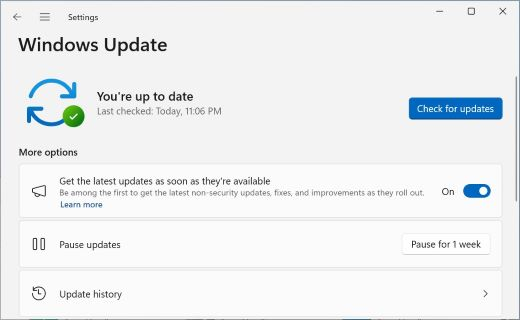
To ensure you have access to the latest and greatest features of Windows, open Settings > Windows Update or use the following shortcut:
Here, select Check for updates
And if you want to be among the first to get the latest non-security updates, set the toggle to On next to Get the latest updates as soon as they're available
Upgrading from Windows 10
If your device came with Windows 10 and you haven't yet upgraded to Windows 11, see Which Surface devices can be upgraded to Windows 11?
Related topics
- Get Windows updates as soon as they're available for your device
- Windows 11, version 25H2 update history
- Delivering continuous innovation in Windows 11
Need more help?
Technical support

For technical support, open the Surface app, describe your problem and select Get Help.
Community support

Communities can help you ask questions, and hear from experts with rich knowledge. Ask the Community.
Other support

If you can't use your Surface or have a question about something else, open Get Help to get other support online.