Note
- Incredible speed and battery life come together with next-level AI experiences and signature Surface design.
- Explore the newest Surface PCs
Get to know Surface Go
The following image shows some of the key buttons and parts of Surface Go.
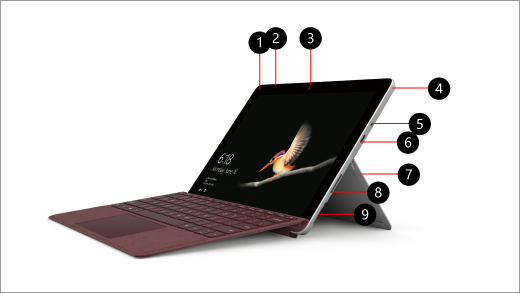
- Power button
- Volume
- Windows Hello with face sign-in
- Speaker
- Headset jack
- USB-C port
- Kickstand
- Surface Connect
- MicroSDXC card reader
Charging your Surface
You can charge your Surface using USB-C or Surface Connect. For more information, see How to charge Surface.
Surface Go features
Here are a few highlights to get you going with Surface Go.
Built with portability in mind
Surface Go is slim and light, so it’s easy to take wherever you go—work, school, home, and places in between. With a 10” PixelSense™ display and weighing just 1.15 pounds (without the Type Cover), you don’t have to think about where you’ll put it when you’re on the go. Surface Go fits easily in your bag without weighing you down.
Made for handwriting
Take notes in your own handwriting and keep them organized. By using Surface Pen and OneNote with Surface Go, you can keep your notes organized for the different parts of your life—whether it’s for work, school, or personal. (Surface Pen is sold separately.)
Get things done with Windows, Microsoft Office, and OneDrive
Get more done with Microsoft Office. It includes the apps you need to do your best work, like Word, Excel, and PowerPoint. And OneDrive is included, so your content is safe and easy to get to in the cloud. Windows 10 Home in S mode helps to keep your Surface running fast and more secure.
Make it your own
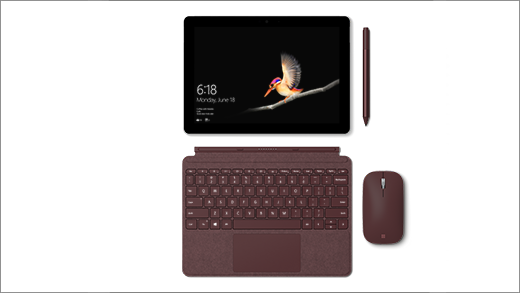
Surface Go Signature Type Cover
It’s slim, light, and made specifically for Surface Go. See it in the Store
Surface Mobile Mouse
Just like your Surface Go, this mouse is made for portability. It’s small, light and connects quickly, so you can take it out and start working. See it in the Store
Surface Pen
Write naturally with Surface Pen and Surface Go. See it in the Store
Surface Dock
Connect your Surface Go to Surface Dock to turn it into a desktop PC and use an external monitor, keyboard, and mouse. See it in the Store
Surface Go Tech specs
| Feature | Details |
|---|---|
| Software | Surface Go Windows 10 Home in S mode¹ Microsoft 365 30-day trial Surface Go for Business Windows 10 Pro Microsoft 365 30-day trial |
| Dimensions | 9.65" x 6.90" x 0.33" (245 mm x 175 mm x 8.30 mm) |
| Weight | Wi-Fi: Starting at 1.15 lbs (522 g), not including Type Cover* LTE Advanced: Starting at 1.17 lbs (532g), not including Type Cover* |
| Storage 3 | eMMC drive: 64GB, or Solid-state drive (SSD): 128GB SSD |
| Display | Screen: 10" PixelSense™ Display Resolution: 1800 x 1200 (217 PPI) resolution Aspect ratio: 3:2 Contrast ratio: 1500:1 Touch: 10-point multi-touch Corning® Gorilla® Glass 3 |
| Battery life | Wi-Fi: Up to 9 hours of video playback2 LTE Advanced: Up to 8.5 hours of battery life for local video playback2 |
| Processor | Intel® Pentium® Gold Processor 4415Y |
| Security | TPM 2.0 for enterprise security Enterprise-grade protection with Windows Hello face sign-in |
| Memory | 4GB or 8GB RAM |
| Wireless | Wi-Fi: IEEE 802.11 a/b/g/n/ac compatible Bluetooth Wireless 4.1 technology |
| Connections | 1 x USB-C 3.5 mm headphone jack 1 x Surface Connect port Surface Type Cover port4 microSDXC card reader (UHS-I) Compatible with Surface Dial* off-screen interaction |
| Cameras, video, and audio | Windows Hello face authentication camera (front-facing) 5.0MP front-facing camera with 1080p Skype HD video 8.0MP rear-facing autofocus camera with 1080p HD video Single microphone 2W stereo speakers with Dolby® Audio™ |
| Graphics | Intel® HD Graphics 615 |
| Exterior | Casing: Magnesium Color: Silver Physical buttons: Volume, Power |
| Sensors | Ambient light sensor Accelerometer Gyroscope Magnetometer |
| What’s in the box | Surface Go Power supply Quick start guide Safety and warranty documents |
| Warranty | 1-year limited hardware warranty |
| Network | Nano SIM Tray 4G LTE Advanced (Bands 1, 2, 3, 4, 5, 7, 8, 12, 13, 17, 19, 20, 25, 26, 28, 29, 30, 38, 39, 40, 41, 66) GPS/GLONASS: Standalone and assisted GNSS, accuracy up to 3 meters |
[*] Type Cover, Surface Dial, Microsoft 365, Surface Pen, and some software and accessories sold separately.
LTE functionality only available on the following consumer configuration: Surface Go Intel® 4415Y/128GB SSD/8GB RAM with LTE Advanced. Service availability and performance subject to service provider’s network. Contact your service provider for details, compatibility, pricing, SIM card, and activation.
[1] Windows 10 Home in S mode works exclusively with apps from the Microsoft Store within Windows and accessories that are compatible with Windows 10 Home in S mode. A one-way switch out of S mode is available. Learn more at Windows.com/SmodeFAQ.
[2] Surface Go battery life
Surface Go:
Up to 9 hours of battery life for local video playback. Testing conducted by Microsoft in June 2018 using preproduction Intel Pentium Gold 4415Y Processor, 128GB, 8 GB RAM device. Testing consisted of full battery discharge during video playback. All settings were default except: Wi-Fi was associated with a network and Auto-Brightness disabled. Battery life varies significantly with settings, usage, and other factors.
Surface Go with LTE Advanced:
Up to 8.5 hours of battery life for local video playback. Testing conducted by Microsoft in October 2018 using preproduction Intel® Pentium® Gold 4415Y Processor, 128GB, 8GB RAM LTE Advanced device. Testing consisted of full battery discharge during video playback. All settings were default except: LTE enabled and device connected to LTE Network. Wi-Fi and Bluetooth in airplane mode and Auto-Brightness disabled. Battery life varies significantly with settings, usage, and other factors.
[3] System software uses significant storage space. Available storage is subject to change based on system software updates and apps usage. 1 GB= 1 billion bytes. See Surface.com/Storage for more details.
[4] Compatible with the Surface Go Signature Type Cover only.
Related topics
Need more help?
Technical support

For technical support, open the Surface app or web browser, describe your problem and select Get Help.
Community support

Communities can help you ask questions, and hear from experts with rich knowledge. Ask the Community.
Other support

If you can't use your Surface or have a question about something else, open Get Help to get other support online.