
The currency key responds directly to the language/locale that the phone is set to, regardless of the language model/layout in use in SwiftKey. So if your phone language is set to English UK, you’ll get a £; if it’s English US, you should get a $ (and Yen with Japanese, Euro with French/Spanish/German and so on).
To change this:
- Go into your phone's device settings
- Tap 'Language & Input'/'Locale'
- Ensure that your chosen language is correct for your locale/the currency you wish to display
- When you next use SwiftKey, your currency key should have changed.
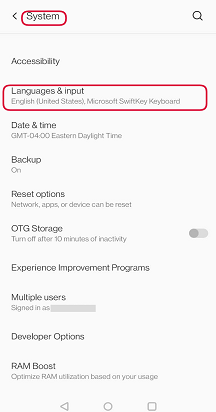

Note: This setting may vary depending on a device.
Contact Us
For more help, Contact Support at Microsoft SwiftKey Support - Contact us