
Within your Microsoft SwiftKey Keyboard, there are three available options with regards to how the spacebar functions.
- Spacebar will always insert a space
- Spacebar will complete the current word
- Spacebar will always insert a prediction
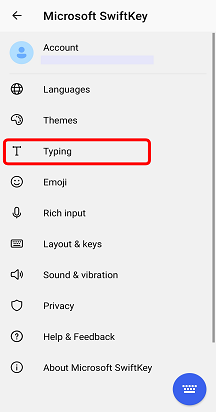
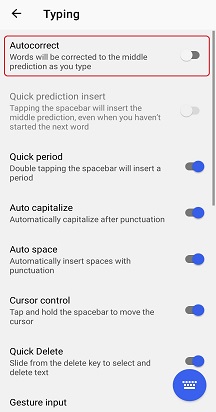
(No autocorrect selected) Spacebar will always insert a space
This means that pressing the spacebar will not affect your predictions or what you are typing. It will simply function as a spacebar. Your words will not be corrected or completed unless you tap the prediction buttons.
To change the function of your spacebar (adjust your autocorrection settings), please follow the below steps.
1. Open your Microsoft SwiftKey app
2. Tap 'Typing'
3. Uncheck 'Auto-correct' option
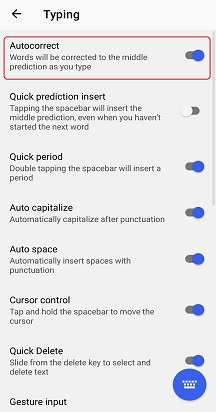
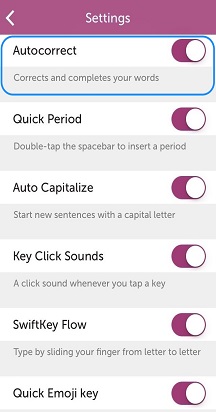
(Autocorrect selected) Spacebar will complete the current word–
Selecting this option means that pressing spacebar when typing a word will automatically enter the middle prediction. If you are not currently typing, then spacebar will simply enter a space, or a period if a space is already present (uncheck 'Quick period' to disable this).
To change the function of your spacebar (adjust your autocorrection settings), please follow the below steps.
1. Open your Microsoft SwiftKey app
2. Tap 'Typing'
3. Enable 'Auto-correct' option
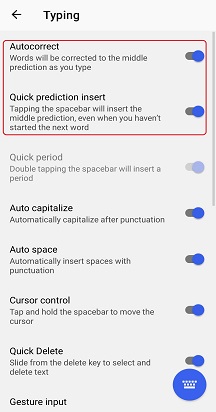
(Auto insert prediction selected) Spacebar will always insert a prediction –
Selecting this option means that pressing spacebar always enters the middle word prediction (plus one space), including next words. The option will never enter a space alone.
To change the function of your spacebar, please follow the below steps.
1. Open your Microsoft SwiftKey app
2. Tap 'Typing'
3. Enable 'Quick prediction insert' option
FAQ:
Please note that turning off Autocorrect will not turn off the prediction bar.
Read more: Can I turn off the Microsoft SwiftKey prediction bar?

Contact Us
For more help, Contact Support at Microsoft SwiftKey Support - Contact us