

If you have backed up your Microsoft SwiftKey account, your Data is still stored in Data Portal even after uninstalling your Microsoft SwiftKey Keyboard. You can sync your data when you install Microsoft SwiftKey later again.
If you wish to discontinue using Microsoft SwiftKey, and remove all data from your Microsoft SwiftKey Account, then you will need to remove your Microsoft SwiftKey Account first before uninstalling Microsoft SwiftKey from your device.
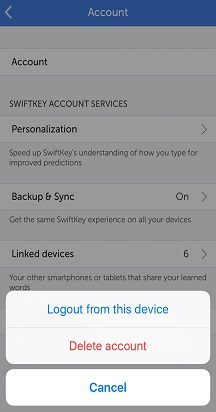
You can do so by following the steps below:
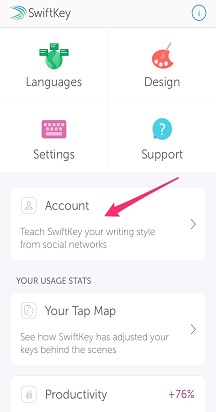
Open Microsoft SwiftKey
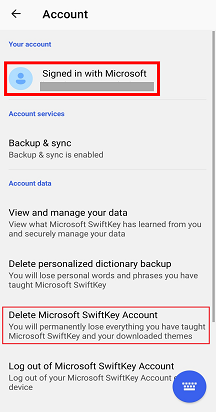
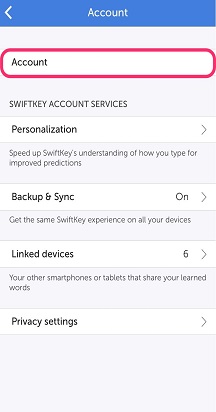
Tap 'Account'
Tap ‘Delete Microsoft SwiftKey Account’
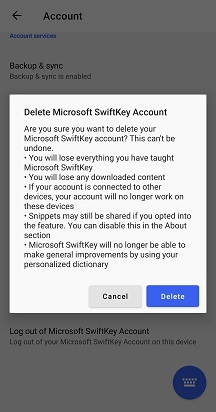
Confirm that you wish to delete your account by tapping 'Delete'
Please note: this will unregister all of your connected devices, and also delete your backed-up data.

If you forgot to delete your Microsoft SwiftKey account before uninstalling Microsoft SwiftKey app from your device, please go to your Data Portal and you can delete your data.
FAQ
You can log in to your Data portal from here: SwiftKey Data Portal - Sign In
Contact Us
For more help, Contact Support at Microsoft SwiftKey Support - Contact us