

Microsoft Whiteboard makes it easy to share ideas and collaborate with everyone in the same Microsoft Teams meeting.
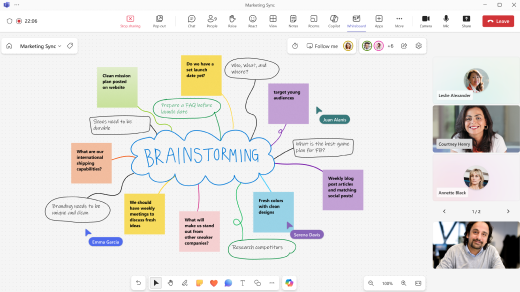
Here are some of the key benefits of using Whiteboard in Teams:
- Bring teams to gether in one inclusive space for co-creation: You can now create a new whiteboard or open up an existing one directly in a Teams meeting. There's no need to switch between apps or share your screen.
- Real time collaboration across all devices: Everyone in the meeting can view and edit the board simultaneously across any device, allowing them to bring new ideas and co-create together.
- Re-use an existing Whiteboard across multiple meetings: Users can choose an existing whiteboard to share in a Teams meeting. This allows you to prepare a whiteboard ahead of time or continue working iteratively on a project.
Learn more
- Use Whiteboard in a Teams meeting
- Share a whiteboard in Microsoft Teams
- Continue working on a whiteboard after a meeting ends
- Use annotation while sharing your screen in Teams
- Use Whiteboard in Teams on Mobile
- Use Whiteboard in Teams on Surface Hub
- Use Whiteboard in Teams on MTR all-in-one devices
- Get started with Whiteboard for Teams Rooms with a console