
The Calculator app for Windows can help you calculate dates. Depending on the option you choose, Date Calculation either calculates the difference between two dates, or it adds days to (or subtracts days from) a date.
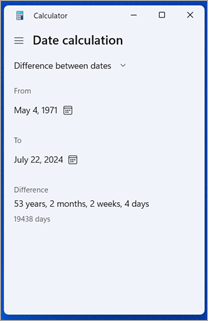

To calculate the difference between two dates:
- Select Start
 , and then select Calculator in the list of apps.
 - Select the Open Navigation
 button.
 - Select Date Calculation. By default, Difference between dates is selected.
- Select a date under From.
- Select a date under To. The number of days between the dates you selected displays under Difference.
To find a date that's years, months, or days in the past or future of a specific date:
- Select Start
, and then select Calculator in the list of apps.
- Select the Open Navigation
button.
- Select Date Calculation.
- Select Add or subtract days.
- Select a date.
- Select either Add or Subtract.
- Select the number of years, months, and days you want to add to, or subtract from, your chosen date. The resulting date displays under Date.