The default line spacing in Word is 1.15. By default, paragraphs are followed by a blank line and headings have a space above them.
Go to Home > Line and Paragraph Spacing
 and then choose Line Spacing Options.

Under Spacing, choose an option in the Line spacing box.

Adjust the Before and After settings if you want to change spacing between paragraphs.
Select Set as Default.
Choose All documents based on the Normal template.
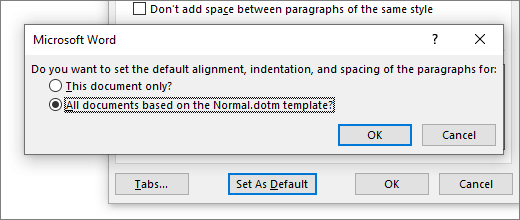
Select OK.
For more info, go to Adjust indents and spacing.
The default line spacing in Word is 1.15. By default, paragraphs are followed by a blank line and headings have a space above them.
- Go to Home > Line and Paragraph Spacing.

- Select Line Spacing Options and then choose the options you want under Spacing.

- To change the spacing before or after the selected paragraphs, select the arrow next to Before or After and enter the amount of space that you want.
- Select Set as Default.
- Choose All documents based on the Normal template.
- Select OK.
For more info, go to Adjust indents and spacing.
You can change the line spacing, but the next time you create a new document, Word for the web reverts back to 1.15 line spacing.

