A table of contents in Word is based on the headings in your document.
Add heading styles
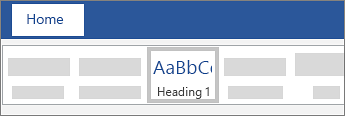
For each heading that you want in the table of contents, select the heading text, go to Home > Styles, and then choose Heading 1, 2, or 3.
Create the table of contents
- Put your cursor where you want to add the table of contents.
- Go to References > Table of Contents, and choose Automatic Table 1 or Automatic Table 2, or choose Custom Table of Contents to create your own style.
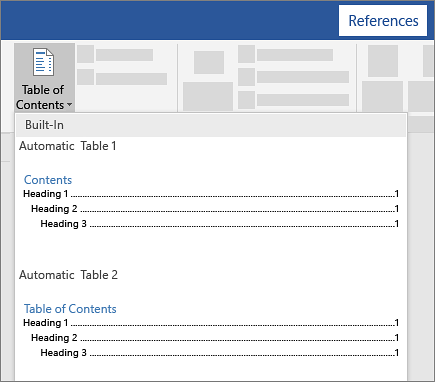
- If you make changes to your document that affect the table of contents, update the table of contents by right-clicking the table of contents and choosing Update Field.
Apply heading styles
Select the text you want to include in the table of contents, and then on the Home tab, click a heading style like Heading 1.
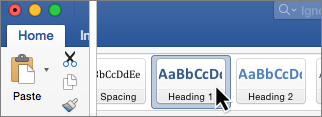
Do this for all of the text you want to show up in the table of contents.
Create the table of contents
Word uses the headings in your document to build an automatic table of contents that can be updated when you change the heading text, sequence, or level.
Click where you want to insert the table of contents – usually near the beginning of a document.
Click References > Table of Contents and then choose an Automatic Table of Contents style from the list.
Note
If you use a Manual Table of Contents style, Word won't use your headings to create a table of contents and won't be able to update it automatically. Instead, Word will use placeholder text to create the look of a table of contents so you can manually type each entry into the table of contents.
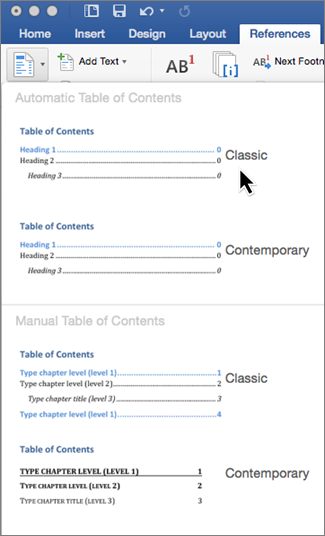
If you want to Format or customize your table of contents, you can. For example, you can change the font, the number of heading levels, and whether to show dotted lines between entries and page numbers.
Add heading styles
For each heading that you want in the table of contents, select the heading text, go to Home > Styles, and then choose Heading 1 or 2.
Create the table of contents
- Put your cursor where you want to add the table of contents.
- Go to References > Insert Table of Contents,.
