

Delete cells, columns, or rows in a Word table by using the right-click menus.
If you want to delete an entire table, see Delete a table.
- Right-click in a table cell, row, or column you want to delete.
- On the Mini toolbar, click Delete.
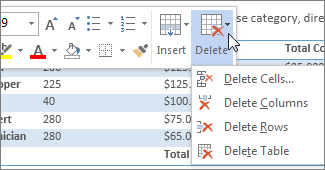
- Choose Delete Cells, Delete Columns, or Delete Rows.
Tip
You can delete the contents of a table row or column without deleting the table structure. To do this, select the row or column and then press the Delete key.