
Using dictation
Dictating with your voice
1. Make sure you are on a supported browser such as Edge, Firefox, or Chrome.
2. Go to Home > Dictate. First-time users will be prompted to enable microphone permissions.
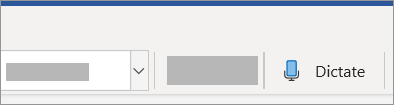
3. A mic icon will appear - wait for it to turn on to be sure it started listening.
Tip
On Windows, use Alt + ` (backquote) to toggle the mic
4. Insert punctuation any time by saying them explicitly.
5. Fix mistakes with suggestions or keyboard without having to turn off the mic icon.
6. Exit dictation with Close (X) in the Dictation toolbar or pressing the button in the ribbon again.
Dictation and language settings
Click on the gear icon to see the following settings:
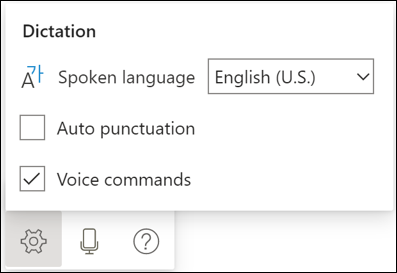
Auto Punctuation: Toggle the check-mark on or off, if it is available for the language chosen.
Voice Commands: Toggle commanding on or off. By default, it is turned on for supported languages.
Spoken Language: View and change languages in the drop-down. By default, Dictation is set to your document language in Office.
Supported Languages
Chinese (China)
English (Canada)
English (United Kingdom)
English (United States)
French (France)
German (Germany)
Italian (Italy
Spanish (Spain)
Spanish (Mexico)
Preview languages *
Danish
Dutch (Netherlands)
English (Australia)
English (India)
Finnish
French (Canada)
Japanese
Norwegian (Bokmål)
Portuguese (Brazil)
Swedish (Sweden)
* Preview Languages may have lower accuracy or limited punctuation support.
Making corrections
Fix mistakes with suggestions or keyboard without having to turn off the mic icon. At the moment, corrections cannot be made fully with voice.
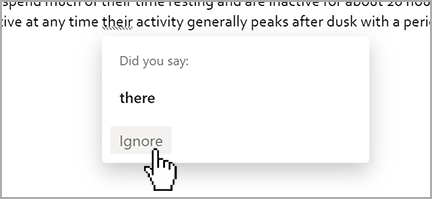
Markings may appear under words with alternates that we may have misheard.
If the marked word is already correct, you can select Ignore.
What can I say?
Choose your language:
English | Chinese | Spanish | French | German | Italian | Portuguese | Japanese | Norwegian | Swedish | Danish | Dutch | Finnish
English
Dictation is more powerful with punctuation and voice commands (preview). Try phrases like "new line", "delete", "bold that", "underline last sentence", "start list".
Adding punctuation
| Phrase | Output |
|---|---|
| Period | . |
| Comma | , |
| Question mark | ? |
| Exclamation mark | ! |
| New line | New line (i.e. Enter) |
| Colon | : |
| Semicolon | ; |
| Open quotes | " |
| Close quotes | " |
Editing
| Undo |
|---|
| Delete |
| Delete that |
| Delete last word |
| Delete last sentence |
Formatting
| Bold |
|---|
| Italics |
| Underline |
| Strikethrough |
| Superscript |
| Subscript |
| Remove [format] |
| Clear all formatting |
| [format] that |
| [format] last word |
| [format] last sentence |
| Align [left, center, right] |
Creating lists
| Start list |
|---|
| Start numbered list |
| Next line |
| Exit list |
One-Shot Commenting
| Add comment [content] |
|---|
While dictating
| Show help |
|---|
| Pause dictation |
| Exit dictation |
Chinese
| Phrase | Output |
|---|---|
| 句 号 | 。 |
| 逗 号 | , |
| 换 行 | New line |
| 问 号 | ? |
Spanish
Adding punctuation
| Phrase | Output |
|---|---|
| punto | . |
| coma | , |
| signo de apertura de interrogación | ¿ |
| signo de interrogación | ? |
| signo de apertura de exclamación | ¡ |
| signo de exclamación | ! |
| salto de línea nueva línea |
nueva línea |
| dos puntos | : |
| punto y coma | ; |
| comillas izquierdas | « |
| comillas derechas | » |
French
Adding punctuation
| Phrase | Output |
|---|---|
| point | . |
| virgule | , |
| point d'interrogation | ? |
| point d'exclamation | ! |
| saut de ligne | saut de ligne |
| deux points | : |
| point-virgule | ; |
| guillemet gauche guillemet ouvrant |
« |
| guillemet droit guillemet fermant |
» |
German
Adding punctuation
| Phrase | Output |
|---|---|
| punkt satzende |
. |
| komma | , |
| fragezeichen | ? |
| ausrufezeichen rufzeichen |
! |
| neue zeile zeilenumbruch |
neue zeile |
| doppelpunkt kolon |
: |
| strichpunkt semikolon |
; |
| öffnendes anführungszeichen beginn zitat |
? |
| schließendes anführungszeichen ende zitat |
" |
Italian
Adding punctuation
| Phrase | Output |
|---|---|
| punto | . |
| virgola | , |
| punto interrogativo punto di domanda |
? |
| punto esclamativo | ! |
| a capo nuova riga |
nuova riga |
| due punti | : |
| punto e virgola | ; |
| virgolette aperte | « |
| virgolette chiuse | » |
Portuguese
Adding punctuation
| Phrase | Output |
|---|---|
| ponto final | . |
| vírgula | , |
| ponto de interrogação | ? |
| ponto de exclamação | ! |
| nova linha mudar de linha |
nova linha |
| dois pontos | : |
| ponto e vírgula | ; |
| abrir aspas | " |
| fechar aspas | " |
Japanese
| Phrase | Output |
|---|---|
| 読 点 | 、 |
| 句 点 | 。 |
| く て ん | 。 |
| ク エ ス チ ョ ン マ ー ク | ? |
| 疑 問 符 | ? |
| 改 行 か い ぎ ょ う |
New line |
| び っ く り マ ー ク | ! |
| 感 嘆 符 | ! |
| か っ こ 開 く | ( |
| か っ こ 閉 じ る | ) |
Norwegian
Adding punctuation
| Phrase | Output |
|---|---|
| punktum | . |
| komma | , |
| spørsmålstegn | ? |
| utropstegn | ! |
| ny linje | ny linje |
Swedish
Adding punctuation
| Phrase | Output |
|---|---|
| punkt | . |
| kommatecken | , |
| frågetecken | ? |
| utropstecken | ! |
| plustecken | + |
| påbörja ny rad ny rad |
ny rad |
Danish
Adding punctuation
| Phrase | Output |
|---|---|
| punktum | . |
| komma | , |
| spørgsmålstegn | ? |
| udråbstegn | ! |
| plustegn | + |
| linjeskift | linjeskift |
| kolon | : |
| semikolon | ; |
Dutch
Adding punctuation
| Phrase | Output |
|---|---|
| punt | . |
| komma | , |
| vraagteken | ? |
| uitroepteken | ! |
| plusteken | + |
| nieuwe regel regeleinde |
nieuwe regel |
| puntkomma | ; |
| dubbele punt | : |
Finnish
Adding punctuation
| Phrase | Output |
|---|---|
| piste | . |
| pilkku | , |
| kysymysmerkki | ? |
| huutomerkki | ! |
| plusmerkki | + |
| uusi rivi rivinvaihto |
uusi rivi |
Troubleshooting
Microphone issues
Microphone doesn't have access
If you see "We don't have access to your microphone":
- Make sure no other application or web page is using the microphone and try again.
Microphone isn't working
If you see "There is a problem with your microphone" or "We can't detect your microphone":
- Test the microphone to make sure it's working.
Accuracy issues or missed words
If you see a lot of incorrect words being output or missed words:
- Make sure you're on a fast and reliable internet connection.
- Avoid or eliminate background noise that may interfere with your voice.
- Try speaking more deliberately.
Privacy
This service does not store your audio data or transcribed text.
Your speech utterances will be sent to Microsoft and used only to provide you with text results.
For more information about experiences that analyze your content, see Connected Experiences in Office.