

Note
This content applies to Word for Windows (including Word with a Microsoft 365 subscription). The steps may differ in Word for Mac and Word for the web.
Try it!
Here's how to add, replace, and format text in Word:
Add text
- Place the cursor where you want to add the text.
- Start typing.
Replace text
Select the text you want to replace.
- To select a single word, double-click it.
- To select a line, click to the left of it.
Start typing.
Format text
Select the text you want to format.
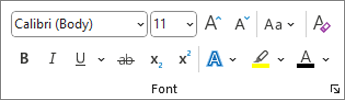
From the pop up toolbar or the Home tab, select an option to change the Font, Font Size, Font Color, or make the text bold, italics, or underline.
Copy formatting
Select the text with the formatting you want to copy.
Select
 Format painter, and then select the text you want to copy the formatting to.
Tip
Double-click
Format painter if you want to copy the formatting in more than one place.