

The Advanced Word options control features that affect editing, display, printing, and file compatibility. Most users do not need to change these settings.
To select your advanced Word options, select File > Options, and on the left pane, select Advanced. You may need to scroll within the Advanced pane to find the specific option you are looking for.
Note
This content applies to the Windows desktop versions of Word. The features described here aren’t applicable to Word for the web or Word for Mac.
| Editing options Set up the way you select, replace, and format words and paragraphs. |

|
|---|---|
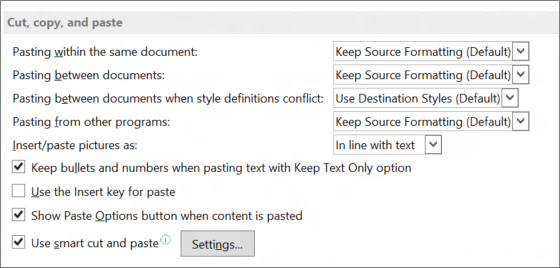
| Cut, copy, and paste Choose how you want to paste content and formatting within the same document or between different documents and apps. |
|
| Image Size and Quality Apply image size and quality settings for an open document or for all new documents. |

|
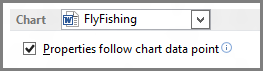
| Chart Allow custom formatting and labels to stay with data points, even if the chart changes. |
|
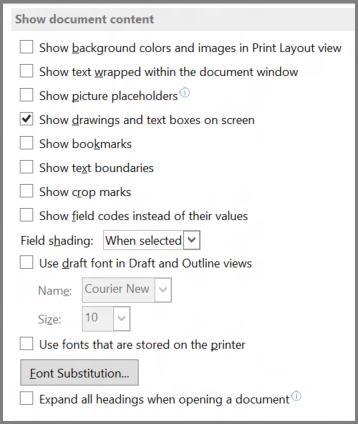
| Show document content Choose formatting, text, and image options. |
|
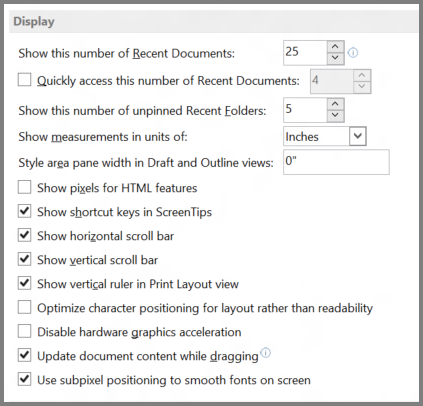
| Display Choose a measurement format, show scrolling bars, and select the number of documents shown in the Recent Documents list. |
|
| Print Optimize the appearance of the hard copy version of the document or change your printer paper size. |

|
| Save Save backup copies, automatically save changes to templates, or allow backup saves. |

|
| Preserve fidelity when sharing this document Make sure the look of your document is preserved when you share the document with someone who uses a different version of Word. |

|
| General Among the options in this section, you can change where Word saves your changes by selecting File Locations, and you can choose to open documents in Draft view. |

|
| Layout options for: Modify the layout, such as character spacing, for an open document or all new documents. |

|