
Avec Outlook sur votre PC, Mac ou appareil mobile, vous pouvez :
- organiser votre courrier de façon à vous concentrer sur l’essentiel ;
- gérer votre calendrier pour planifier des réunions et rendez-vous ;
- partager des fichiers à partir du cloud afin que tout le monde dispose toujours de la version la plus récente ;
- rester connecté et productif où que vous soyez.
Ajouter un compte de courrier
- Ouvrez Outlook et sélectionnez Fichier>Ajouter un compte.
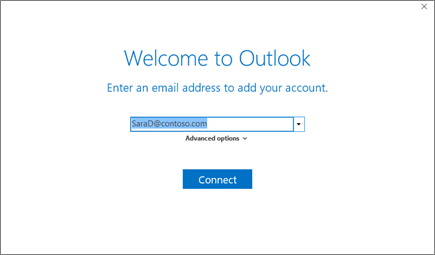
Si vous n’avez pas lancé Outlook auparavant, un écran d’accueil s’affiche.
- Entrez votre adresse e-mail, puis sélectionnez Se connecter.
Si votre écran présente un aspect différent, entrez vos nom, adresse e-mail et mot de passe, puis sélectionnez Suivant. - Si vous y êtes invité, entrez votre mot de passe et sélectionnez OK.
- Sélectionnez Terminer.
Vous avez besoin d’une aide supplémentaire ? Consultez les articles connexes spécifiques à votre appareil.
Suivant :Créer et envoyer un e-mail dans Outlook
Articles connexes
Ajouter un compte de messagerie à Outlook pour Windows
Ajouter un compte de courrier dans Outlook pour Mac
Configurer le courrier électronique dans l’application Outlook pour Android