
Last Updated: March 10, 2026
ISSUE
When you start a new email, view an existing email, or reply to an email you may see the error message:
“This is not a valid style name.”
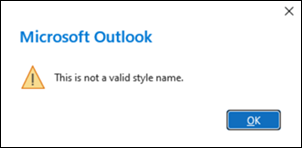
The error occurs when Outlook is rendering the signature. In addition, you may see the signature in the email now has a <DIV> tag inserted.
This issue occurs with some signatures and if Outlook is set to use the message format as Rich Text (RTF).
STATUS: FIXED
This issue is fixed in production as of 2/28/2026.
The fix does not address broken signatures. Make sure to delete the broken signatures and create new ones. For more information, please go to How to add and change an email signature in Outlook.
If you worked around the issue by disabling roaming signatures, you can now re-enable them. To re-enable roaming signatures, use Regedit to delete the DisableRoamingSignatures registry key at the path below:
HKEY_CURRENT_USER\Software\Microsoft\Office\16.0\Outlook\Setup
DWORD: DisableRoamingSignatures
Value: 1
Workaround #1
To work around the issue, set classic Outlook to use HTML for the message format.
- Select File > Options > Mail.
- Set Compose messages in this format: to HTML.
Workaround #2
To immediately stop the issue, disable the signature.
- Select File > Options > Mail > Signatures.
- At the bottom of the Signatures and Stationary dialog box, set New messages: and Replies/Forward: to None.
Additional Resources
Create, add, or change an email signature in Outlook
More Resources
 Ask the experts
Connect with experts, discuss the latest Outlook news and best practices, and read our blog.
 Get help in the community
Ask a question and find solutions from Support Agents, MVPs, Engineers, and Outlook users.
 Suggest a new feature
We love reading your suggestions and feedback! Share your thoughts. We're listening.
See Also
Fixes or workarounds for recent issues in classic Outlook for Windows