
참고
원래 게시 날짜: 2026년 3월 16일
마지막 업데이트 날짜: 2026년 5월 12일
KB ID: 5084567
이 문서의 내용
- 개요
- 주요 기능
- 인증서 업데이트 설정 참조
- 아키텍처
- 1단계: 엔터프라이즈 단계에서 검색 및 상태 모니터링
- 2단계: 보안 부팅 인증서 업데이트 오케스트레이션 스크립트
- E2E 배포 단계(빠른 참조 가이드)
- 문제 해결
- 로그 변경
개요
이 가이드에서는 그룹 정책 및 점진적 출시 웨이브를 사용하는 Windows 보안 부팅 DB 인증서 업데이트를 위한 자동화된 배포 시스템에 대해 설명합니다.
보안 부팅 인증서 출시 자동화는 제어되고 점진적인 방식으로 도메인 가입 컴퓨터에 Windows 보안 부팅 DB 인증서 업데이트를 배포하는 PowerShell 기반 시스템입니다.
주요 기능
| 기능 | 설명 |
|---|---|
| 점진적 롤아웃 | 1 > 2 > 4 > 8... 버킷당 장치 |
| 자동 차단 | 연결할 수 없는 디바이스가 있는 버킷은 제외됩니다 |
| 자동화된 GPO 배포 | 단일 오케스트레이터 스크립트로 모든 것을 처리 |
| 예약된 작업 실행 | 대화형 프롬프트가 필요하지 않습니다. |
| 실시간 모니터링 | 진행률 표시줄이 있는 상태 뷰어 |
인증서 업데이트 설정 참조
이 섹션의 내용
AvailableUpdatesPolicy 그룹 정책
| 레지스트리 위치 | HKEY_LOCAL_MACHINE\SYSTEM\CurrentControlSet\Control\SecureBoot |
|---|---|
| 이름 | AvailableUpdatesPolicy |
| Value | 0x5944(DWORD) |
GPO/ADMX 제어 키는 다음을 수행합니다.
- 재부팅 후에도 지속됨
- 그룹 정책/MDM에 의해 설정됨
- 재시도 루프를 일으키지 않음(ClearRolloutFlags를 통해 지워짐)
- 정책 기반 배포에 대한 올바른 키입니다.
참조: IT 관리 업데이트가 있는 Windows 장치의 보안 부팅을 위한 그룹 정책 개체(GPO) 방법
WinCSFlags - Windows 구성 시스템 플래그
도메인 관리자는 또는 Windows OS 업데이트와 함께 릴리스 된 WinCS(Windows 구성 시스템 )를 사용하여 도메인에 가입된 Windows 클라이언트 및 서버에 보안 부팅 업데이트를 배포할 수 있습니다. 보안 부팅 구성을 컴퓨터에 로컬로 쿼리하고 적용하는 CLI(명령줄 인터페이스) 유틸리티 로 구성됩니다.
| 기능 이름 | WinCS 키 | 설명 |
|---|---|---|
| Feature_AllKeysAndBootMgrByWinCS | F33E0C8E002 | 이 키를 사용하도록 설정하면 다음과 같은 Microsoft 제공 보안 부팅 새 인증서를 장치에 설치할 수 있습니다.
|
참조: 보안 부팅을 위한 WinCS(Windows 구성 시스템) API
아키텍처
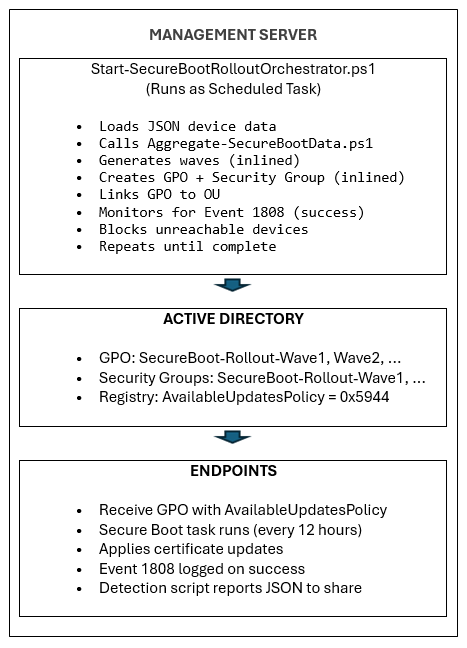
1단계: 엔터프라이즈 수준에서 검색 및 상태 모니터링
이 섹션의 내용
1단계에 필요한 스크립트
샘플 보안 부팅 인벤토리 데이터 수집 스크립트
참고
중요 샘플 스크립트가 포함된 다음 문서는 사용 중지되었습니다. 2026년 5월 12일 또는 그 이후에 릴리스된 Windows 업데이트를 설치한 경우 샘플 스크립트는 디바이스의 %systemroot%\SecureBoot\ExampleRolloutScripts 폴더에서 찾을 수 있습니다.
| 샘플 스크립트 이름 | 용도 | 실행 위치 |
|---|---|---|
| 샘플 Detect-SecureBootCertUpdateStatus.ps1 스크립트 | 장치 상태 데이터를 수집합니다. | 각 엔드포인트(GPO를 통해) |
| 샘플 Aggregate-SecureBootData.ps1 스크립트 | 보고서 및 대시보드 생성 | 관리 워크스테이션 |
| 샘플 Deploy-GPO-SecureBootCollection.ps1 스크립트 | 데이터 수집을 위한 GPO 만들기 자동화 | 도메인 컨트롤러 |
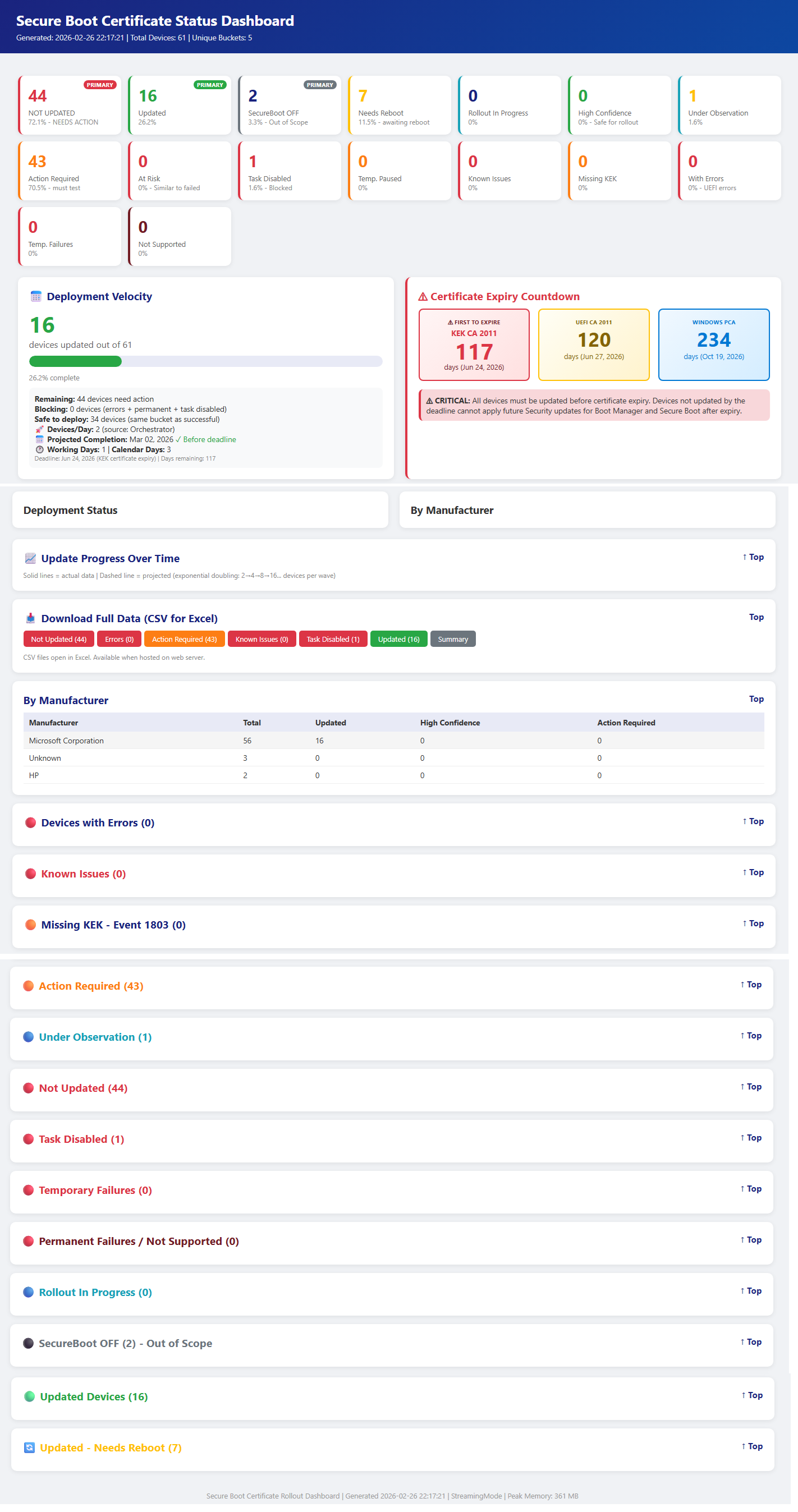
위의 1단계 스크립트의 샘플 출력입니다.
"1단계: 엔터프라이즈 수준의 검색 및 상태 모니터링"으로 돌아가기
로컬 테스트
GPO를 통해 배포하기 전에 단일 컴퓨터에서 컬렉션 스크립트를 테스트하여 기능을 확인합니다.
로컬에서 컬렉션 스크립트 실행
관리자 권한 PowerShell 프롬프트를 열고 다음을 실행합니다.
& .\Detect-SecureBootCertUpdateStatus.ps1 -OutputPath "C:\Temp\SecureBootTest"JSON 출력 확인
# View the collected data
Get-Content "C:\Temp\SecureBootTest\*_latest.json" | ConvertFrom-Json | Format-List
확인할 주요 필드
• SecureBootEnabled – true 또는 false여야 합니다.
• OverallStatus – Complete, ReadyForUpdate, NeedsData 또는 Error
• BucketHash – 신뢰도 데이터 일치를 위한 디바이스 버킷
• SecureBootTaskEnabled - 보안 부팅 업데이트 작업의 상태를 표시합니다.테스트 집계 스크립트
# Generate reports from collected data
& ".\Aggregate-SecureBootData.ps1" `
    -InputPath "C:\Temp\SecureBootTest" `
    -OutputPath "C:\Temp\SecureBootReports"

# Open the HTML dashboard
Start-Process "C:\Temp\SecureBootReports\SecureBoot_Dashboard_*.html"
"1단계: 엔터프라이즈 수준의 검색 및 상태 모니터링"으로 돌아가기
네트워크 공유 설정
네트워크 공유 만들기
파일 서버에서 컬렉션 데이터를 위한 전용 공유를 만듭니다.
# Run on file server as Administrator
$SharePath = "D:\SecureBootCollection"
$ShareName = "SecureBootData$"

# Create folder
New-Item -ItemType Directory -Path $SharePath -Force

# Create hidden share ($ suffix hides from browse list)
New-SmbShare -Name $ShareName -Path $SharePath `
    -Description "Secure Boot Certificate Status Collection" `
    -FullAccess "Domain Admins" `
    -ChangeAccess "Domain Computers"
NTFS 권한 구성
# Get current ACL
$Acl = Get-Acl $SharePath

# Allow Authenticated Users to write files
$WriteRule = New-Object System.Security.AccessControl.FileSystemAccessRule(
    "Domain Computers",
    "Modify",
    "ContainerInherit,ObjectInherit",
    "None",
    "Allow"
)
$Acl.AddAccessRule($WriteRule)

# Allow Domain Admins full control (for aggregation)
$AdminRule = New-Object System.Security.AccessControl.FileSystemAccessRule(
    "Domain Admins",
    "FullControl",
    "ContainerInherit,ObjectInherit",
    "None",
    "Allow"
)
$Acl.AddAccessRule($AdminRule)

# Apply permissions
Set-Acl -Path $SharePath -AclObject $Acl
공유 액세스 확인
# Test from a domain-joined workstation
Test-Path "\\fileserver\SecureBootData$"
# Should return: True
"1단계: 엔터프라이즈 수준의 검색 및 상태 모니터링"으로 돌아가기
GPO 배포
도메인 컨트롤러에서 제공하는 자동화 스크립트를 사용합니다.
# Run on Domain Controller as Domain Admin for interactive OU Section – Recommended
# Replace the “Contoso.com”, “Contoso” with the name of the domain
# Replace FILESERVER with the file server name.  Script shows list of OUs to deploy GPO on
.\Deploy-GPO-SecureBootCollection.ps1 `
    -DomainName "contoso.com" `
    -AutoDetectOU `
    -CollectionSharePath "\\FILESERVER\SecureBootData$" `
    -ScriptSourcePath ".\Detect-SecureBootCertUpdateStatus.ps1" `
    -Schedule "Daily" `
    -ScheduleTime "14:00" `
    -RandomDelayHours 4
이 스크립트는 다음을 수행합니다.
- 지정된 이름으로 새 GPO를 만듭니다.
- 고가용성을 위해 컬렉션 스크립트를 SYSVOL에 복사합니다.
- 컴퓨터 시작 스크립트 구성
- GPO를 대상 OU에 연결합니다.
- 선택적으로 정기 수집을 위해 예약된 작업을 만듭니다.
다음 표는 플릿 크기에 따라 지연 기간에 대한 지침을 제공합니다.
| 플릿 크기 | 지연 범위 |
|---|---|
| 1-10K 디바이스 | 4시간 |
| 10K-50K 장치 | 8시간 |
| 50K+ 장치 | 12-24시간 |
"1단계: 엔터프라이즈 수준의 검색 및 상태 모니터링"으로 돌아가기
GPO 설정 요약
| 설정 | 위치 | Value |
|---|---|---|
| 시작 스크립트 | 컴퓨터 구성 → 스크립트 | Detect-SecureBootCertUpdateStatus.ps1 |
| 스크립트 매개 변수 | (동일) | -OutputPath "\\server\share$" |
| 실행 정책 | PowerShell→ 컴퓨터 구성 → 관리 템플릿 | 로컬 및 원격 서명 허용 |
| 예약된 작업 | 컴퓨터 구성 → 기본 설정 → 예약된 작업 | 매일/매주 수집 |
"1단계: 엔터프라이즈 수준의 검색 및 상태 모니터링"으로 돌아가기
확인
테스트 머신에서 GPO 업데이트 강제 적용
# On a test workstation
gpupdate /force

# Reboot the client machines to startup script or it will trigger on next schedule.
Restart-Computer -Force
데이터 수집 확인
# Check if data was collected (on file server or from any machine)
Get-ChildItem "\\fileserver\SecureBootData$" |
    Sort-Object LastWriteTime -Descending |
    Select-Object -First 10

# Verify JSON content
Get-Content "\\fileserver\SecureBootData$\TESTPC_latest.json" | ConvertFrom-Json
GPO 응용 프로그램 확인
# Verify GPO is applied to the computer
gpresult /r | Select-String "SecureBoot"
# The script also saves a local copy for redundancy.
Get-ChildItem "C:\ProgramData\SecureBootCollection\"
"1단계: 엔터프라이즈 수준의 검색 및 상태 모니터링"으로 돌아가기
2단계: 보안 부팅 인증서 업데이트 오케스트레이션 스크립트
중요
원격 서버 공유에 대한 각 엔드포인트의 데이터 수집을 포함하여 1단계가 완료되었는지 확인합니다.
이 섹션의 내용
- 2단계에 필요한 스크립트
- Start-SecureBootRolloutOrchestrator.ps1
- Deploy-OrchestratorTask.ps1
- Get-SecureBootRolloutStatus.ps1
2단계에 필요한 스크립트
샘플 보안 부팅 인벤토리 데이터 수집 스크립트
참고
중요 샘플 스크립트가 포함된 다음 문서는 사용 중지되었습니다. 2026년 5월 12일 또는 그 이후에 릴리스된 Windows 업데이트를 설치한 경우 샘플 스크립트는 디바이스의 %systemroot%\SecureBoot\ExampleRolloutScripts 폴더에서 찾을 수 있습니다.
| 샘플 스크립트 이름 | 용도 | 실행 장치: |
|---|---|---|
| 샘플 Detect-SecureBootCertUpdateStatus.ps1 스크립트 | 장치 상태 데이터를 수집합니다. | 각 엔드포인트(GPO를 통해) |
| 샘플 Aggregate-SecureBootData.ps1 스크립트 | 보고서 및 대시보드 생성 | 관리 워크스테이션 |
| 샘플 Deploy-GPO-SecureBootCollection.ps1 스크립트 | 데이터 수집을 위한 GPO 만들기 자동화 | 도메인 컨트롤러 |
| 샘플 Start-SecureBootRolloutOrchestrator.ps1 스크립트 | 인증서 설치를 위한 자동화된 GPO 배포를 통한 완전 자동화된 지속적인 오케스트레이션 | 관리 워크스테이션 |
| 샘플 Deploy-OrchestratorTask.ps1 스크립트 | 자동 롤아웃을 위해 예약된 대로 Orchestrator 스크립트 배포 | 도메인 컨트롤러 |
| 샘플 Get-SecureBootRolloutStatus.ps1 스크립트 | 모든 워크스테이션에서 보안 부팅 인증서 롤아웃 상태 보기 | 관리 워크스테이션 |
| 샘플 Enable-SecureBootUpdateTask.ps1 스크립트 | 보안 부팅 업데이트 작업을 사용하도록 설정합니다. | 작업이 비활성화된 끝점에서 (비활성화된 경우 한 번만 실행하여 작업을 활성화) |
"2단계: 보안 부팅 인증서 업데이트 오케스트레이션 스크립트"로 돌아가기
Start-SecureBootRolloutOrchestrator.ps1
목적: 자동화된 GPO 배포를 통한 완전히 자동화된 지속적인 오케스트레이션입니다.
기능 설명
디바이스 상태에 대한 호출 Aggregate-SecureBootData.ps1
점진적 배가를 사용하여 롤아웃 웨이브를 생성합니다.
다음 방법 중 하나를 사용하여 인증서 배포를 위한 GPO를 만듭니다
- 보안 부팅 그룹 정책 AvailableUpdatesPolicy = 0x5944(기본값)
- WinCS 메서드(매개 변수 –UseWinCS)
대상 지정을 위한 AD 보안 그룹을 만듭니다.
보안 그룹에 컴퓨터 계정 추가
GPO 보안 필터링 구성
GPO를 대상 OU에 연결합니다.
차단된 버킷(연결할 수 없는 디바이스) 모니터링
장치가 복구되면 자동으로 차단 해제
사용법
# Interactive (testing)
.\Start-SecureBootRolloutOrchestrator.ps1 `
    -AggregationInputPath "\\fileserver\SecureBootData$" `
    -ReportBasePath "C:\SecureBootReports" `
    -PollIntervalMinutes 30
# Interactive (testing), leveraging WinCS method .\Start-SecureBootRolloutOrchestrator.ps1 ` -AggregationInputPath "\\fileserver\SecureBootData$" ` -ReportBasePath "C:\SecureBootReports" ` -PollIntervalMinutes 30 ` -UseWinCS관리 명령
# List blocked buckets
.\Start-SecureBootRolloutOrchestrator.ps1 -ReportBasePath "C:\SecureBootReports" -ListBlockedBuckets
# Unblock specific bucket .\Start-SecureBootRolloutOrchestrator.ps1 -ReportBasePath "C:\SecureBootReports" -UnblockBucket "Dell|Latitude5520|BIOS1.2"# Unblock all .\Start-SecureBootRolloutOrchestrator.ps1 -ReportBasePath "C:\SecureBootReports" -UnblockAll매개 변수
매개 변수 기본값 설명 AggregationInputPath 필수 끝점 JSON 파일의 UNC 경로 ReportBasePath 필수 보고서 및 상태에 대한 로컬 경로 TargetOU 도메인 루트 GPO를 연결하는 OU WavePrefix SecureBoot-Rollout GPO/그룹 명명 접두사 최대 대기 시간 72 장치 연결성을 확인하기 몇 시간 전 PollIntervalMinutes 1440 상태 확인 간격(분) 드라이런 False 변경하지 않은 상황 표시 참고
PollIntervalMinutes에 유의하세요. 오케스트레이터를 직접 실행하는 경우 기본값은 1440분(24시간)입니다. Deploy-OrchestratorTask.ps1를 통해 배포하는 경우 기본값은 30분입니다. 배포 스크립트는 자체 기본값을 오케스트레이터에 전달합니다. 활성 롤아웃에는 30분, 유지 관리 모니터링에는 1440분을 사용합니다.
선택적 매개 변수
매개 변수 기본값 설명 UseWinCS False AvailableUpdatesPolicy GPO 대신 WinCS 메서드 사용 윈CSKey F33E0C8E002 보안 부팅 구성을 위한 WinCS 키 AllowListPath (없음) 대상 지정/파일럿 롤아웃을 허용할 호스트 이름이 있는 파일의 경로입니다. .txt 또는 .csv를 지원합니다. AllowADGroup (없음) 허용할 컴퓨터 계정의 AD 보안 그룹입니다. 예: "SecureBoot-pilot-computers" ExclusionListPath (없음) 롤아웃에서 제외할 호스트 이름이 있는 파일의 경로(VIP/임원 장치) ExcludeADGroup (없음) 제외할 컴퓨터 계정의 AD 보안 그룹입니다. 예: "VIP-Computers" ListBlockedBuckets False 현재 차단된 장치 버킷 표시 UnblockBucket (없음) 특정 버킷의 차단을 해제합니다. 형식: "제조업체|모델|BIOS" UnblockAll False 차단된 모든 장치 버킷 차단 해제
"2단계: 보안 부팅 인증서 업데이트 오케스트레이션 스크립트"로 돌아가기
Deploy-OrchestratorTask.ps1
목적: 오케스트레이터를 Windows 예약 작업으로 배포합니다.
이점
- PowerShell 보안 프롬프트 없음(ExecutionPolicy 우회)
- 백그라운드에서 지속적으로 실행됩니다.
- 사용자 상호 작용이 필요하지 않습니다.
- 재부팅에서 유지됨
사용법
도메인 서비스 계정으로 배포(권장)
AvailableUpdates 그룹 정책 사용(기본 방법)
.\Deploy-OrchestratorTask.ps1 `
    -AggregationInputPath "\\server\SecureBootData$" `
    -ReportBasePath "C:\SecureBootReports" `
    -ServiceAccount "DOMAIN\svc_secureboot"
WinCS 방법 사용
.\Deploy-OrchestratorTask.ps1 `
    -AggregationInputPath "\\server\SecureBootData$" `
    -ReportBasePath "C:\SecureBootReports" `
    -ServiceAccount "DOMAIN\svc_secureboot" -UseWinCS
SYSTEM 계정으로 배포
AvailableUpdates 그룹 정책 사용(기본 방법)
.\Deploy-OrchestratorTask.ps1 `
    -AggregationInputPath "\\server\SecureBootData$" `
    -ReportBasePath "C:\SecureBootReports"
WinCS 방법 사용
.\Deploy-OrchestratorTask.ps1 `
    -AggregationInputPath "\\server\SecureBootData$" `
    -ReportBasePath "C:\SecureBootReports"  -UseWinCS
서비스 계정 요구 사항
- 도메인 관리(New-GPO, New-ADGroup, Add-ADGroupMember용)
- JSON 파일 공유에 대한 읽기 액세스 권한
- ReportBasePath에 대한 쓰기 액세스 권한
"2단계: 보안 부팅 인증서 업데이트 오케스트레이션 스크립트"로 돌아가기
Get-SecureBootRolloutStatus.ps1
목적: 모든 워크스테이션에서 출시 진행률을 봅니다.
표시되는 내용
- 예약된 작업 상태(실행 중/준비됨/중지됨)
- 현재 웨이브 번호
- 대상 디바이스와 업데이트 디바이스
- 시각적 진행률 표시줄
- 차단된 버킷 요약
- 최신 HTML dashboard에 대한 링크
사용법
# Quick status check
.\Get-SecureBootRolloutStatus.ps1 -ReportBasePath "C:\SecureBootReports"
# Continuous monitoring (refreshes every 30 seconds) .\Get-SecureBootRolloutStatus.ps1 -ReportBasePath "C:\SecureBootReports" -Watch 30# View blocked buckets .\Get-SecureBootRolloutStatus.ps1 -ReportBasePath "C:\SecureBootReports" -ShowBlocked# View wave history .\Get-SecureBootRolloutStatus.ps1 -ReportBasePath "C:\SecureBootReports" -ShowWaves# View recent log .\Get-SecureBootRolloutStatus.ps1 -ReportBasePath "C:\SecureBootReports" -ShowLog# Open dashboard in browser .\Get-SecureBootRolloutStatus.ps1 -ReportBasePath "C:\SecureBootReports" -OpenDashboard매개 변수
매개 변수 필수 여부 기본값 설명 ReportBasePath 필수 — 보고서 및 상태 파일에 대한 로컬 경로 로그 표시 선택 사항 False 최근 Orchestrator 로그 항목 표시 ShowBlocked 선택 사항 False 차단된 버킷 세부 정보 표시 ShowWaves 선택 사항 False 웨이브 기록 표시 조회 선택 사항 0(사용 안 함) 자동 새로 고침 간격(초)입니다. 예: -Watch 30은 30초마다 새로 고쳐집니다. OpenDashboard 선택 사항 False 기본 브라우저에서 최신 HTML dashboard 열기 샘플 출력
참고
==============================================================
보안 부팅 출시 상태
2026-02-17 19:30:00
======================================================Scheduled Task: RunningROLLOUT PROGRESS
상태: 진행 중
현재 웨이브: 5
총 목표: 1250
업데이트된 총계: 847Progress: [█████████████████████░░░░░░░░░░░░░░░░░░░] 67.8%BLOCKED BUCKETS: 2 buckets need attention
-ShowBlocked와 함께 실행하여 자세한 내용을 확인하세요.LATEST DASHBOARD
C:\SecureBootReports\Aggregation_20260217_193000\SecureBoot_Dashboard.html
__________________________________________________________________________________________
"2단계: 보안 부팅 인증서 업데이트 오케스트레이션 스크립트"로 돌아가기
E2E 배포 단계(빠른 참조 가이드)
이 섹션의 내용
1단계: 검색 인프라
1단계: 컬렉션 공유 만들기
# On file server
$sharePath = "D:\SecureBootData"
New-Item -ItemType Directory -Path $sharePath -Force
New-SmbShare -Name "SecureBootData$" -Path $sharePath -FullAccess "Domain Admins" -ChangeAccess "Domain Computers"
# Set NTFS permissions $acl = Get-Acl $sharePath $rule = New-Object System.Security.AccessControl.FileSystemAccessRule("Domain Computers","Modify","Allow") $acl.AddAccessRule($rule) Set-Acl $sharePath $acl2단계: 검색 GPO 배포
.\Deploy-GPO-SecureBootCollection.ps1 `
    -DomainName "contoso.com" `
    -OUPath "OU=Workstations,DC=contoso,DC=com" `
    -CollectionSharePath "\\server\SecureBootData$"
3단계: 엔드포인트가 보고할 때까지 대기(24-48시간)
# Check collection progress
(Get-ChildItem "\\server\SecureBootData$" -Filter "*.json").Count
2단계: 오케스트레이션된 롤아웃
4단계: 필수 구성 요소 확인
- 검색 GPO 배포됨(2단계)
- JSON을 보고하는 엔드포인트 50+ 개 이상
- 도메인 관리 권한이 있는 서비스 계정
- PowerShell 5.1+를 사용하는 관리 서버
5단계: 예약된 대로 Orchestrator 배포
.\Deploy-OrchestratorTask.ps1 `
    -AggregationInputPath "\\server\SecureBootData$" `
    -ReportBasePath "C:\SecureBootReports" `
    -ServiceAccount "DOMAIN\svc_secureboot"
6단계: 진행률 모니터링
.\Get-SecureBootRolloutStatus.ps1 -ReportBasePath "C:\SecureBootReports"7단계: 대시보드 보기
.\Get-SecureBootRolloutStatus.ps1 -ReportBasePath "C:\SecureBootReports" -OpenDashboard8단계: 차단된 버킷 관리
# List blocked
.\Start-SecureBootRolloutOrchestrator.ps1 -ReportBasePath "C:\SecureBootReports" -ListBlockedBuckets
# Investigate and unblock .\Start-SecureBootRolloutOrchestrator.ps1 -ReportBasePath "C:\SecureBootReports" -UnblockBucket "Manufacturer|Model|BIOS"9단계: 완료 확인
.\Get-SecureBootRolloutStatus.ps1 -ReportBasePath "C:\SecureBootReports"
# Status should show "Completed"
State Files
오케스트레이터는 ReportBasePath\RolloutState\에서 상태를 유지 관리합니다.
| 파일 | 설명 |
|---|---|
| RolloutState.json | 웨이브 기록, 대상 디바이스, 상태 |
| BlockedBuckets.json | 조사가 필요한 버킷 |
| DeviceHistory.json | 호스트 이름별 장치 추적 |
| Orchestrator_YYYYMMDD.log | 일별 활동 로그 |
문제 해결
이 섹션의 내용
Orchestrator가 진행되지 않음
예약된 작업 확인
Get-ScheduledTask -TaskName "SecureBoot-Rollout-Orchestrator"로그 확인
Get-Content "C:\SecureBootReports\RolloutState\Orchestrator_*.log" -Tail 50JSON 데이터 새로 고침 확인
(Get-ChildItem "\server\SecureBootData$" -Filter "*.json" | Where-Object { $_.LastWriteTime -gt (Get-Date).AddDays(-1) }).Count
차단된 버킷
목록이 차단되었습니다.
.\Start-SecureBootRolloutOrchestrator.ps1 -ReportBasePath "C:\SecureBootReports" -ListBlockedBuckets디바이스 연결성을 조사합니다.
펌웨어 문제를 확인합니다.
조사 후 차단을 해제합니다.
GPO가 적용되지 않음
GPO가 있는지 확인합니다.
Get-GPO -Name "SecureBoot-Rollout-Wave*"보안 필터링을 확인합니다.
Get-GPPermission -Name "GPO-Name" -All컴퓨터가 보안 그룹에 있는지 확인합니다.
대상에 GPO를 적용합니다.
gpupdate /force
로그 변경
| 날짜 변경 | 설명 변경 |
|---|---|
| 2026년 5월 12일 | 이전에는 각 샘플 스크립트 파일이 스크립트를 복사하여 붙여넣을 수 있는 개별 문서로 게시되었습니다. 2026년 5월 12일 이후에 릴리스된 Windows 업데이트부터 샘플 스크립트는 디바이스의 %systemroot%\SecureBoot\ExampleRolloutScripts 폴더에 있습니다. |