
Izmantojot Teams mobilā programma, izmēģiniet teksta paredzēšanu, lai efektīvāk rakstītu angļu valodas vārdus un frāzes. Rakstīšanas laikā ērti atlasiet parādītos ieteikumus, ietaupot laiku un samazinot pareizrakstības kļūdas.
Piezīme
Teksta paredzēšana ir pieejama tikai ASV angļu valodā.
Vienkāršāka rakstīšana, izmantojot teksta paredzēšanu
Teksta paredzēšana pēc noklusējuma ir ieslēgta — vienkārši sāciet rakstīt.
Rakstot ziņojumu, atlasiet pieskaršanās , lai pievienotu ieteikto tekstu.
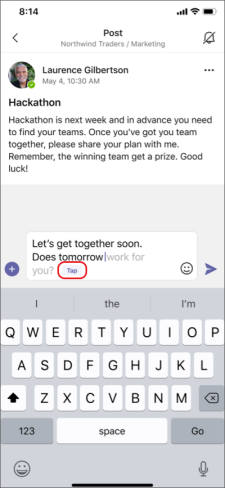
Lai noņemtu ieteikto tekstu no ziņojuma, atlasiet pogu Atpakaļ .
.
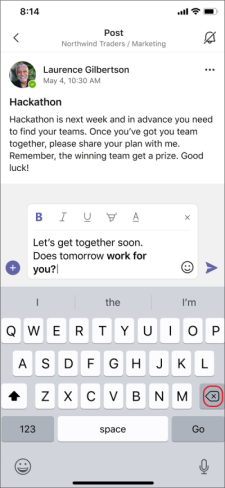
Lai ignorētu ieteikto tekstu, turpiniet rakstīt, un tas pazudīs.
Teksta prognožu izslēgšana
- Pieskarieties savam profila attēlam programmas Teams augšdaļā.
- Pieskarieties
 >Iestatījumi Tērzēšana un kanāli.
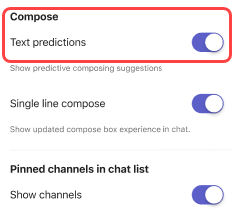
 - Pieskarieties pie pārslēga blakus Teksta paredzēšana.
Saistītie raksti
Izmantojiet ieteiktās atbildes, lai atbildētu uz ziņojumiem nerakstot