Ja esat grupas īpašnieks, varat noņemt kādu personu no savas grupas.
Blakus grupas nosaukumam atlasiet Papildu opcijas
 >Komandas iestatījumu pārvaldības
 .
.Nākamajā ekrānā atlasiet Dalībnieki un pēc tam atrodiet komandas dalībnieku sadaļā Dalībnieki un viesi.
Padoms
Varat arī meklēt dalībnieku pēc vārda.
Atlasiet Noņemt
 tās personas vārda labajā malā, kuru vēlaties noņemt.
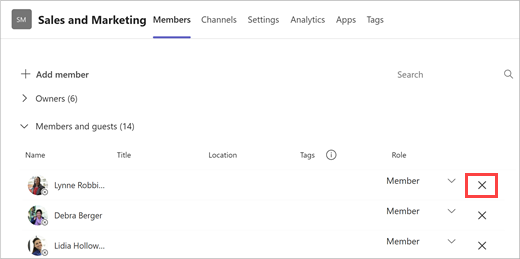
Lai noņemtu citu grupas īpašnieku, vispirms mainiet viņa lomu no īpašnieka uz dalībnieku, pēc tam noņemiet viņu.
Pēc kādas personas noņemšanas no grupas vienmēr varat to vēlāk atkal pievienot grupai, atlasot Papildu > Vairāk opcijuDalībnieka pievienošana .
.
Piezīme
Grupas īpašnieki var noņemt dalībniekus no grupas, taču tikai administrators var noņemt kādu personu no organizācijas.
Saistītie raksti
Komandas īpašnieka, dalībnieka un viesu iespējas pakalpojumā Teams
Komandas iestatījumu un atļauju pārvaldība pakalpojumā Teams

