To start a shared focus plan, you need to have a premium Viva Insights subscription. For more information, refer to Plans and environments. You don't need to have a premium Viva Insights subscription to participate in a shared focus plan.
Note
This article talks about a focus plan shared between a group. If you just want to block out time on your calendar to focus, refer to this Focus plan article.
A shared focus plan in Microsoft Viva Insights helps your team book daily, uninterrupted time to get work done. This plan also helps build shared productivity habits with your coworkers.
Create a shared focus plan
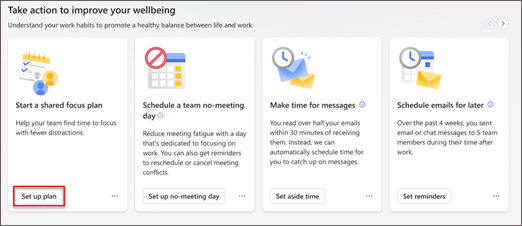
In the Wellbeing tab, go to the Take action to improve your wellbeing section.
Find the Start a shared focus plan card and select the Set up plan button.
In Set up a shared focus plan, select:
- Who you want to invite to your shared focus plan.
Use the search bar to find people by name.
- The number of hours you want your team to focus each day.
- Whether to schedule focus time in the morning or afternoon.
- The earliest you'd want your team to focus.
- Whether you want a Teams reminder to start focusing.
- Whether to silence Teams notifications during focus time.
- Whether you want to add a custom message.
If you do, add your message in the text box provided.
- Select Share when you're ready to send out your invite.
After you send the invitation, Viva Insights sends invitees a notification in Teams.
Join a shared focus plan
When someone invites you to join a shared meeting plan, you get an invitation in Teams. Select the notification to view the plan's settings and choose whether to join it.
Your join options differ depending on whether you're already enrolled in a focus plan.
If you're not currently enrolled in a focus plan, you can select Join plan, which automatically books time based on the preferences the organizer set. After you join, you get a confirmation card. If you need to change your settings, select Change settings there.
If you don't want to join, select the X in the notification's top-right corner. The invite remains on your Wellbeing tab, so if you change your mind, you can join later.
If you are already enrolled in a focus plan, you can select:
- Join plan, which switches you from your individual plan to the shared plan.
- Edit settings, which switches you from your individual plan to the shared plan, but lets you change some of the settings first. Adjust your focus hours per day, when you focus, and whether you want to silence Teams notification during focus time. Then, select Join plan.
If you don't want to join, select the X in the notification's top-right corner. You stay enrolled in your individual plan, but don't join this new shared one. The invite remains on your Wellbeing tab, so if you change your mind, you can join later.
View and edit plan details
- To view details about your shared focus plan, go to the Track your progress section of the Wellbeing tab.
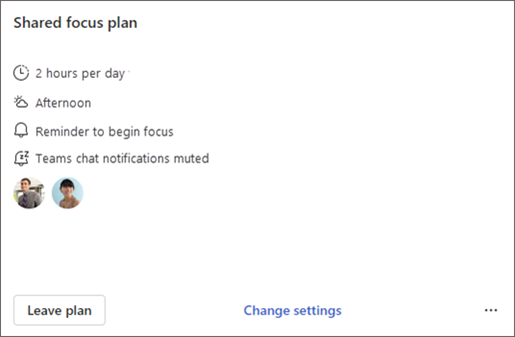
- Use the arrows to right of the section header to find the Shared focus plan card. Here, you get a summary of the plan's settings: how much time your team focuses a day, what time of the day focus time occurs, whether you get a reminder to start focus time, and whether Viva Insights mutes Teams chats during focus time.
- To change any of these settings, select Change settings.
Leave a plan
You can also leave a plan through the Shared focus plan card. Select Leave plan, and then confirm you want to leave.
Note
When you leave a shared focus plan as a participant, you don't remove anyone else from it. Other plan participants stay in the focus plan until they leave it. When you leave a shared focus plan as an organizer, you end the plan for all participants.
If you have a personal focus plan, you'll still be enrolled in it even after you leave the shared focus plan. To leave the personal focus plan or change its settings, refer to our Focus plan documentation.
Concepts
To learn about how Viva Insights schedules focus time, refer to Focus plan.
