

Why?
To quickly get a total instead of typing each number into a calculator.
How?
Click the first empty cell below a column of numbers.
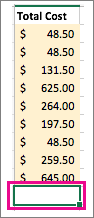
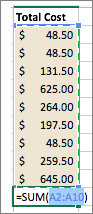
On the Formulas toolbar, click AutoSum.
Tip
If the blue border does not contain all of the numbers that you want to add, adjust it by dragging the sizing handles on each corner of the border.
-
Press RETURN .

Tip
If you want a quick total that doesn't have to appear on the sheet, select all the numbers in the list, and then look at the status bar at the bottom of the workbook window.

You can quickly insert the AutoSum formula by typing the
 + SHIFT + T keyboard shortcut.
See also
Use Excel as your calculator in Excel for Mac
Multiply and divide numbers in Excel