

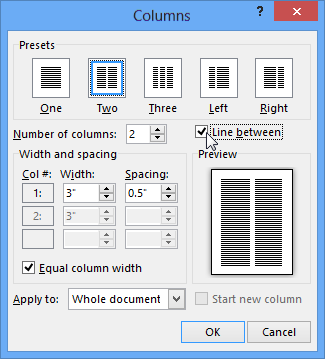
In Word, you can add newsletter style columns to a document. If you’d like to add a vertical line between the columns, open the Columns dialog box.
- Choose Page Layout > Columns. At the bottom of the list, choose More Columns.

- In the Columns dialog box, select the check box next to Line between.
Note
- You can also use the Columns dialog box to adjust the column width and the spacing between columns.
- If your document has more than one section, the new layout will only be applied to the current section.
- Insert a column break to control how text flows between columns. For example, insert a column break to end a paragraph in one column and start a new paragraph at the top of the next column.