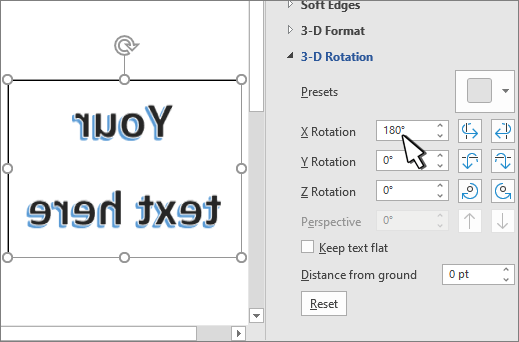
To reverse (or mirror) text in a document, you must first enter the text in a text box. After reversing the text, you can remove the appearance of using a text box by removing the outline.
Using a text box
Insert a text box in your document and type and format your text.
For more details, see Add, copy, or delete a text box.Right-click the box and select Format Shape.

In the Format Shape pane, select Effects.

Under 3-D Rotation, in the X Rotation box, enter 180°.
Note
- If your text box becomes filled with a color, you can remove the color in the Format Shape pane. Under Shape Options, select the Fill & Line tab
 , expand Fill, and select No fill.
 - If you want to remove the text box outline, right-click the text box, select Outline in the mini toolbar that appears, and choose No Outline.
- If your text box becomes filled with a color, you can remove the color in the Format Shape pane. Under Shape Options, select the Fill & Line tab
Using WordArt text
- Select the WordArt to mirror.
For more info see Insert WordArt. - Right-click the box and select Format Shape.
- Select Text Options, then Text Effects > 3D Rotation.
- Under 3-D Rotation, set X Rotation to 180°.
-