In Outlook, the default font is Calibri in black. It's used when you compose new email messages. You can change the default font and its color, size, and style — such as bold or italic.
Outlook allows you to change the font, color, size, and style for new messages and replies and forwards independently. If you want to change the font used in the message list, see Change the font or font size in the message list.
Select a tab option below for the version of Outlook you're using. What version of Outlook do I have?
Note
If the steps under this New Outlook tab aren't working for you, you may not be using new Outlook for Windows yet. Select the Classic Outlook tab and follow those steps instead.
Change the default font, style, and size for messages in new Outlook
- On the View tab, select
 View settings in new Outlook.
- Select Mail, then Compose and reply.
- Under Message format, choose the font, size, and style you would like, then select Save.
Change the font size for reading messages in new Outlook
You can change the size of messages in the Reading pane by using the Zoom feature.
- Select a message from your inbox to view in the Reading pane.
- Select the View tab, then Zoom.
- Select the plus + button to Zoom in or the minus - button to Zoom out. Use Reset to go back to the default view.
Guided support in your browser can provide digital solutions for Office problems
Try guided support |
In classic Outlook, you have the option to:
Change default font, color, etc. | Restore default font, color, etc. | Change font in reading pane
Change the default font, color, style, and size for messages in classic Outlook
On the File tab, choose Options > Mail.

Under Compose messages, choose Stationery and Fonts.
On the Personal Stationery tab, under New mail messages or Replying or forwarding messages, choose Font.
In the Font box, choose the font, style, size, and color that you want to use. You can see a preview of your changes as you make them.
Choose OK three times to return to Outlook.
Your new settings will take effect immediately.
Note
- You have to set your font preferences independently for both new messages and replies and forwards.
- If the font that you choose isn't installed on the recipient's computer, then the recipient's mail program substitutes an available font.
Restore the initial default font style options in classic Outlook
If you later decide you don't want to keep your custom font settings and want to return to the default settings, you can use the above steps, but choose the following values.
- Font: +Body
- Font style: Regular
- Size: 11
- Font color: Automatic
Change the font size for reading messages in classic Outlook
You can change the size of messages in the Reading pane by using the Zoom feature.
To change the zoom level for a single message
- Use the slider at the bottom right of the Reading pane to adjust your zoom level. As you adjust, the text size in the Reading Pane will increase or decrease.
To change the zoom level on all received messages
You can now change the zoom level on all received messages. Click the percentage to the right of the Zoom slider to open the Zoom window.
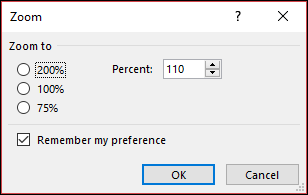
Select one of the default options or enter a specific percentage number.
To apply this zoom level to all messages, check the Remember my preference check box and then click OK.
You can change fonts if you use HTML format to compose new messages in Outlook on the web or Outlook.com.
- Go to
Settings > Mail> Compose and reply.
- Under Message format, set Compose messages in to HTML format.
- Set the font and size you want for the default.
- Select Save.
Related articles
Change the font or font size in the message list
