Seleziona un'opzione della scheda di seguito per la versione di Outlook in uso.
Qual è la versione di Outlook in uso?
Nota
Se i passaggi descritti in questa scheda Nuovo Outlook non funzionano, è possibile che non si stia ancora usando il nuovo Outlook per Windows. Selezionare la scheda Outlook classica e seguire invece questa procedura.
Come abilitare l'inoltro automatico nel nuovo Outlook
Nella finestra superiore del nuovo Outlook selezionare Impostazioni .
.
SelezionareInoltro dellaposta>.
Attivare o disattivare l'opzione Abilita inoltro , immettere l'indirizzo di posta elettronica di inoltro e selezionare Salva.
Nota
Se si vuole che una copia del messaggio originale rimanga nella cassetta postale, selezionare Mantieni una copia dei messaggi inoltrati.
Come disabilitare l'inoltro automatico nel nuovo Outlook
- Nella finestra superiore del nuovo Outlook selezionare Impostazioni .
- SelezionareInoltro dellaposta>.
- Attiva o disattiva l'opzione Disabilita inoltro e seleziona Salva.
È possibile inoltrare o reindirizzare automaticamente i messaggi di posta elettronica configurando una regola posta in arrivo nella versione classica di Outlook. Questa funzionalità è utile se si desidera leggere e rispondere ai messaggi da un altro account di posta elettronica o se si vuole che qualcun altro riceva e risponda ai messaggi quando si è assenti.
Come abilitare l'inoltro automatico nella versione classica di Outlook
- Per la versione classica di Outlook, sulla barra multifunzione selezionare la scheda Home , quindi nella sezione Altri comandi
 selezionare Regole>gestione regole & avvisi.
Se sono configurati più account di posta elettronica, nella scheda Regole Email verificare che l'opzione Applica modifiche alla cartella sia impostata sull'indirizzo di posta elettronica da cui si vuole iniziare. In caso contrario, andare al passaggio successivo.
Selezionare Nuova regola.
In Crea nuova regola selezionare Applica regola ai messaggi ricevuti. Selezionare Avanti.
In Quali condizioni vuoi controllare?
Non selezionare alcuna condizione o modificare la descrizione della regola nei passaggi 1 o 2.
Selezionare Avanti e quindi Sì a Questa regola verrà applicata a tutti i messaggi ricevuti.
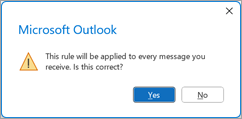
In Cosa si vuole fare con il messaggio?
In Passaggio 1: selezionare le azioni selezionare Reindirizza a utenti o gruppi pubblici e interrompere l'elaborazione di altre regole.
In Passaggio 2: modificare la descrizione della regola selezionare il collegamento utenti o gruppo pubblico .

Nella finestra di dialogo Indirizzo regola , in Rubrica, selezionare l'elenco di contatti che contiene l'indirizzo a cui inoltrare il messaggio.
- Nella casella A nella parte inferiore immettere l'indirizzo di posta elettronica a cui inoltrare tutti i messaggi. Selezionare OK. Dovrebbe essere visualizzato l'indirizzo di posta elettronica a cui si vuole che tutti i messaggi vengano inoltrati nella regola nel passaggio 2.
Seleziona Fine, seleziona Applica e quindi fai clic su OK.
Quando si verifica per la prima volta che i messaggi vengono inoltrati correttamente, controllare la cartella Posta indesiderata per verificare se i messaggi inoltrati sono stati inseriti in quella cartella.
Articoli correlati
Rispondere o inoltrare un messaggio di posta elettronica
Gestire i messaggi di posta elettronica con le regole
Come abilitare l'inoltro automatico in Outlook sul web
Nella parte superiore della finestra in Outlook sul web seleziona Impostazioni .
SelezionareInoltro dellaposta>.
Attivare o disattivare l'opzione Abilita inoltro , immettere l'indirizzo di posta elettronica di inoltro e selezionare Salva.
Nota
Se si vuole che una copia del messaggio originale rimanga nella cassetta postale, selezionare Mantieni una copia dei messaggi inoltrati.
Come disabilitare l'inoltro automatico in Outlook sul web
- Nella parte superiore della finestra in Outlook sul web seleziona Impostazioni .
- SelezionareInoltro dellaposta>.
- Attiva o disattiva l'opzione Disabilita inoltro e seleziona Salva.
Articoli correlati
Creare, rispondere o inoltrare messaggi di posta elettronica in Outlook sul Web
Come abilitare l'inoltro automatico in Outlook.com
- Nella parte superiore della pagina Outlook.com selezionare Impostazioni .
- Selezionare Email>Forwarding e IMAP.
- Selezionare Abilita inoltro, immettere l'indirizzo di posta elettronica di inoltro e selezionare Salva.
Come disabilitare l'inoltro automatico in Outlook.com
- Nella parte superiore della pagina Outlook.com selezionare Impostazioni .
- Selezionare Email>Forwarding e IMAP.
- Seleziona Disabilita inoltro e quindi Salva.
