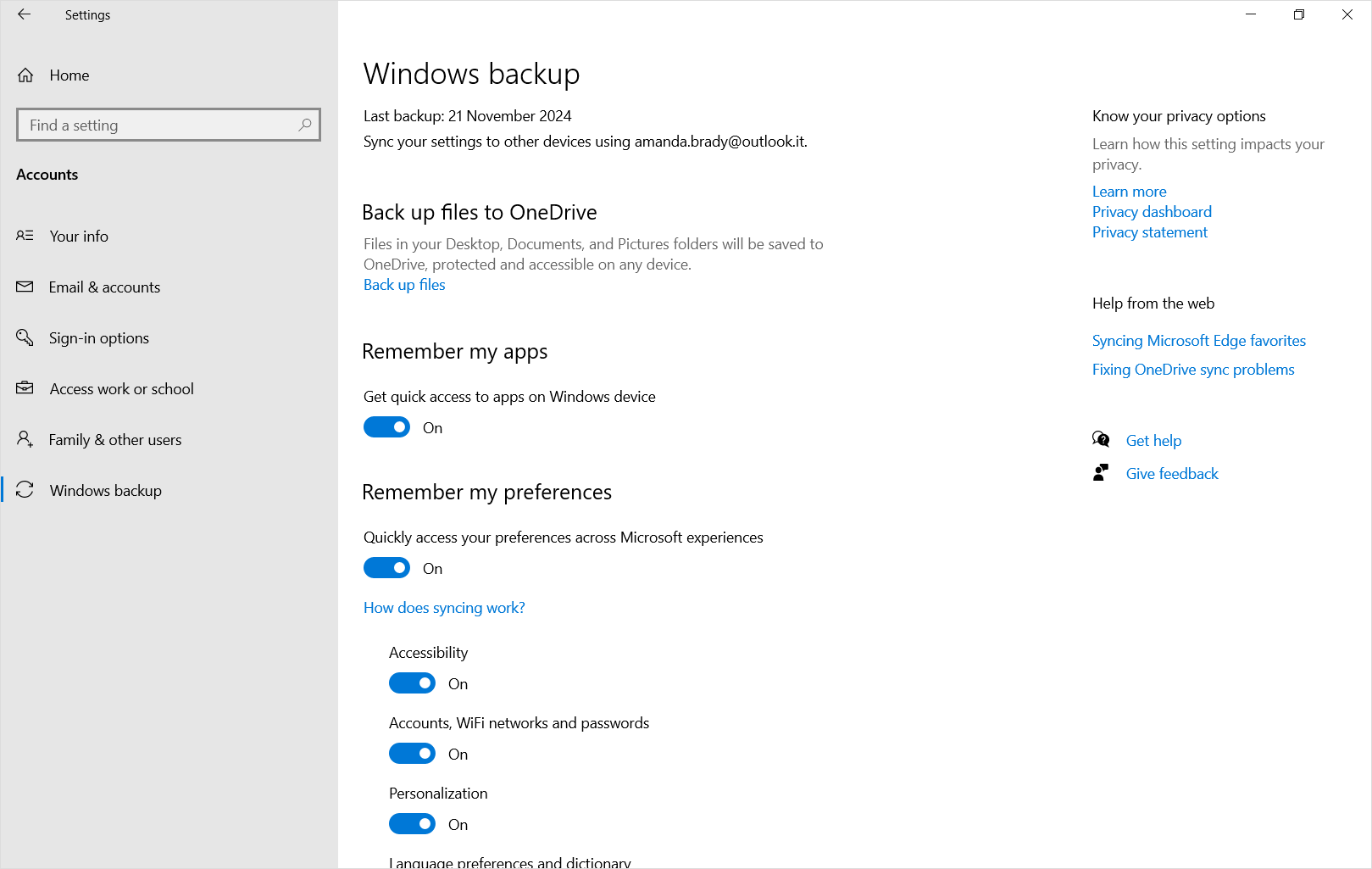
Windows バックアップを有効にすると、Microsoft アカウントでサインインしたすべての Windows デバイスで選択した設定がバックアップされます。 この記事では、同期内容について詳しく説明します。
[Windows バックアップを有効にする] を選びます。
Windows バックアップは、Windows バックアップ アプリまたは [設定] から有効にできます。 バックアップの構成方法の詳細については、「 Windows PC のバックアップと復元」を参照してください。
![Windows 11の Windows バックアップ> [設定] >アカウントのスクリーンショット。](../../media/windows-backup-settings-1.png)
Windows バックアップ設定と基本設定カタログ
各セクションを展開して、設定またはWindows バックアップ アプリから選択できる各項目のバックアップ内容について学習します。
アプリ
注
Windows の設定>Accounts>Windows のバックアップで、[アプリを記憶する] スイッチです。
| [設定] ページ | 設定 |
|---|---|
| アプリ | インストールされているアプリの一覧 |
アクセシビリティ
| [設定] ページ | サブページ | 設定 | ||
|---|---|---|---|---|
| アクセシビリティ | テキスト サイズ | デバイス上のテキストのサイズ | ||
| 視覚効果 | 常にスクロール バーを表示する 透明度の効果 アニメーション効果 優先時間の経過後に通知を無視する |
|||
| マウス ポインターとタッチ | マウス ポインター のスタイル マウスのカスタム色 カーソル サイズ タッチ インジケーター タッチ インジケーターの円を暗くして大きくする |
|||
| 視線制御 | 視線コントロールのオン/オフ クリックする方法を選択する 視線入力カーソルを表示する 図形の書き込みを使用する 高度なマウス機能を使用する 入力ドウェル時間 一般的なドウェル時間 スムージング 遅延 |
|||
| テキスト カーソル | テキスト カーソル インジケーター テキスト カーソル インジケーターのサイズ テキスト カーソル インジケーターの色 テキスト カーソル インジケーターの太さ |
|||
| 拡大鏡 | サインイン前に拡大鏡を起動する サインイン後に拡大鏡を起動する ズーム レベル ズーム増分 |
|||
| 表示 | ユーザー設定の表示 | |||
| 拡大鏡をフォローしてもらう: | マウス ポインター キーボード フォーカス テキスト カーソル ナレーター カーソル |
|||
| マウス ポインターの位置を維持する テキスト カーソルの位置を保持する |
||||
| 色の反転 画像とテキストのエッジを滑らかにする 読み取りショートカット |
||||
| カラー フィルター | カラー フィルター 好ましいカラー フィルターの選択 カラー フィルターのキーボード ショートカット |
|||
| コントラスト テーマ | コントラスト テーマ | |||
| ナレーター | ナレーターの声 | 音声を選択する 速度 ピッチ 出来高 |
||
| ナレーターが話しているときに他のアプリの音量を下げる | ||||
| 詳細レベル | 詳細レベル 書式設定されたテキストを強調する 文字による読み取り時の音素読み 句読点を読み取るときに少し一時停止する ボタンやその他のコントロールのヘルプ テキストなどの詳細を読む 大文字のテキストの読み取り方法を変更する |
|||
| ボタンとコントロールのコンテキスト レベル | ボタンとコントロールのコンテキスト レベル ボタンやその他のコントロールを操作する方法に関するヒントを読む アクションを実行できない理由を教えてください 一般的なアクションのアナウンスの代わりにサウンドを再生する ボタンやその他のコントロールの詳細を教えてください |
|||
| 入力時にナレーターに発表してもらう | 文字、数字、句読点 言葉 ファンクション キー 矢印、タブ、およびその他のナビゲーション キー Capslock や Num lock などのキーを切り替える Shift キー、Alt キー、その他の修飾子キー |
|||
| ナレーター キー タッチ キーボードで、指を離したときにキーをアクティブにする マウスを使用して画面を読み取り、操作する ナレーター カーソルを表示する ナレーターがテキストを読み取る場合に、ナレーター カーソルを使用してテキスト カーソルを移動する ナレーター カーソルとシステム フォーカスを同期する Outlook の詳細度を下げる |
||||
| オーディオ | モノラル音声 オーディオ通知中の画面の点滅の設定 |
|||
|
キャプション ライブ キャプション |
キャプションのスタイル 不適切な表現のフィルター処理 (アプリ内設定) 位置 (アプリ内設定) |
|||
| 音声認識 | 音声アクセス | PC にサインインした後に音声アクセスを開始する PC にサインインする前に音声アクセスを開始する フィルターの不適切な表現を開始する (アプリ内設定) 自動句読点 (アプリ内設定) |
||
| 音声入力 | 音声入力起動ツール (アプリ内設定) 自動句読点 (アプリ内設定) |
|||
| キーボード | 固定キー | 固定キーを使用する 固定キーのキーボード ショートカット タスク バーに固定キー アイコンを表示する 行を 2 回押したときにショートカット キーをロックする 2 つのキーが同時に押されたときに固定キーをオフにする ショートカット キーが押されて離されたときにサウンドを再生する |
||
| フィルター キー機能 | フィルター キーを使用する フィルター キーのキーボード ショートカット タスク バーの [フィルター キー] アイコンを表示する キーが押されたとき、または受け入れられたときにビープ音を鳴らす |
|||
| クイック キーストロークを無視する (低速キー) | キー ストロークを受け入れる前に待機する | |||
| 意図しないキーストロークを無視する (バウンス キー) | 繰り返しキーストロークを受け入れる前に待機する | |||
| 繰り返されるキーストロークを無視する (繰り返しキー) | 最初に繰り返されるキーストロークを受け入れる前に待機します 後続の繰り返しのキーストロークを受け入れる前に待機する |
|||
| キーの切り替え | ||||
| 通知設定 | キーボードから固定キー、フィルター キー、またはトグル キーをオンにしたときに通知する キーボードで固定キー、フィルター キー、トグル キーをオンまたはオフにしたときにサウンドを再生する |
|||
| 下線アクセス キー 印刷画面キーを使用して切り取りツールを開く |
||||
| マウス | マウス キー | マウス キー Num lock がオンの場合にのみマウス キーを使用する タスク バーにマウス キー アイコンを表示する Ctrl キーを押したままにして速度を上げ、Shift キーを押して速度を下げる マウス キーの速度 マウス キーの高速化 |
言語の設定
| [設定] ページ | サブページ | 設定 | |
|---|---|---|---|
| 時間 & 言語 | 言語 & リージョン | 言語プロファイル Windows の表示言語 国または地域 地域設定 |
|
| 入力 | タッチ キーボード | 入力時にキー サウンドを再生する 各文の最初の文字を大文字にする Space キーをダブルタップした後にピリオドを追加する 音声入力マイク ボタンを表示する |
|
| 物理キーボードで入力するときにテキスト候補を表示する 多言語テキスト候補 スペルミスの単語のオートコレクト スペルミスの単語を強調表示する |
|||
| プライバシー & セキュリティ | 手描き入力 & 入力のパーソナル化 | カスタム辞書 | |
| アクティビティの履歴 | [このデバイスでのアクティビティの履歴を保存する] |
[その他の Windows の設定]
| [設定] ページ | サブページ | 設定 | |
|---|---|---|---|
| システム | ディスプレイ | 複数ディスプレイ | モニター接続に基づいてウィンドウの場所を記憶する モニターが切断されたときにウィンドウを最小化する ディスプレイ間のカーソル移動を容易にする 夜間モード |
| 通知 | アプリやその他の送信者から通知を取得する | 通知によるサウンドの再生を許可する ロック画面に通知を表示する ロック画面にアラームと着信 VoIP 呼び出しを表示する |
|
| マルチタスク | ウィンドウをスナップする | スナップ ウィンドウ ウィンドウをスナップするときに、その横にスナップできる内容を提案します |
|
| スナップ時または Alt キーを押しながら Tab キーを押したときにアプリのタブを表示する [デスクトップ] タスク バーで、開いているすべてのウィンドウを表示します Alt キーを押しながら Tab キーを押したときに開いているすべてのウィンドウを表示する |
|||
| 開発者向け | エクスプローラー | ファイル拡張子を表示する 非表示ファイルとシステム ファイルを表示する タイトル バーに完全なパスを表示する 空のドライブを表示する |
|
| 音 | 出力 | モノラル音声 | |
| 詳細設定 | その他のサウンド設定 (サウンド スキームのみ) | ||
| & デバイスのBluetooth | マウス | プライマリ マウス ボタン マウス ポインターの速度 マウス ホイールをスクロールしてスクロールする 一度にスクロールする行 非アクティブなウィンドウの上にマウス ポインターを合わせるとスクロールする |
|
| タッチパッド | タッチパッド | ||
| ジェスチャ & 操作 | カーソルの速度 タッチパッドのフィードバック 触覚強度 |
||
| タップ | タッチパッドの感度 1 本の指でタップしてシングル クリック 2 本指でタップして右クリック 2 回タップし、複数選択にドラッグします タッチパッドの右下隅を押して右クリック |
||
| ズーム & スクロール | 2 本の指をドラッグしてスクロールする スクロール方向 ピンチ操作によるズーム |
||
| タッチ | 3 本指と 4 本指のタッチ ジェスチャ タップしてスリープを解除する |
||
| ペン & Windows Ink | ペンの利き手 使用可能な場合は、ペン ボタンを右クリックの同等のボタンとして使用します ペンの上部を使用してインクが使用可能になったときにインクを消去する ショートカット ボタンの動作を選択する |
||
| ショートカット ボタンの動作を選択する | シングルクリック ダブルクリック 長押し (一部のペンでのみサポート) アプリによるショートカット ボタンの動作のオーバーライドを許可する 使用可能な場合は、ストレージからペンを削除した後にペン メニューを表示します |
||
| その他のペン設定 | 視覚効果を表示する カーソルの表示 使用可能な場合は、ペンをマウスとして使用しましょう ペンを使用しているときにタッチ入力を無視する ペン使用時に押された追加のキーを表示する |
||
| 手書きパネルの設定 | フォント フォント サイズ ペンでテキスト フィールドをタップするときは、手書きパネルまたはタッチ キーボードを使用してテキストを入力します 指先で書く |
||
| 自動 | すべてのメディアとデバイスに自動再生を使用する [自動再生] リムーバブル ドライブの既定値を選択する [AutoPlay memory]\(自動再生メモリ\) カード既定値を選択します |
||
| USB | 接続通知 この PC が USB 経由で低速に充電されている場合に通知を表示する |
||
| プリンター & スキャナー | [Windows で通常使うプリンターを管理する] | ||
| ネットワークとインターネット | Wi-Fi | [ランダムなハードウェア アドレス] の下で目的の設定を選んだら | |
| Vpn | 従量制課金ネットワーク経由で VPN を許可する ローミング中に VPN を許可する |
||
| 携帯ネットワーク | アプリごとの携帯データネットワーク Wi-Fi フェールオーバー 従量制課金 Windows で接続したままにする [データ ローミング オプション] ドロップダウン |
||
| アカウント | Windows バックアップ | 自分の好みを思い出す | アクセシビリティ アカウントとパスワード カスタマイズ 言語の設定 [その他の Windows の設定] |
| Email & アカウント | 他のアプリで使用されるアカウント (MSA アカウントのみ) | ||
| 時間 & 言語 | 日付 & 時刻 | タイム ゾーンを自動的に設定する タイム ゾーン | |
| ゲーム | ゲーム バー | コントローラーのボタンを使用してゲーム バーを開く すべてのショートカット |
|
| ゲーム モード | ゲーム モードを使用する | ||
| Windows Update | 利用可能になったらすぐに最新の更新プログラムを入手する | ||
| 詳細オプション | 他の Microsoft 製品の更新プログラムを受け取る 最新の情報を取得する 更新を完了するために再起動が必要になったときに通知する |
||
| その他 | エクスプローラー | クリックするだけで項目を開きます (選択ポイント): 下線アイコンのタイトル ダブルクリックしてアイテムを開きます (クリックして選択します) 項目間のスペースを減らす (コンパクト ビュー) タイトル バーに完全なパスを表示する 既知のファイルの種類の拡張子を非表示にする 非表示のファイルとフォルダー: 非表示のファイル、フォルダー、またはドライブを表示しない/非表示のファイル、フォルダー、ドライブを表示する [チェック] ボックスを使用して項目を選択する |
|
| ごみ箱 | 削除の確認ダイアログを表示する | ||
| デスクトップ | 表示 (アイコン サイズ、アイコンの自動配置、グリッドへのアイコンの配置、デスクトップ アイコンの表示) 並べ替え (名前、サイズ、アイテムの種類、変更日) |
カスタマイズ
| [設定] ページ | サブページ | 設定 | ||
|---|---|---|---|---|
| 個人設定 | 背景 | 背景をカスタマイズする デスクトップ イメージに合わせて選択する |
||
| 変更 | モードを選択する 既定の Windows モードを選択する 既定のアプリ モードを選択する 透明度の効果 アクセントカラー スタートとタスク バーにアクセントカラーを表示する タイトル バーとウィンドウの罫線にアクセントカラーを表示する |
|||
| テーマ | 現在のテーマ カスタム受信トレイのテーマ |
|||
| ロック画面 | ロック画面を個人用に設定 ロック画面で楽しい事実、ヒント、コツなどを入手する サインイン画面にロック画面の背景画像を表示する |
|||
| テキスト入力 | タッチ キーボードのテーマ タッチ キーボードのサイズ キーの背景を表示する キー テキスト サイズ |
|||
| スタート | レイアウト 最近追加したアプリを表示する [スタート] に推奨されるファイル、エクスプローラーの最近のファイル、ジャンプ リストの項目を表示する |
|||
| フォルダー | 設定 エクスプローラー ドキュメント ダウンロード 音楽 写真 ビデオ ネットワーク 個人用フォルダー |
|||
| タスク バー | タスク バーの項目 | タスク ビュー ウィジェット |
||
| タスク バーの動作 | タスク バーの配置 タスク バーを自動的に隠す タスク バー アプリにバッジを表示する タスク バー アプリで点滅を表示する すべてのディスプレイにタスク バーを表示する 複数のディスプレイを使用してタスク バー アプリを表示する場合 検索アイコンをポイントしたときに最近の検索を表示する タスク バーから任意のウィンドウを共有する タスク バーの右端を選択してデスクトップを表示する タスク バー ボタンを組み合わせてラベルを非表示にする タスク バー ボタンを結合し、他のタスク バーのラベルを非表示にする |
|||
| その他 | タスク バーとスタート メニューのピン |
資格情報
注
[Windows 設定>Accounts>Windows バックアップこれは [アカウントとパスワード] チェック ボックスです。
| [設定] ページ | サブページ | 設定 |
|---|---|---|
| ネットワークとインターネット | Wi-Fi | Wi-Fi プロファイル (WPA プロファイルのみ) |
| その他 | パスワード | Web 資格情報 |