
Notlarınızda matematik denklemlerini veya formülleri iletmeniz gerektiğinde, bunu doğrudan Mac'inizde yapabilirsiniz. OneNote kullanarak notlarınıza kesirler, üslü değerler, logaritmalar ve diğer matematiksel yapıları ekleyebilirsiniz.
Not
Microsoft OneNote'un şu anda denklemi sizin için hesaplamadığını unutmayın.
Denklem ekleme ve düzenleme
Not
Microsoft OneNote'un şu anda bir denklem hesaplamadığını unutmayın. Notlarınızda matematik denklemlerini iletmeniz gerektiğinde bir denklem yapılandırmanıza yardımcı olur.
- Notunuzda, denklemi eklemek istediğiniz yere tıklayın.
-
Ekle sekmesinde Denklem'e tıklayın.

- Buraya bir yer tutucu türü denklemi eklenir.
- Denkleminizi yazın.
- Bitirdiğinizde, klavyenizdeki ENTER tuşuna basın.
- Daha sonra düzenlemek isterseniz denkleme tıklamanız yeterlidir.
İpucu
Denklemlerde varsayılan olarak Cambria Math yazı tipi kullanılır, ancak yazı tipini daha sonra istediğiniz zaman değiştirebilirsiniz.
Denkleminize matematik simgeleri ekleme
Denkleminize daha karmaşık simgeler ekleyebilirsiniz.
- Denklemde simgeyi eklemek istediğiniz yeri tıklatın.
- Menü çubuğunda, Emoji & Sembolleri Düzenle'ye > tıklayın.
- Solda sembol kategorilerinin bulunduğu tam Karakterler iletişim kutusunu görmüyorsanız, sağ üstte yer alan
 tıklayın.
 -
Karakterler iletişim kutusunda, soldaki Matematik Sembolleri'ne tıklayın.
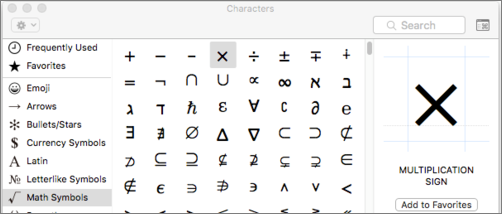
- Eklemek istediğiniz simgeye çift tıklayın.
İpucu
Sık kullanılan simgeleri Sık Kullanılanlarınıza ekleyin, böylece onları hızlı bir şekilde bulabilirsiniz.
Denklem yapıları oluşturma
Kesirler, üst simgeler veya alt simgeler gibi yapılar kullanmanız gerekiyorsa, klavyeyi kullanarak bunları ekleyebilirsiniz.
Denklem yapısı kullanmak için, denkleme bir simge yazın ve ARA ÇUBUĞU'na basın. Aşağıdaki sembolleri kullanabilirsiniz:
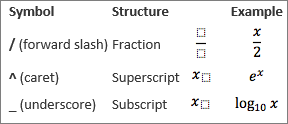
Yapının içine yazmak için, tıklayarak seçin.

Diğer ilgili bilgiler
Toplama, integral veya matris gibi daha karmaşık bir denklem veya yapı eklemeniz gerekiyorsa, Denklem işlevini kullanarak denklemi Word olarak oluşturun ve notlarınıza kopyalayın.