Last updated: May 2026
Word for Mac crashes and slow performance
- Word does not respond when using "Save as Picture"
- WordRake add-in causing Word for Mac to crash since upgrading to Catalina (OSX 15.0)
- Problems launching Word for Mac 2016 (Version 16.11) [FIXED]
Issues affecting Word for Mac features and add-ins
- [WORKAROUND] Files are grayed out when using the compare feature in Word for Mac
- [INVESTIGATING] Users are prompted to save locally saved documents after being idle with no edits made
- [FIXED] Formatting lost when coauthoring a Word document
- [WORKAROUND] The Sketch shape outline isn't visible when applied in Word
- [FIXED] Equation Editor may not open or convert expressions as expected in Word for Mac
- [INVESTIGATING] Users on macOS might have issues printing from Word, Excel, or PowerPoint for the web
- [FIXED] Footnote number might change unexpectedly in Word for Windows and Mac
- [FIXED] Word JavaScript API gives error "RichApi.Error: NotImplemented" with Office Add-ins using content controls
- [INVESTIGATING] Office documents are not rendering as expected
- [WORKAROUND] Word document save as a PDF to an online location is changed to .docx
Issues with fonts in Office for macOS [WORKAROUND]
ISSUE
Users may see issues with fonts when using version 16.9 of Microsoft Word, Excel, Outlook, OneNote and Microsoft PowerPoint on macOS.
Symptoms:
- Text appears garbled or in a different font
- Fonts not appearing in font picker
STATUS: WORKAROUND
We recommend you check the installed versions of the font. If you have multiple versions, then make sure the latest version of the font is active.
For more information, read about how to fix Issues with fonts in Office for macOS
Need more help?
|
Talk to support. If you have a Microsoft 365 for home subscription, or you purchased a one-time download of Office 2016, click the Contact Us link at the bottom of this page. |
|---|---|
|
Ask the community Get help from experts in our forums: Office for Mac community for Mac users |
|
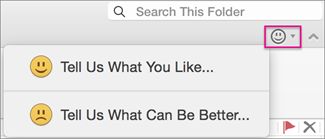
Provide feedback in Office app You can send feedback directly to our Office teams:. For Mac users, in Office 2016 for Mac, click the smiley icon in the upper-right corner.
|
Have a feature request?
|
We love reading your suggestions on new features and feedback about how you use our products! To learn more about how to share feedback, see How do I give feedback on Microsoft Office. We're listening. |
|---|