Note
- Get tablet-to-laptop flexibility in one powerful PC. With AI-accelerated Copilot+ PC experiences and all-day battery life, Surface Pro is built to keep you on the go.
- Explore the newest Surface devices
Get to know Surface Pro 2
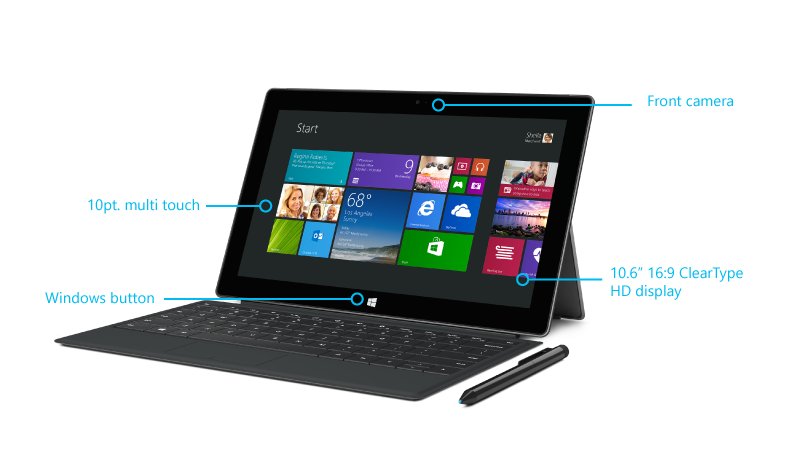
Here's a quick overview of Surface Pro 2 features.
| Touchscreen | The 10.6 ClearType Full HD display, with its 16:9 aspect ratio and 1080p resolution (1920x1080 pixels), is great for watching HD movies, browsing the web, and using Office apps (sold separately). You can use your fingers to select, zoom, or move things around on the screen. For more info, see Touch gestures for Windows. |
| Type Covers | Type Covers can be used as a keyboard and protective cover. |
| Pro Pen | Take notes, draw, and mark up documents using the digital pen. |
| Wi-Fi and Bluetooth | Surface supports standard Wi-Fi protocols (802.11a/b/g/n) and Bluetooth® 4.0. This means that you can connect to a wireless network and use Bluetooth mice. |
| Two cameras and a microphone | There are two cameras and a microphone that you can use for phone calls and videos. The cameras record video in 720p, with a 16:9 aspect ratio (widescreen). |

| Kickstand | Flip out the dual-angle kickstand when you want to be productive. One position is ideal for typing at a desk, and another for typing on your lap. |
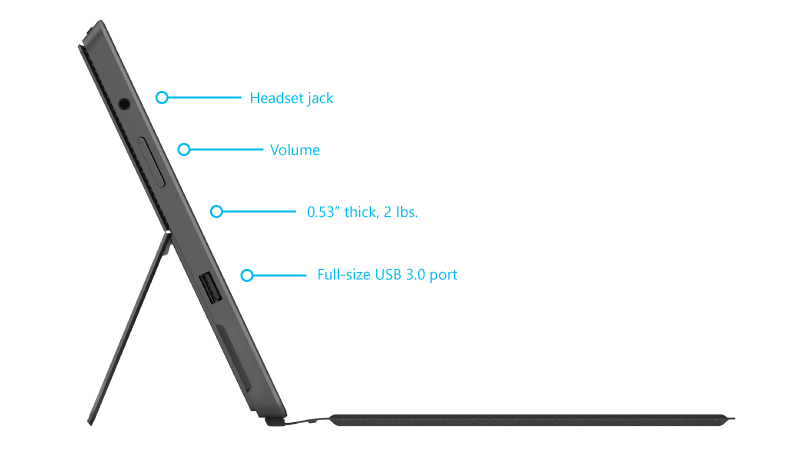
| Stereo speakers, headset jack, and volume |
Listen to music, conference calls, or audio books using apps from Microsoft Store or Internet Explorer. |
| Ports |
|
| Software | Software included with Surface Pro 2:
|
| CPU and RAM | 4th Gen Intel® Core i5 Processor, with Intel HD Graphics 4400 with 4 or 8 GB RAM (Dual-channel LPDDR3). |
| Storage | In addition to the internal storage included with Surface Pro 2, there are some additional storage options. For info, see Surface storage options. |
| Sensors | Surface has four sensors (an ambient light sensor, an accelerometer, gyroscope, and compass) that apps can use to do cool things. |
Surface Pro 2 hardware specifications
| Software | Windows 8.1 Pro |
| Exterior | Dimensions: 10.81 x 6.81 x 0.53 in Weight: 2 lbs Casing: VaporMg Color: Dark Titanium Physical buttons: Volume, Power |
| Storage* and Memory | 64/128GB 256/512GB -------------------------- 4GB RAM 8GB RAM |
| Display | Screen: 10.6 inch ClearType Full HD Display Resolution: 1920 x 1080 Aspect Ratio: 16:9 (widescreen) Touch: 10-point multi-touch Durable display |
| CPU and Wireless | 4th generation Intel® Core™ i5 Processor TPM Chip for enterprise security Wi-Fi (802.11a/b/g/n) Bluetooth ®4.0 Low Energy technology |
| Battery Life | 7-15 days idle life Charges in 2-4 hours with included power supply |
| Camera, Video, and Audio | Two 720p HD cameras, front and rear-facing Microphone Stereo speakers with Dolby® sound |
| Ports | Full-size USB 3.0 microSDXC card reader Headset jack Mini DisplayPort** Cover port |
| Sensors | Ambient light sensor Accelerometer Gyroscope Magnetometer |
| Surface Pro Pen | Included |
* System software uses significant storage space. Available storage is subject to change based on system software updates and apps usage. 1 GB = 1 billion bytes. See Surface.com/Storage for more details.
** Maximum display output from the Mini DisplayPort depends on the refresh rate and screen resolution. See Connect Surface to an external display for more details.
Need more help?
Technical support

For technical support, open the Surface app, describe your problem and select Get Help.
Community support

Communities can help you ask questions, and hear from experts with rich knowledge. Ask the Community.
Other support

If you can't use your Surface or have a question about something else, open Get Help to get other support online.